AutoClaw: Inventory the Digital Employee Before Cluster Mode Fans Out
AutoClaw is a digital employee on the machine. Inventory credit plan, bot tokens, connectors, Cluster Mode, wake-lock and Hermes gate, then test the kill path.

Go deeper. Build your own.
Ten changelog entries between Jul 2 and Aug 27, 2026, and four of them widen what the app can reach. A wake-lock landed in v1.11.0. A connector feature arrived in v1.15.3, with Cloudflare and Vercel connectors six days later. v1.17.2 lifted the model restrictions off Cluster Mode.
AutoClaw grows a new limb every couple of weeks, and the person who installed it in March has not read a release note since.
That person is who this is for. AutoClaw is a vendor-bundled digital employee: a locally installed desktop app that reads and writes files, drives a browser, holds bot tokens for four or five chat platforms and, behind one toggle, assembles a team of roles and runs them in parallel. The same machine probably runs a coding CLI or two and another vendor’s desktop agent. As a fleet member it needs what every fleet member needs: an inventory line with a fixed set of attributes, and a kill path that still works where the docs stop.
By Tuesday you will have both. Model and credit plan, IM bindings, connectors, Cluster Mode state, wake-lock behaviour, the Hermes approval gate, and a written stop procedure with four rungs. None of it depends on a feature the vendor has not shipped. All of it depends on opening the app and looking.
Aug 27, 2026: the v1.17.8 pulse, and the pages that do not exist
On Aug 27, 2026, AutoClaw shipped v1.17.8. The changelog entry announces GLM-5.3-Flash as live in the app, built for vision, coding and long-horizon agent tasks, and pairs it with a promotion: log in to claim 10,000 credits, plus a full credit refund on GLM-5.3-Flash and Auto Mode usage. It is the newest entry on the page as of Sep 19. The model itself is covered in the GLM-5.3 release piece; this is about the app around it.
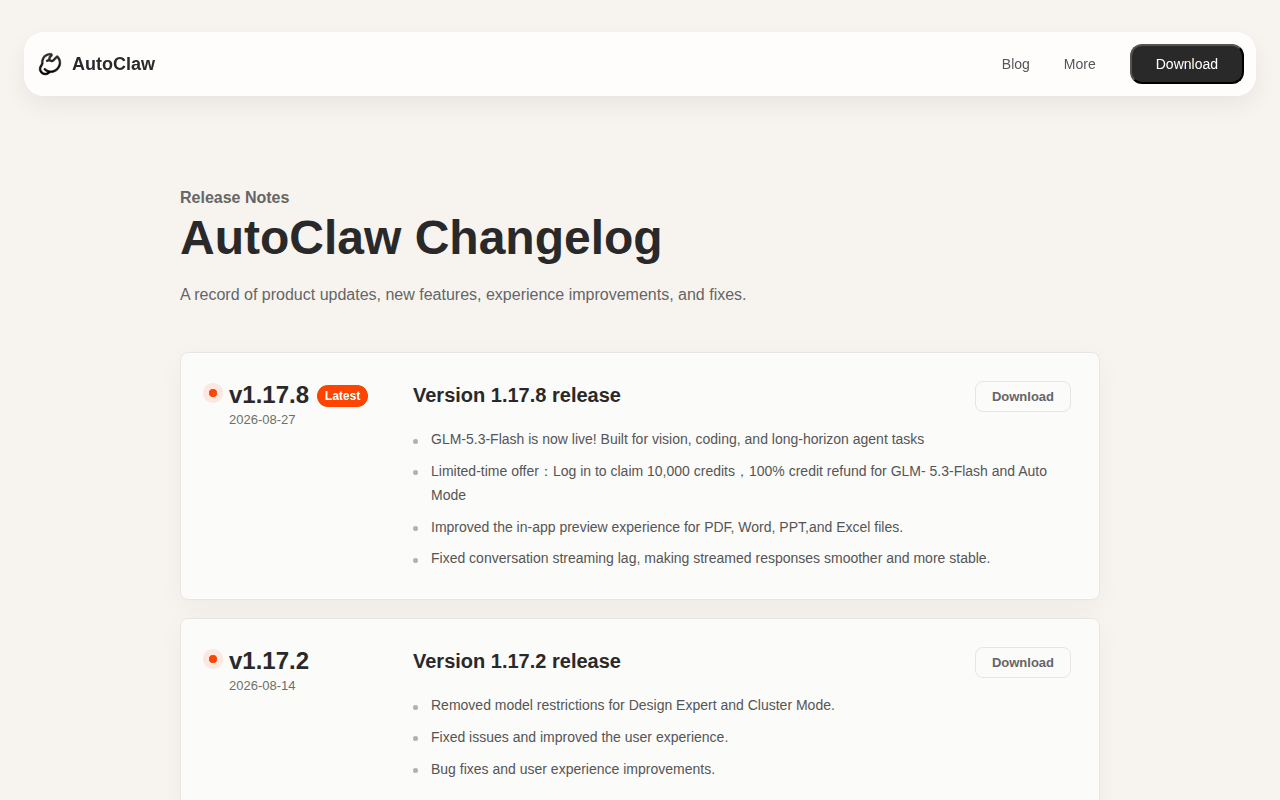 Screenshot: autoclaw.z.ai, “AutoClaw Changelog | Product Release Notes” (v1.17.8, 2026-08-27), captured Sep 19, 2026.
Read down the page from there and the product’s shape appears. v1.17.2 (Aug 14): “Removed model restrictions for Design Expert and Cluster Mode.” v1.16.2 (Aug 10): “Added Cloudflare and Vercel connectors” and “Improved Hermes evolution visibility and activation sensitivity”. v1.15.3 (Aug 4): “Added connector feature, enabling Agents to connect to external applications and services.” v1.11.0 (Jul 6): “Tasks can now keep the device awake during runtime to prevent interruptions.” and “Upgraded the OpenClaw kernel to version 6.8.”
The May 29, 2026 explainer calls the product “an AI digital employee built on the OpenClaw open-source framework”. That lineage is AutoClaw’s claim; OpenClaw’s homepage, README and security docs never mention AutoClaw, and “6.8” maps to no upstream release. The engine-versus-metered-car comparison works through the relationship. Here it matters for one reason: whatever a gateway of that family can do on a host, this app inherits some version of, packaged for someone who will never open a config file.
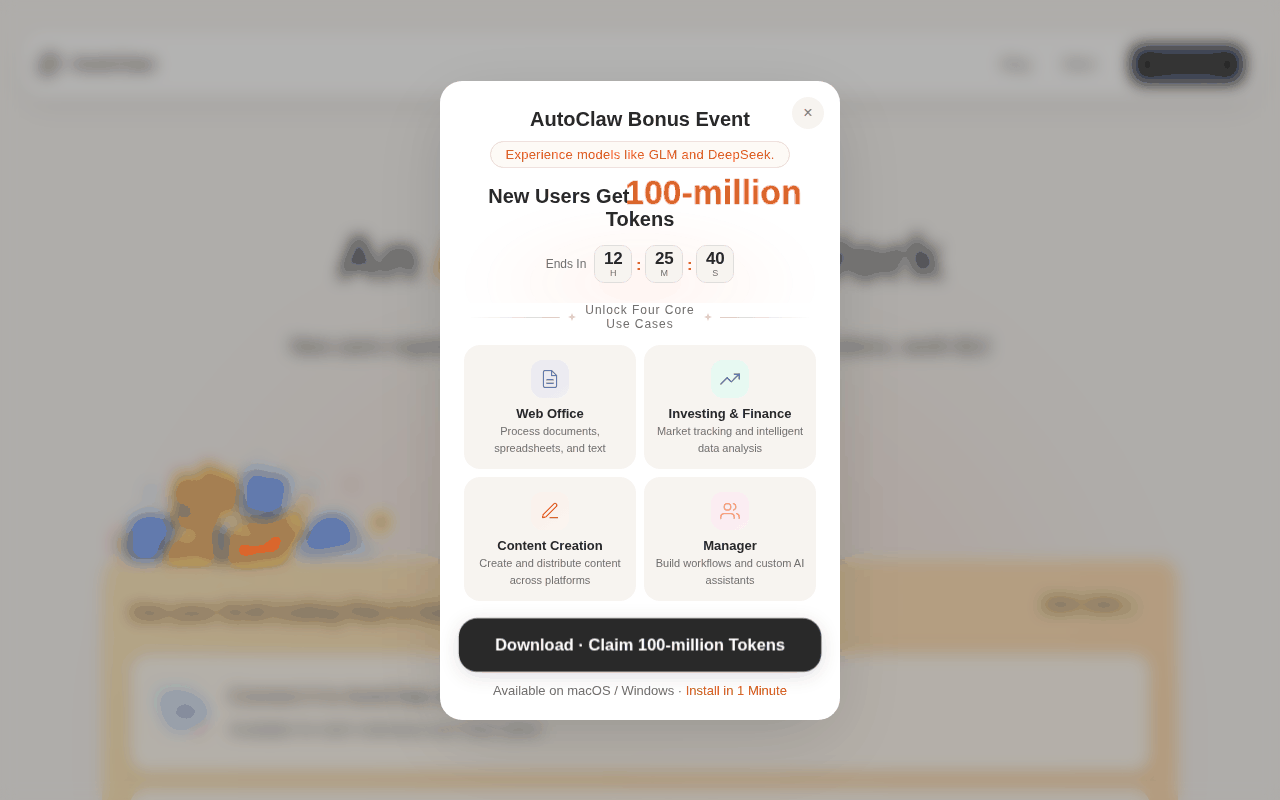 Screenshot: autoclaw.z.ai, “AutoClaw - Z.ai’s Official AI Agent | GLM-5.3-Flash Now Live” (homepage, undated), captured Sep 19, 2026.
Now the pages that do not exist, because their absence decides who writes the policy. There is no security page: nothing on sandboxing, permission prompts, tool allowlists, or what a skill or connector may touch. There is no revoke path for a bot or a connector; the multi-agent post documents adding a bot, never removing one. There are no Cluster Mode limits: no cap on roles, no cost per role, no timeout, no abort, nothing on closing the app mid-run.
The single security sentence on the site is in the homepage FAQ: “For private files or enterprise accounts, teams should configure access according to their own security policies.” Fair. This is that policy.
A chat window that publishes is a different class of install
Chatbots suggest; agents act. The explainer says what this one does in a single sentence: “Tell it what to do in the chat box, and it automatically operates browsers, reads and writes files, calls APIs, runs scripts, and delivers the results to you.” Every clause is a verb with a blast radius, and none of them sits behind an approval the docs describe.
Add the chat surfaces and a person in a Telegram group can hand this app a task that runs with the credits, files, browser sessions and connectors on your machine. That is an employee with an inbox, and it gets an inventory line the day it starts.
The six-attribute AutoClaw inventory line
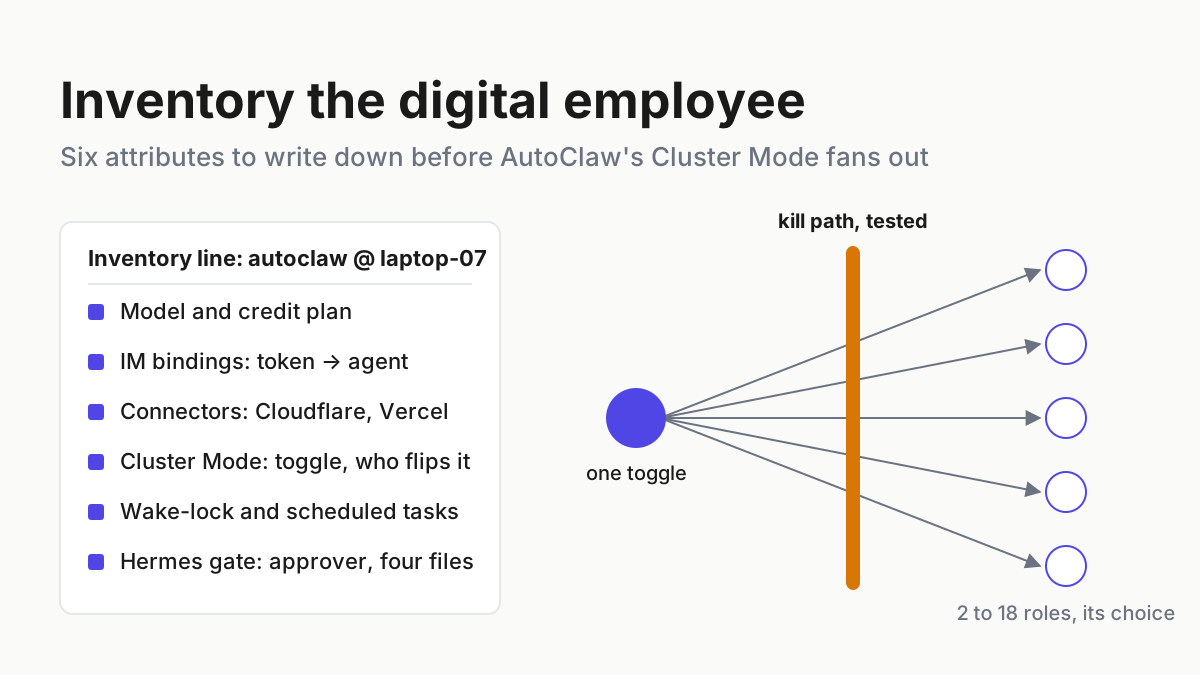
One row per install, six attributes, one decision. The diagram is the shape; the steps fill it in.
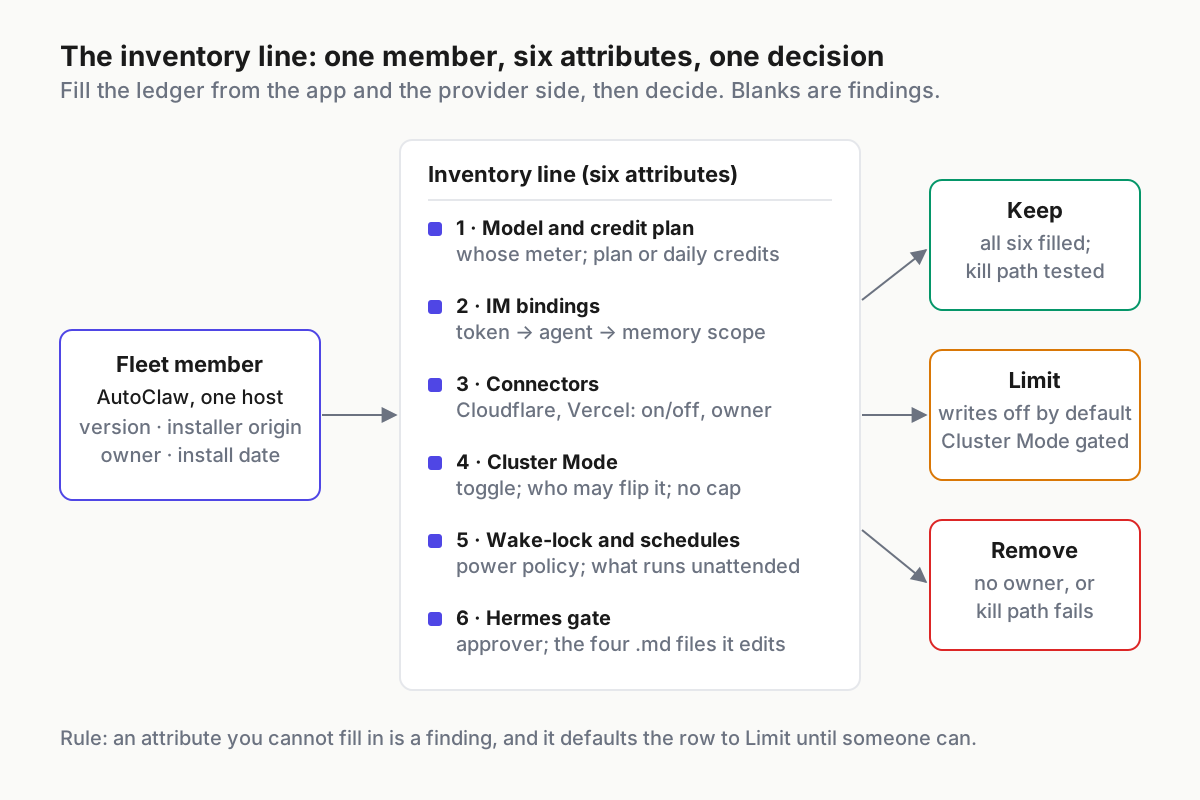 One member, six attributes, one of three decisions. An attribute you cannot fill in is a finding.
Step 1: Model and credit plan, and whose plan it is
Open the model picker and write down the default. The models page lists five GLM models with no prices and no credit costs; the homepage FAQ adds DeepSeek as a switchable option. Then find the meter. The FAQ says “AutoClaw offers free basic usage and daily free credits” and that “Paid plans are available for heavier usage”, and that is the entire published economics: no daily amount, no exchange rate, no plan list.
The plan that does have numbers is not an AutoClaw plan. The homepage invites you to “Use your GLM Coding Plan in AutoClaw to unlock exclusive benefits”, with monthly bonus credits of “Lite 5,000 · Pro 10,000 · Max 26,000”. Those are GLM Coding Plan tiers (Lite/Pro/Max) that AutoClaw honours, and nothing more. If a coding CLI on the same machine bills the same plan, you have one account and two consumers; the site does not say how AutoClaw’s usage and the plan’s own quota interact, and the app’s hover-to-view consumption statistics (v1.15.3) are the only per-task meter you get.
Record: default model, Auto Mode on or off, whether a GLM Coding Plan account is connected and whose it is, and where the current balance came from (daily allowance, the new-user promotion, the v1.17.8 offer, or a plan bonus).
Step 2: IM bindings, token by token, agent by agent
The setup lives at “Settings → IM Channels”, then the platform, then “Click Add Account”, then “Configure the bot credentials and authorize”, per the multi-agent post of Jun 1, 2026. The sentence that matters for the inventory is the next one: “The newly created bot can be bound to an existing Agent (shared memory) or to a new Agent (independent memory).” A bot is a token plus a binding, and the binding decides whose memory the chat can read.
The surfaces the site names are WhatsApp, Telegram, Discord and Lark, plus Slack in the homepage’s IM block and WeCom in blog copy. Nothing on the site describes a per-channel allowlist, a rate limit, or a group gate. The one boundary example is a rule a user taught Hermes: “never proactively @everyone in any group chat unless I explicitly ask”. A taught rule is a preference; IM channel allowlists for digital employees is the piece on building an actual control.
Record per token: platform, bot name, which agent it binds to, shared or independent memory, who owns the platform-side bot, and whether it sits in a group or only in DMs.
Step 3: Connectors, on or off, which accounts
Two are named anywhere on the site: “Added Cloudflare and Vercel connectors” (v1.16.2, Aug 10, 2026), on top of the connector feature itself from Aug 4. There is no connector page, no scope statement, no note on who may add one. For this line, record on or off, the account each one is bound to, and the date it appeared; the weekly connector inventory turns that into a ritual with a blast-radius score.
Step 4: Cluster Mode, and what the toggle spawns
The toggle sits to the right of the chat input; the Cluster Mode post of May 29, 2026 names it the “Agent Cluster Mode” button. With it on, the app follows a fixed order, “plan, research, parallelize, audit, deliver”, and picks its own team size: “Even within Cluster Mode, formation is automatically selected based on task complexity—broad research may involve 18 roles coordinating, while a single-company valuation needs only 2.” The vendor’s showcase is an 18-researcher run that produced a roughly 20,000-word report in 43 minutes. A progress panel in the chat shows which step it is on and what remains.
Two facts change the inventory. Since v1.17.2 on Aug 14 there is no model restriction on Cluster Mode, so any model in the picker can fan out. And nothing published caps the roles, prices a role, times a run out, or aborts one. Metering subagent fan-out already does the sums; the difference here is that the ceiling is not exposed at all.
Record: toggle state now, who may flip it, and which meter from Step 1 it will drain.
Step 5: Wake-lock and scheduled work
“Tasks can now keep the device awake during runtime to prevent interruptions.” That is the whole wake-lock documentation, from v1.11.0 on Jul 6, 2026. Around it: “Improved scheduled task reliability” in v1.16.2, scheduled browser tasks on the homepage, and a FAQ line that the desktop app is designed for “long-running automation workflows”. A laptop that will not sleep while a task runs keeps working after you walk away from it, on battery and on whatever network it happens to be on.
Record: whether the machine’s power policy permits an app-held wake-lock, which scheduled tasks exist and what they touch, and whether a long task can outlive the operator’s working day.
Step 6: The Hermes approval gate and the four files behind it
AutoClaw’s Hermes is its own feature, unrelated to the Hermes Agent project. The Jun 1, 2026 post sets the rule: “Core principle: AutoClaw never secretly modifies itself. Every evolution requires your explicit approval.” The flow is “Three steps: You speak → It proposes → You approve.” Proposals trigger on phrases such as “from now on, remember, always, never, every time, consistently, next time, without exception”, and a skill-evolution check runs on its own after long work: “This task involves 10+ tool calls and automatically triggers an evolution check.”
Approved changes land in four files: SKILL.md for workflows, AGENTS.md (“Behavioral rules, preferences”), MEMORY.md (“Factual information, long-term memory”) and TOOLS.md, which the post describes as holding “Commonly used camera names, SSH addresses”. Read that last one twice. The file that lists SSH addresses is part of the app’s reach, and it grows by approval click.
Record: who is allowed to click approve, the current contents of all four files, and the date they were last reviewed. v1.16.2’s “Improved Hermes evolution visibility and activation sensitivity” suggests proposals arrive more readily than they did in June; plan for approval fatigue.
The line, as a file
# fleet-inventory.yaml (illustrative shape); one entry per digital employee on the host
- member: autoclaw
host: laptop-07
version: 1.17.8 # from Settings; the changelog shows nothing newer
model_default: glm-5.3-flash
credit_plan: glm-coding-plan # or daily-free / promo; record whose account
im_bindings:
- {platform: telegram, agent: work, memory: independent, scope: dm-only}
connectors: {cloudflare: off, vercel: off}
cluster_mode: {enabled: false, may_enable: [russell]}
wake_lock: allowed-on-ac-only
hermes_approver: russell
kill_path: tested-2026-09-22
decision: limit # keep | limit | remove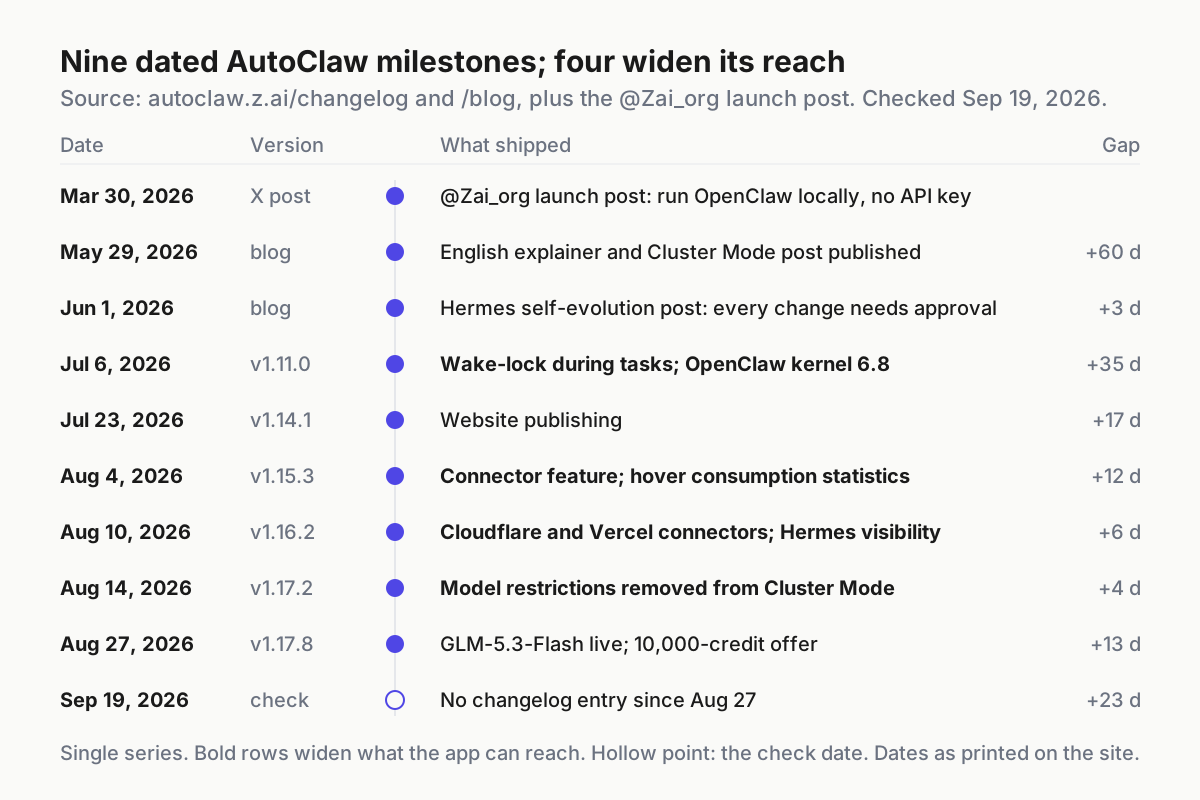 Dates from autoclaw.z.ai’s changelog and blog, plus the Mar 30 @Zai_org post. The bold rows are the four that widen what the app can reach.
The AutoClaw kill path the docs do not document
Search the site for a stop button and you find one sentence, in the privacy policy, about OS permissions: “Once granted, you may disable such permissions at any time through your device’s system settings.” Nothing about ending a Cluster Mode run, unbinding a bot, or disconnecting a connector. So the kill path is yours, and it has four rungs, cheapest first.
- Soft stop in the app. Flip Cluster Mode off and stop the running task from the chat. Whether a mid-run stop ends the spawned roles or only the panel is not documented; test it once on a throwaway task and write down what happened.
- Quit or kill the process. The download page says an internet connection is required for model calls, so a dead process is a dead employee. Run it once with nothing at stake and note the process name your build uses.
- Revoke at the mint. The token a Telegram bot uses was issued by Telegram; the Cloudflare or Vercel credential was issued by Cloudflare or Vercel. Revoke there; the app documents no disconnect, so it happens where the credential was created, and the Step 2 line says where.
- Pull the OS permissions. Files, screen, automation, whatever the app was granted at install, off in system settings. The vendor documents this rung; it is last because it is slowest to restore.
# Illustrative; confirm the process name in Task Manager or Activity Monitor on your build
taskkill /IM AutoClaw.exe /F          # Windows
pkill -f AutoClaw                     # macOS
Write the rungs on the inventory line as kill_path: tested-<date>. An untested kill path is a hope, and I have not yet met one that worked the first time it mattered. Interruptible coordinators goes deeper on what stop has to mean when the thing being stopped is itself running a team.
Six ways an AutoClaw line goes stale, and the signal for each
One account, two consumers. A coding CLI and AutoClaw are both tied to one GLM Coding Plan account, and the site does not say how their usage interacts. Signal: the plan’s quota or the app’s credit balance drops faster than either tool’s own view explains. Fix: separate accounts, or the app on the daily allowance only.
The wrong memory behind the bot. The multi-agent post’s own table: a Discord bot and a Telegram bot bound to the same agent share memory; two bots bound to different agents are isolated. Bind a family group’s bot to the work agent and the family group can read what the work agent knows. Signal: an answer in a chat that references a file nobody in that chat shared. Fix: independent memory for anything outside the team.
Cluster Mode on, credits gone. Someone flipped the toggle for one big task and left it on. Signal: consumption statistics on ordinary tasks that look like research runs. Fix: a may_enable list on the line, and the toggle off by default.
The laptop that never sleeps. A scheduled task holds the wake-lock overnight, on battery, off the corporate network. Signal: a machine that is warm and flat in the morning. Fix: wake_lock: allowed-on-ac-only, enforced by the OS power policy rather than by the app.
Approve, approve, approve. Hermes proposals arrive after every long task, and the fourth one of the day gets a reflex click. Signal: a TOOLS.md that has grown an SSH address nobody remembers adding. Fix: the four files get reviewed by someone other than the person who clicked, or at least at a different hour.
Local-first on the homepage, collection in the policy. The explainer says “Your work data, chat records, and file contents—all stay on your own machine.” The privacy policy, effective Mar 25, 2026, says the service will collect “the text, files (including but not limited to uploads and inputs you provide in the form of text, images, audio, video, configuration parameters, shell commands, and similar formats), and code submitted to us through conversation”, and lists model training among its legitimate interests. Both sentences are on the site, and this piece does not referee them. Plan as if the model-call context leaves the machine, since the FAQ itself says tasks send “the necessary task description and model-call context”, and keep vault-worthy files outside the app’s reach.
The inventory is the operating layer, and the app will not write it
Nothing in the six attributes is a feature request. It is the desk-level record a fleet keeps on every member that can act: which meter, which inbox, which reach, which fan-out, which power state, which self-edit gate, how to stop it. The app’s progress panel tells you it is working; the comparison with tray stall flags covers why neither kind of visibility replaces a stop. A multi-agent command center is this ledger with every vendor’s employee on it, and no vendor’s app will write the row for a competitor’s.
Cluster Mode is a good idea with an undocumented ceiling. Write the ceiling on your line before the toggle gets flipped by someone who did not read the changelog.
FAQ: AutoClaw as a fleet member
Does AutoClaw have paid plans?
Not published ones. The homepage FAQ says paid plans are available for heavier usage, but the plan button opens a coming-soon modal and no prices appear on autoclaw.z.ai. The 5,000 / 10,000 / 26,000 monthly bonus credits you see quoted belong to GLM Coding Plan tiers, which AutoClaw honours; they are not AutoClaw plans.
Sources
- AutoClaw changelog — v1.17.8 (2026-08-27), v1.17.2 (08-14), v1.16.2 (08-10), v1.15.3 (08-04), v1.11.0 (07-06)
- What is AutoClaw — May 29, 2026; “built on the OpenClaw open-source framework”
- AutoClaw Cluster Mode: a professional team — May 29, 2026; the toggle, the SOP, automatic formation
- Hermes self-evolution — Jun 1, 2026; approval gate, trigger phrases, the four files
- Multi-agent work/life isolation — Jun 1, 2026; IM channel setup, bot-to-agent binding, memory sharing
- AutoClaw homepage — FAQ, GLM Coding Plan block, IM Integration block, new-user promotion
- AutoClaw download page — Windows and macOS builds; internet connection required for model calls
- AutoClaw models — five listed models, no prices
- AutoClaw privacy policy — effective Mar 25, 2026; collection clause; OS-permission revoke language