IM Channel Allowlists for Digital Employees: Gate the AutoClaw Telegram WhatsApp Bot Before It Joins #ops
An AutoClaw Telegram WhatsApp bot can drive a local agent from any group it joins. Write the channel allowlist, rate cap and revoke path before it hits #ops.

Go deeper. Build your own.
A Telegram group with eleven people in it is eleven people who can type at your laptop. On a fresh install, the AutoClaw Telegram WhatsApp bot takes about two minutes to connect by the vendor’s own count, binds to an agent that reads files, runs scripts and drives a browser, and the docs describe nothing that stands between the eleventh member and that agent. The same is true of the Discord server your side project lives in and the Lark workspace your team uses for lunch orders.
This is a different channel class from the IDE coordinator subscribed to a Slack channel. That one runs in a vendor’s cloud and acts on a repo; this one runs on your desk and acts on your machine. The Slack subscriptions policy piece covers the first. This is the runbook for the second, and it ends with three artifacts you write once: a channel allowlist, a rate cap, and a revoke path you have timed with a stopwatch.
By Tuesday every bot in your fleet has a channel class, a named list of who may trigger it, a ceiling on how often, and a documented way to make it stop that does not depend on the vendor being awake.
What the AutoClaw Telegram WhatsApp bot can do, per the vendor’s own pages
The AutoClaw homepage sells the IM surface in one block: “Works across Slack, Telegram, WhatsApp, and Lark. Team members can @ the AI assistant directly in chat to assign tasks — results, files, progress updates, and next-step recommendations flow back into the thread or DM automatically, eliminating constant tool-switching.” The supported names vary by page. WhatsApp, Telegram and Lark appear in the IM block, the FAQ and the spec table; Discord is in the FAQ, the spec table and the setup posts but not the IM block; Slack appears only in that block; WeCom shows up in a blog call to action; Feishu is named only in blog prose, where the homepage says Lark. Precision matters here because the surface you are gating is whichever one the app actually lets you add.
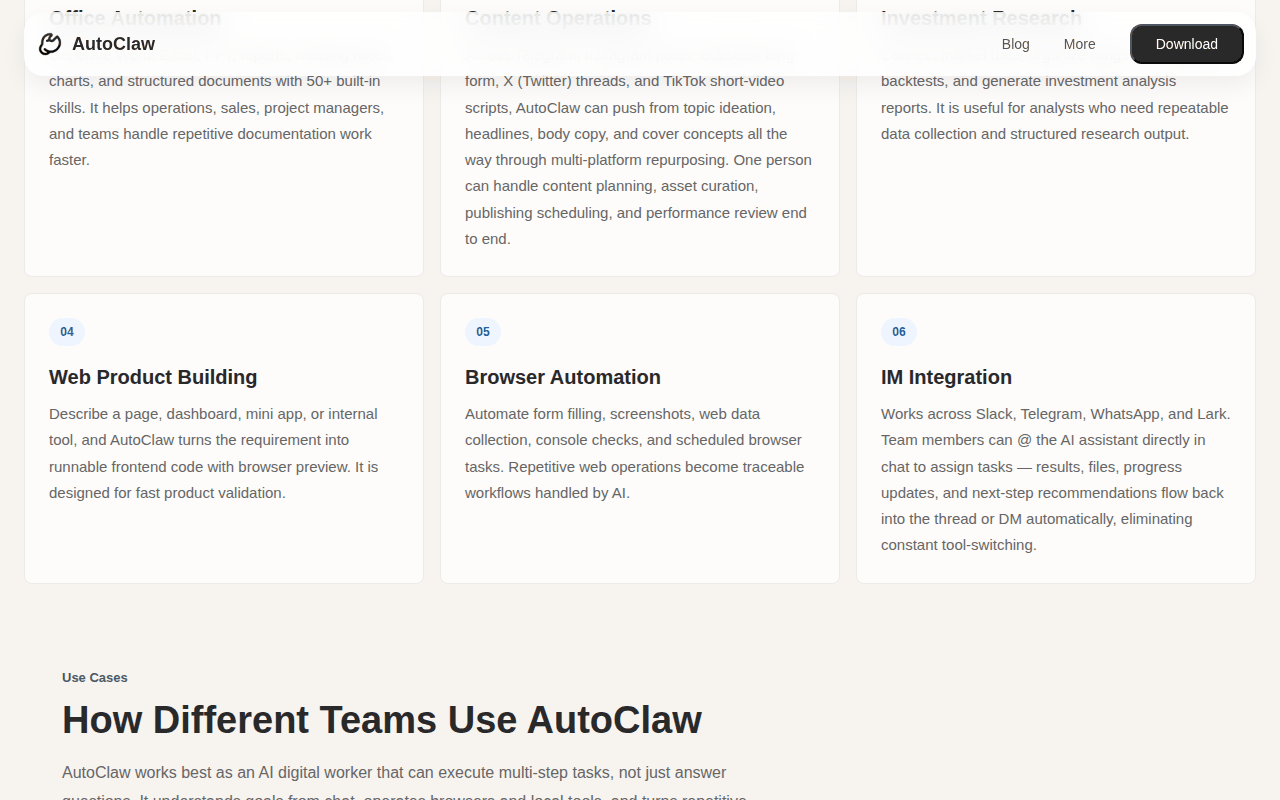 Screenshot: autoclaw.z.ai, “AutoClaw - Z.ai’s Official AI Agent | GLM-5.3-Flash Now Live” (homepage, IM Integration card, undated), captured Sep 19, 2026.
Setup is described in the Jun 1, 2026 post on running multiple agents on one computer: Settings → IM Channels, pick the platform (Discord, Telegram, WhatsApp), click Add Account, configure the bot credentials and authorize. The May 29 explainer puts the per-platform recipe at two or three steps each and promises “1-Minute Install, 2-Minute IM Integration.” The line that decides everything else comes from the multi-agent post: “The newly created bot can be bound to an existing Agent (shared memory) or to a new Agent (independent memory).” A Discord bot and a Telegram bot bound to the same agent share memory fully; two bots on different agents are isolated.
What the pages do not describe is any per-channel allowlist, rate limit or group gate. The only boundary example on the site is a rule a user taught the agent through Hermes, quoted in the self-evolution post as “never proactively @everyone in any group chat unless I explicitly ask”. That is a preference the agent remembers, not a gate a sender hits. The same absence covers revoke: the multi-agent post documents adding a bot and nothing documents removing one, and the only revoke language on the site concerns OS permissions, which you disable in system settings.
OpenClaw, the framework AutoClaw says it is built on, draws the picture the other way round. Its gateway security doc says that on a regular host install “most chat channels answer an unknown DM sender with a pairing code instead of processing the message; and group access is allowlisted, usually behind a mention gate.” The README adds the operator’s rule: “Treat inbound messages as untrusted input. DM-capable channels pair unknown senders by default,” approved with openclaw pairing approve <channel> <code>. The security doc also states the default you must know about before any group gets a bot: “Agents with message-tool access can send across conversations and channel providers by default.”
A rate-limiting page exists in the docs sidebar, covering lockouts, throttles, caps and cooldowns, and the channels page lists 32 entries against the homepage’s count of 29.
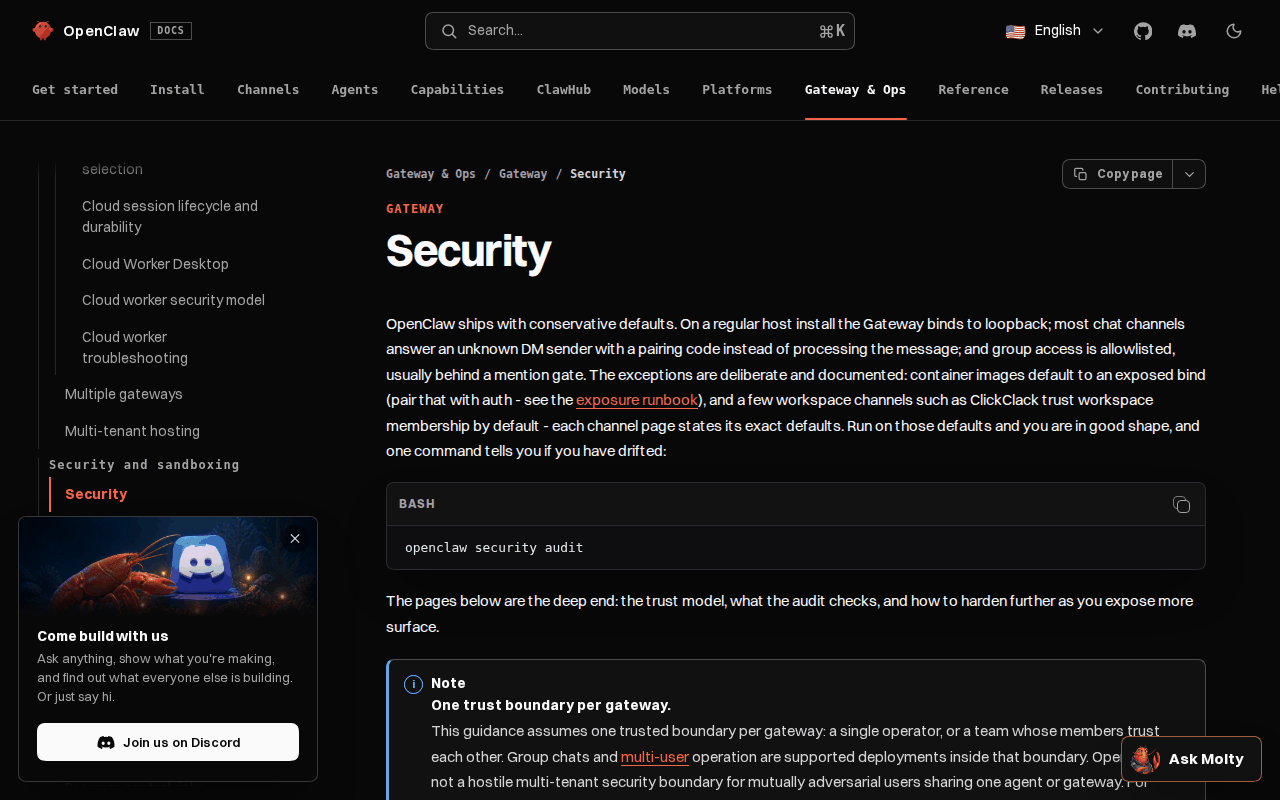 Screenshot: docs.openclaw.ai, “Security - OpenClaw” (Gateway & Ops, undated), captured Sep 19, 2026.
A message in a group is now a command with a shell behind it
The explainer’s own summary of the product is that you tell it what to do in the chat box and it operates browsers, reads and writes files, calls APIs and runs scripts. When the chat box is a group, every member holds that capability. Chatbots suggest; this one acts, and it acts on a machine that also holds your browser sessions, your SSH config and whatever the connectors can reach. That is why a chat bot bound to a local agent belongs in the same policy as any other privileged user, with the extra twist that its input arrives from people who never agreed to be operators.
Step 1: Classify every channel the bot sits in
Start with the channel, not the platform. A Telegram DM from you and a Telegram group with the whole family are the same integration and opposite risks. Five classes cover almost every bot.
| Channel class | Who can trigger | Typical example | Allow in your policy? |
|---|---|---|---|
| Paired DM | One named sender you approved | You, from your phone | Yes |
| Private team group | Named members who already share repo access | A four-person #dev group |
Yes, behind a mention gate |
| Shared operations channel | Anyone in the channel, including guests and bots | #ops with on-call rotation and a vendor |
Only with a sender allowlist |
| Family or public group | Anyone the group admin adds | The family WhatsApp group, a public Discord | No |
| Cross-channel send | The agent itself, posting to another channel | A DM result echoed to a group | No, until restricted |
Walk Settings → IM Channels and write one row per bot account, with the agent it binds to and whether that agent’s memory is shared. This is also the first row of the digital-employee inventory, so keep both in one file.
Step 2: Write the allowlist, and decide where it is enforced
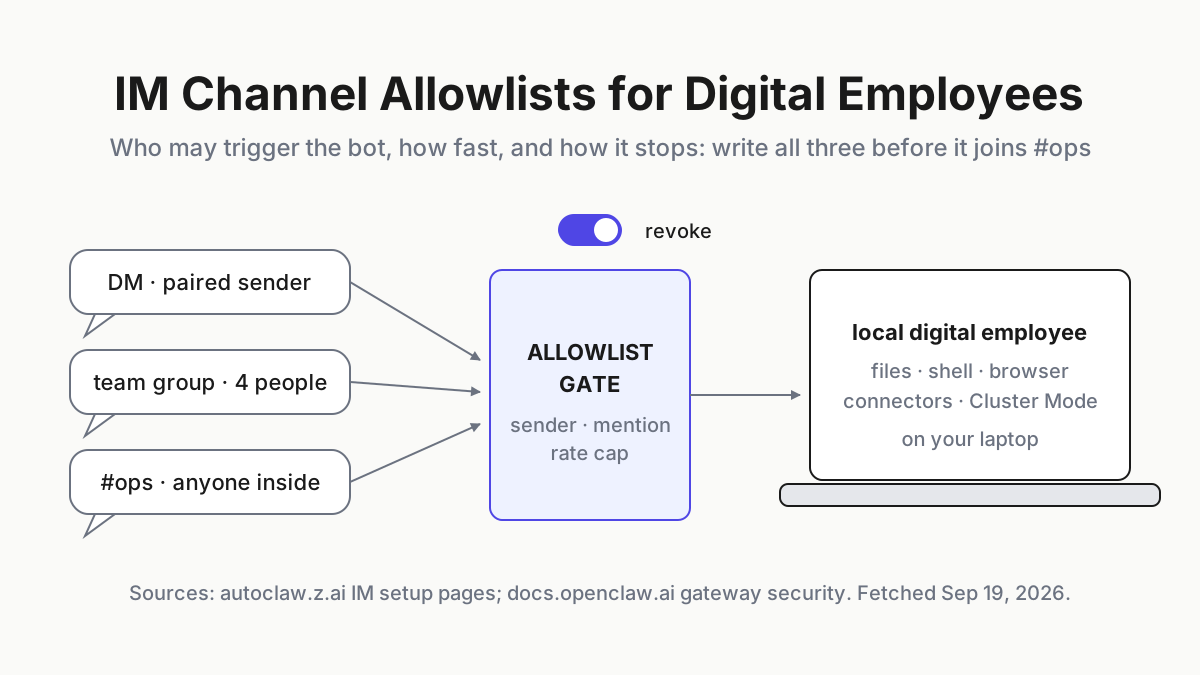
The allowlist answers one question per channel: which senders may cause the agent to act. On OpenClaw this is gateway configuration; DM pairing is the default, group access is allowlisted, and the mention gate keeps a group from triggering the bot on every message. On AutoClaw the docs give you no equivalent knob, so the allowlist is enforced by three things you control from outside: which groups the bot account is a member of, whatever the platform offers for restricting a bot to mentions or to certain senders, and which agent the bot binds to. The honest name for the AutoClaw version is a membership list, and it only works if the bot is in few places.
# im-allowlist.yaml (illustrative shape); enforced by the gateway on OpenClaw,
# by group membership and bot binding on AutoClaw, and by you either way
bot: ops-telegram
platform: telegram
bound_agent: ops-assistant          # independent memory; never the agent that holds deploy context
channels:
  - id: dm:russell
    class: paired-dm
    trigger: [russell]
  - id: group:dev-four
    class: private-team-group
    trigger: [russell, ana, tomas, priya]
    mention_gate: true
  - id: group:ops
    class: shared-ops-channel
    trigger: [russell, ana]          # on-call humans only; guests and other bots never
    mention_gate: true
    hours: "07:00-22:00 local"
  - id: group:family
    class: family-group
    trigger: []                      # the bot is not a member; keep it that way
cross_channel_send: deny
Two rules that survive contact with real groups. First, the trigger list is people, never roles, because a role changes membership without telling you. Second, a Hermes-taught preference such as the @everyone rule goes in the agent’s memory as a courtesy, not in this file as a control; if the only thing stopping a sender is a sentence the model remembers, the sender is on the allowlist.
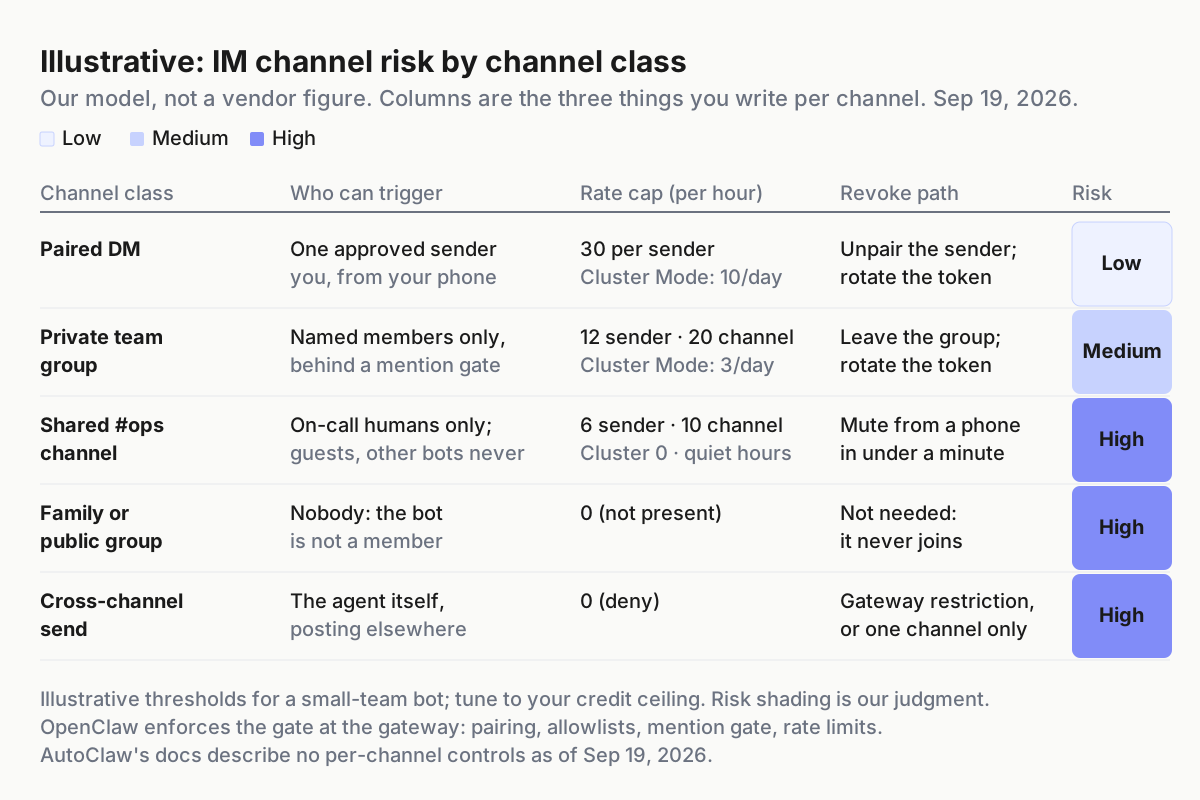 Illustrative. The shading is our model of the risk, not a vendor figure; the columns are the three things you write down per channel.
Step 3: Set rate caps that count Cluster Mode as more than one
A rate cap is what keeps a noisy channel from becoming a noisy machine. Set it per sender, per channel and per day, and set it in requests the agent acts on rather than messages it reads, because the mention gate already filters the reading. The numbers below are illustrative starting points, not vendor limits.
| Cap | Paired DM | Private team group | Shared ops channel |
|---|---|---|---|
| Acting requests per sender per hour | 30 | 12 | 6 |
| Acting requests per channel per hour | 30 | 20 | 10 |
| Cluster Mode requests per channel per day | 10 | 3 | 0 |
| Quiet hours | none | none | 22:00–07:00 local |
| Credit ceiling per machine per day | your normal day × 2 | same | same |
The Cluster Mode row is the one people skip. AutoClaw’s own Cluster Mode post puts the toggle beside the chat input in the main interface and says formation is then picked automatically by task complexity, with broad research possibly involving 18 roles. The site publishes no cap, no per-role cost and no abort path, and does not say whether a request arriving over IM runs in Cluster Mode when the toggle is on. Assume it can: one message that lands in Cluster Mode is not one request but a team hired on your credit balance, so count it as ten, cap it at a handful per day in private groups, and set it to zero in any channel where a guest can type.
On OpenClaw, read the rate-limiting page before you set numbers, since the gateway already documents lockouts, throttles, caps and cooldowns. On AutoClaw the docs describe nothing to tune, so the cap is enforced by the credit ceiling and by the bot’s reach: fewer channels, fewer members, an independent agent. Whichever product, the credit or token burn is the signal that the cap failed, which is where cost anomaly alerts earn their keep.
Step 4: Build the revoke path and time it
A revoke path has three positions, and each one must work without the vendor. Draw the gate with the switch on it, then run the drill.
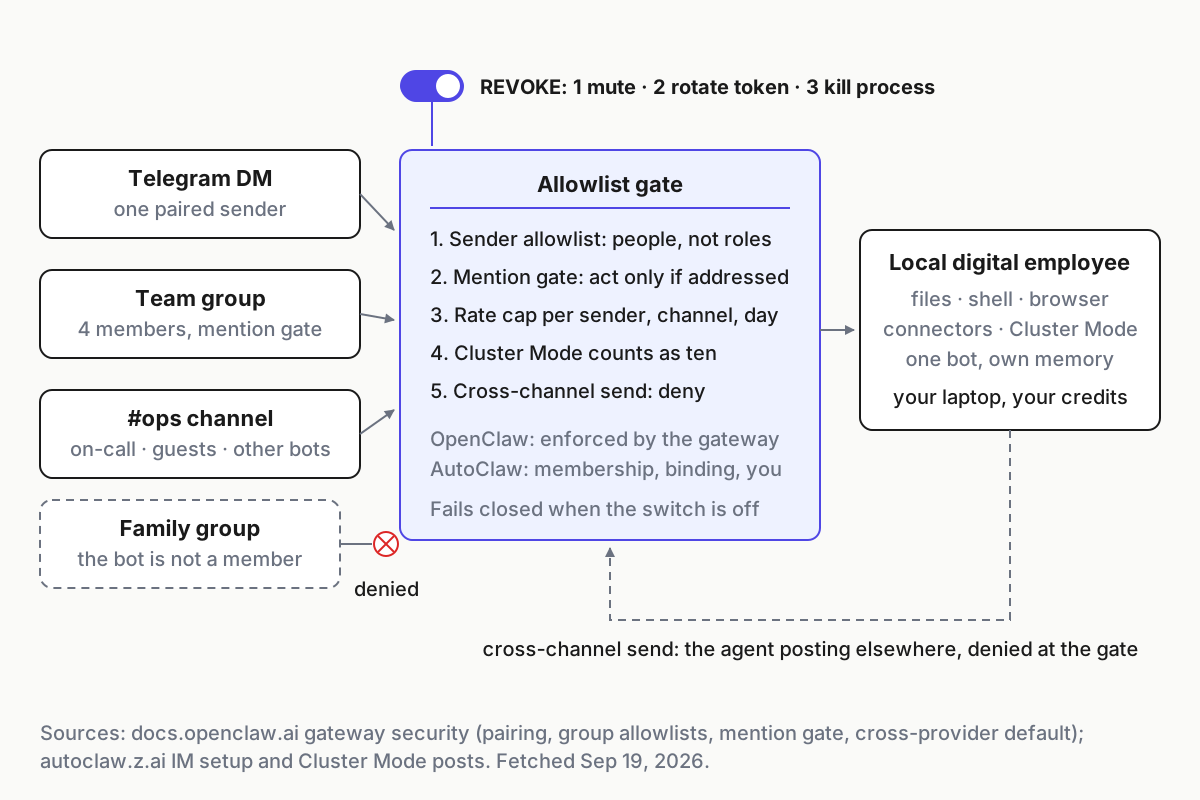 One gate, three checks, one switch. On OpenClaw the gate is the gateway; on AutoClaw it is group membership, bot binding and you.
- Mute. Remove the bot from the group, or leave it. This stops the noisiest channel in under a minute and keeps every other channel working. On the platform side it is a membership change; on the agent side nothing happens, which is the point.
- Revoke. Rotate or delete the bot token at the platform, then remove the account under Settings → IM Channels. The second half is undocumented, so do it once with a throwaway bot and note what the app shows. On OpenClaw, the incident-response page in the docs covers containment, rotation and evidence, and the README puts the exposure runbook on its read-before-exposing list; read both before you need them.
- Kill. Quit the app or stop the gateway process, then disable the OS permissions the agent was granted in system settings. That last step is the one revoke instruction AutoClaw’s site actually gives, and it holds even if the app is relaunched.
# Illustrative drill; run it monthly with a throwaway bot in a throwaway group
start=$SECONDS
# position 1: remove the bot from the test group           -> message it; expect silence
# position 2: rotate the token at the platform             -> message the DM; expect silence
#             then remove the account in Settings -> IM Channels and screenshot the result
# position 3: quit the app; disable its OS permissions     -> expect no reply and no relaunch
echo "revoke drill $(date -I): $(( (SECONDS-start)/60 )) min to full silence" >> im-revoke.log
Record the time to silence for each position. If position 1 takes longer than a minute, the bot is in more groups than your allowlist says. If position 2 leaves the bot answering, a second account is bound to the same agent. If position 3 leaves anything running, you have found a process the app started that the app does not own.
Step 5: The scenario where #ops becomes unbounded Cluster Mode
Picture a #ops channel with a six-person on-call rotation, a vendor’s support engineer and a monitoring bot that posts alerts. Someone adds the digital employee so on-call can ask it to check a dashboard from their phone. Tuesday night, the monitoring bot posts forty alerts in ten minutes, three of them mention the agent by name, and one on-call engineer, meaning well, types the instruction to investigate all of it. Cluster Mode was left on after an afternoon research job and, in this scenario, applies to the IM request too, so the agent picks a formation for a broad task, brings in the roles it decides it needs, and starts reading every alert, opening every dashboard and drafting a report, on the laptop of whoever installed it, on that person’s credit balance.
Nothing in that story is a bug. Every step is a documented feature or a gap the docs leave open.
The allowlist would have stopped the monitoring bot’s mentions from counting. The rate cap would have refused the first Cluster Mode request in a shared channel. The revoke path would have let the on-call engineer mute the bot from their phone in under a minute. Without all three, the ceiling is the credit balance and the person who eventually notices the fan.
The family-group version is the same story with lower stakes and worse timing: a cousin discovers the bot answers, asks it to plan a trip, and the trip plan runs as a long research job at 1 a.m. on your machine. The fix is not a smarter cousin. It is a bot that is not in that group.
Five signs an AutoClaw Telegram WhatsApp bot slipped its allowlist
The guest who can trigger. A vendor engineer or a new hire lands in #ops and the bot answers them. Signal: a reply to a sender who is not on the trigger list. Response: the allowlist was a role, not a list of people; rewrite it.
Shared memory across bots. The Telegram bot on your phone and the Discord bot in a public server were bound to the same agent, so the public server can see what you told the bot in private. Signal: the agent references a private fact in a group. Response: remove the public bot and add it back bound to a new agent with independent memory, and treat whatever the shared agent knew as already disclosed.
Cross-channel echo. A DM result appears in a group. On OpenClaw this is the documented default until you restrict cross-provider messaging; on AutoClaw the docs do not say. Signal: a message from the bot in a channel nobody addressed it in. Response: configure OpenClaw’s cross-provider messaging restrictions (the illustrative file’s cross_channel_send: deny), or keep the bot in one channel only.
Cluster Mode from a group. Signal: the progress panel shows roles, and the balance drops faster than the channel’s message count explains. Response: the daily Cluster Mode cap goes to zero in shared channels, and the on-call runbook gets a mute step.
The revoke that half worked. The token was rotated and the bot kept talking. Signal: replies after position 2 of the drill. Response: a second account or a second gateway is bound; the inventory is wrong, and the drill just fixed it.
One boss per bot, and a desk that can see all of them
An IM bot bound to a local agent is a member of your fleet with the widest input surface in it, because its operators are whoever is in the chat. The layer that runs the fleet needs the same three facts for this member as for every other: who may drive it, how fast, and how it stops. That is the one-boss rule applied to a bot that lives in a group, and it is why a multi-agent command center needs an allowlist column beside the kill switch. The buy-versus-build decision between the gateway you run and the app you install is mostly a question of where that column is enforced.
Write the three artifacts before the bot joins anything with more than four people in it. After that, the group can be as noisy as it likes.
FAQ
Can an AutoClaw Telegram or WhatsApp bot be restricted to certain users?
The docs describe no per-channel allowlist, rate limit or group gate, only bot setup under Settings → IM Channels and binding a bot to a shared or independent agent. Restriction therefore comes from group membership, the platform’s own bot settings and which agent the bot binds to, not from AutoClaw.
How does OpenClaw stop strangers from messaging the bot?
By default most DM-capable channels answer an unknown sender with a pairing code instead of processing the message, and group access is allowlisted, usually behind a mention gate. An operator approves each sender with the pairing command, and the docs say one trust boundary per gateway.
How do I revoke an IM bot from a local AI agent?
Three positions: remove the bot from the group, rotate or delete its token at the platform and remove the account in the app, then quit the app and disable its OS permissions in system settings. Time each step with a throwaway bot first, because removal is not documented on AutoClaw’s site.
Sources
- AutoClaw homepage — IM Integration block (Slack, Telegram, WhatsApp, Lark), FAQ and spec table platform lists
- AutoClaw: Multi-agent work-life isolation — Jun 1, 2026; Settings → IM Channels setup, bot-to-agent binding, memory sharing rules
- AutoClaw: What is AutoClaw — May 29, 2026; per-platform setup recipes, 2-minute IM integration
- AutoClaw: Hermes self-evolution — Jun 1, 2026; the user-taught @everyone rule, approval-gated evolution
- AutoClaw: Cluster Mode — May 29, 2026; automatic formation, up to 18 roles, progress panel
- openclaw/openclaw README — inbound messages as untrusted input, DM pairing,
openclaw pairing approve - OpenClaw docs: Gateway security — pairing codes, group allowlists behind a mention gate, cross-provider messaging default, one trust boundary per gateway
- OpenClaw docs: Gateway exposure runbook — what to read before exposing the gateway beyond loopback
- OpenClaw docs: Channels — 32 listed entries including external plugins, against the homepage’s count of 29