Claude Code Projects: Anthropic's Cloud Coordinator, and Who Owns Abort When Threads Spawn
Claude Code Projects runs cloud threads on their own branches under one coordinator. Stop, Pause, Archive, Delete semantics, 200 threads a day, who owns abort.

Go deeper. Build your own.
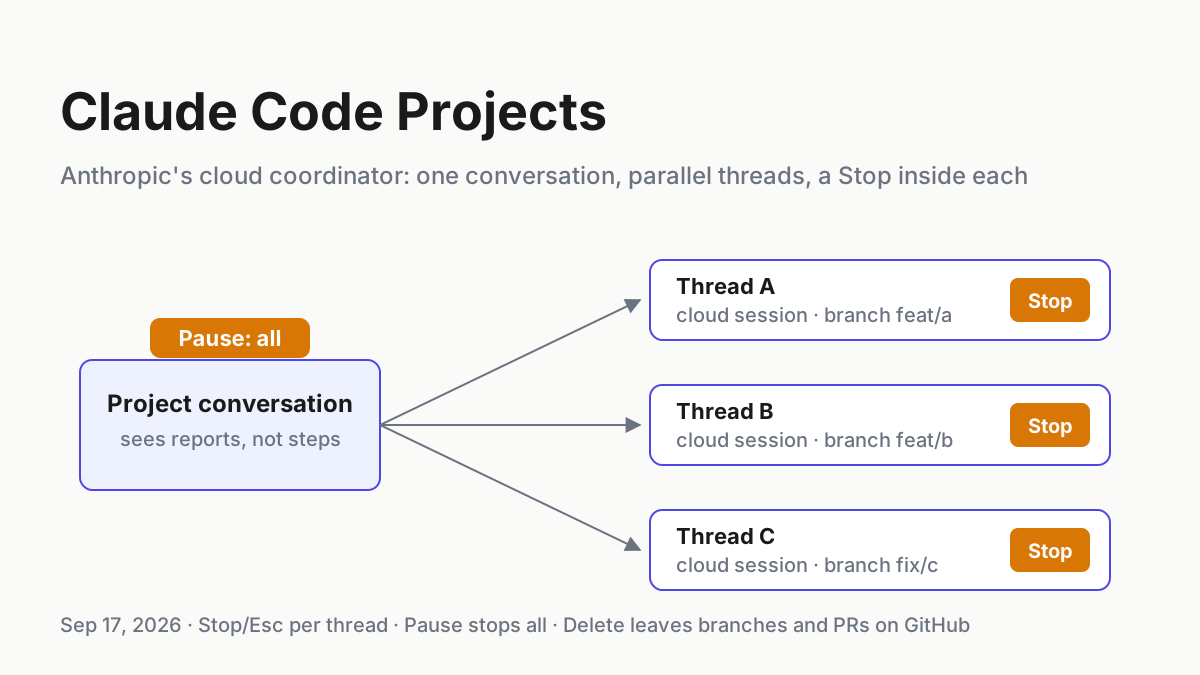
Six threads are working. Each one is a full Claude Code cloud session on its own branch, in a sandbox you have never logged into, and one of them has opened a pull request for a bug it noticed on the way to the task you actually assigned. The Stop button for that thread is inside that thread, and so is any approval prompt it raises; telling the project conversation you are typing into to go ahead does not reach it.
That is the shape of Claude Code Projects as Anthropic redesigned it on Sep 17, 2026: one conversation that coordinates, parallel cloud threads that do the work, and a shared memory and library that outlive any single thread. It arrived seven days after Cursor’s Projects, which makes it the second vendor coordinator in a week that can spawn workers you did not start by hand. The Cursor half of that story already has its ownership table in Cursor Projects versus the tray; this is Anthropic’s twin, and the questions differ because the documentation differs.
Anthropic wrote its abort semantics down. Stop and Esc per thread, Pause for the whole project, Archive, Delete, and what each leaves behind on GitHub are all on the docs page. What the page leaves out is just as useful (no documented API or CLI stop, nothing on whether Stop reaches a thread’s subagents), and one thing it does say is easy to miss: a thread that hits your plan limit waits and resumes in the next window without asking. By Tuesday you should have a matrix on one page: for every process that can spawn on your behalf across Anthropic’s cloud, an IDE coordinator, and the tray on your own laptop, which button stops it, whether the button reaches the children, and where the evidence lands afterwards.
What Anthropic shipped on Sep 17, 2026: threads on branches under one conversation
Anthropic’s own announcement is the blog post “Projects redesigned: from folder to conversation”, dated Sep 17, 2026, and the operational source is the Claude Code docs page titled “Let Claude coordinate ongoing work with Projects” (Claude blog; Claude Code docs). The Verge covered it the same day under the headline “Claude Code relaunches Projects to manage multiple AI agents in the cloud”; “relaunch” is The Verge’s word, and Anthropic’s own words are “redesigned” and “updated projects” (The Verge). Nothing about it appears on anthropic.com/news; the blog is the primary.
The mechanism, in Anthropic’s sentences. “Projects have threads that do the work and a coordinator that directs them.” “Under the hood, each thread is a Claude Code cloud session working on its own branch and copy of the repo. The coordinator keeps work organized, but if any threads work on the same code, the overlap is resolved as a merge conflict just like any other PR.” The fan-out goes one level deeper: “Each thread can further split its delegated work into pieces using subagents, loops, and workflows when needed so large assignments finish faster.”
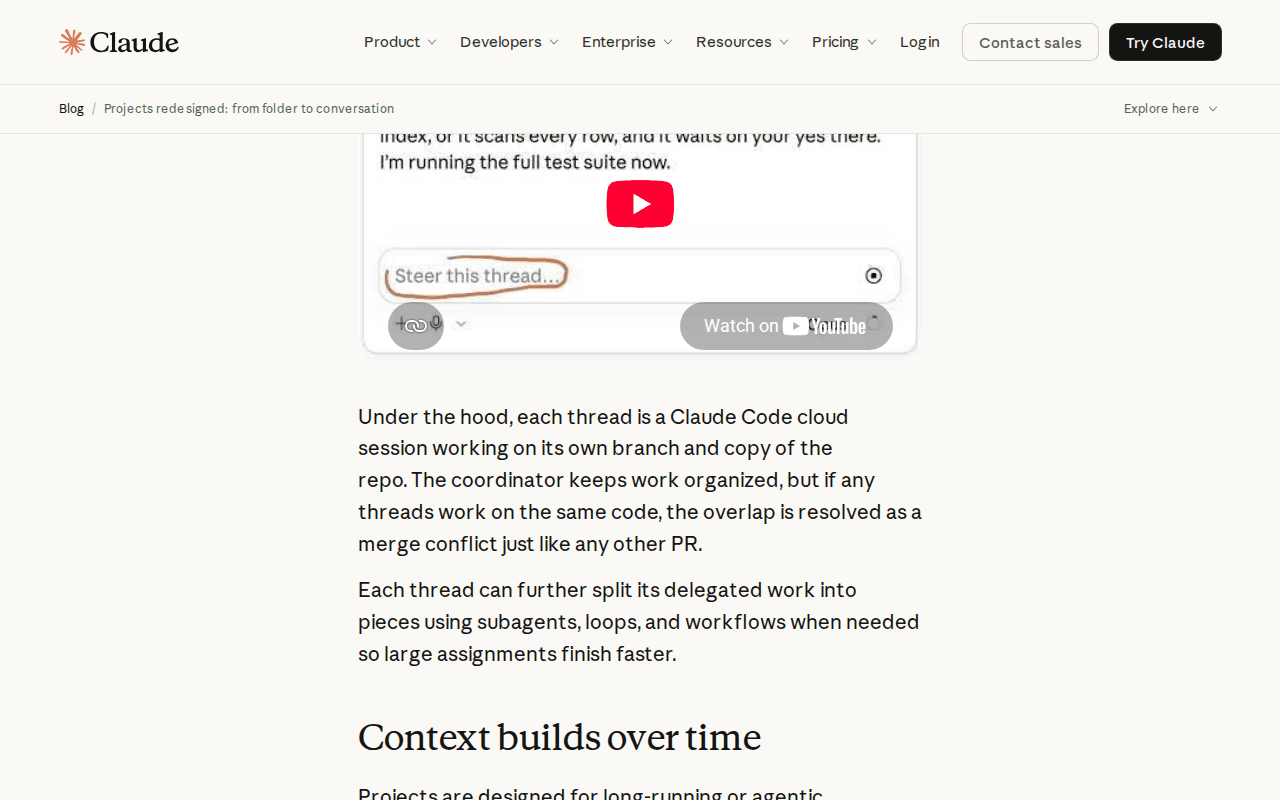 Screenshot: Claude blog, “Projects redesigned: from folder to conversation” (Sep 17, 2026), captured Sep 19, 2026.
The docs describe the coordinator’s field of view in one line that decides most of this article: “It sees what threads report back, not every step they take.” Threads run in auto mode when the model supports it. A new project “runs Opus everywhere, with high effort for threads and low effort for the conversation.” Project instructions run to 16,000 characters, memory is a set of files behind a MEMORY.md index, and files you add are readable under /mnt/project-files.
Who gets it: “Starting today, updated projects are available in beta to select Claude Pro and Max subscribers who use cloud sessions in Claude Code and don’t have any existing projects on the web or desktop.” The docs add that Projects “aren’t available on Team or Enterprise plans yet”, and the blog promises expansion across Claude, Team and Enterprise afterwards, with no dates.
Surfaces are claude.ai/code, the Code tab of the desktop app and the Claude app on iOS and Android; a project is “not in the terminal CLI or through Amazon Bedrock, Google Cloud’s Agent Platform, or Microsoft Foundry.” The CLI’s claude project command is unrelated. Threads need a repository on github.com with the Claude GitHub App installed; a /web-setup token “isn’t enough for project threads”.
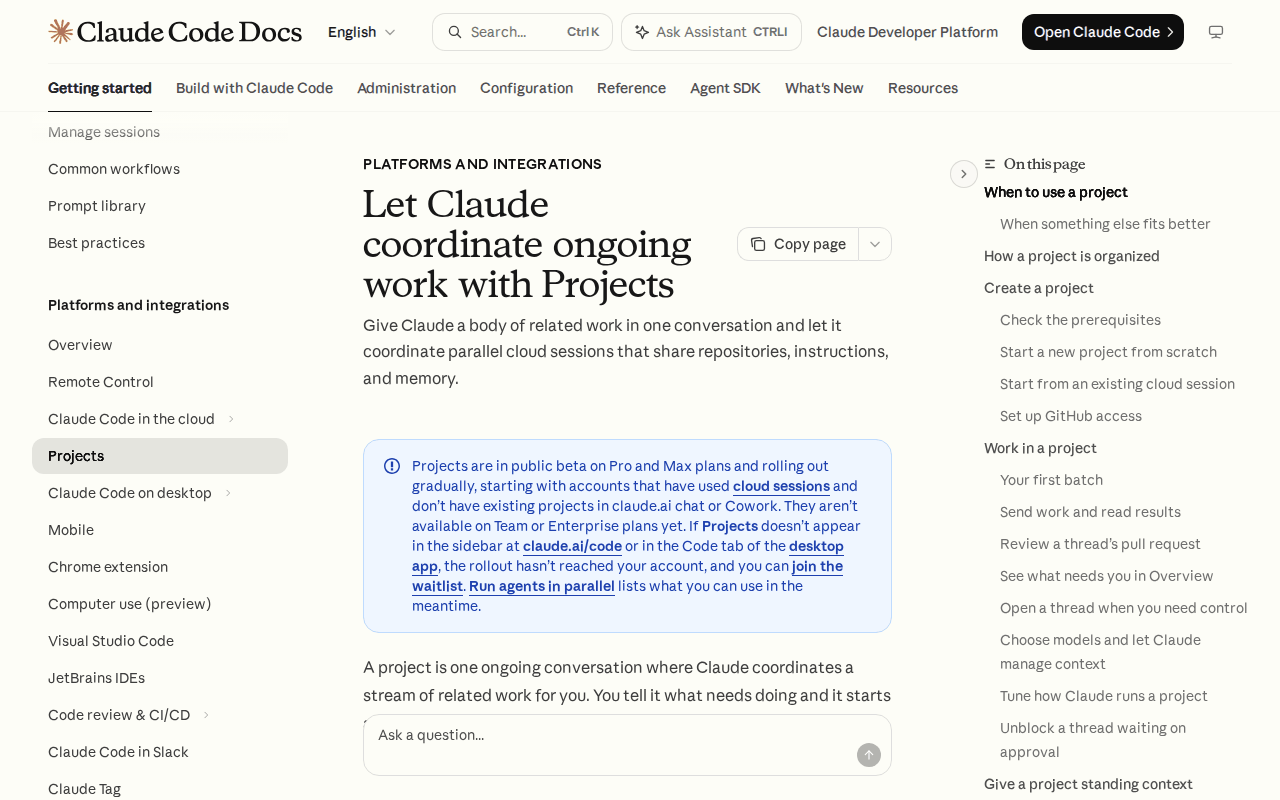 Screenshot: Claude Code Docs, “Let Claude coordinate ongoing work with Projects” (undated), captured Sep 19, 2026.
One more sentence matters for the ownership question. “Threads run in the cloud today; running on your machine alongside your local tools and code and behind your network is coming very soon.” As of Sep 19 the docs are flat about it: “A local session can’t be part of a project.” The overlap with your laptop is scheduled, not shipped.
A coordinator that reads reports, not steps, changes what stop has to mean
When a chat window suggested a diff, stop meant closing the tab. A thread that “works on a new branch, started from the repository’s default branch” and can open a PR “on its own for a bug fix or another concrete change” is acting on a repository while you look elsewhere, and the thing directing it only sees what it reports back. Stop, in that world, is a per-process question with a per-process answer, and the coordinator is not the process.
The abort-ownership runbook for Claude Code Projects
Six steps. Everything labeled illustrative is a shape you adapt; every quoted line is Anthropic’s, Cursor’s, or their docs’.
Step 1: Learn the four controls and what each leaves standing
The docs give a project exactly four ways to interrupt work, plus one that only touches the coordinator. Write them down before you start a project, because two of them are easy to confuse under pressure.
| Control | Scope | What stops | What survives |
|---|---|---|---|
| Stop, or Esc | one thread | that thread’s current turn: “Interrupt the thread with Stop, which replaces the send button while the thread is working, or by pressing Esc.” | the thread, its branch, its sandbox; other threads keep going |
| Pause | whole project | “Every running thread and the conversation are interrupted, no new threads start, routines don’t run, and the project doesn’t accept messages until you resume it.” | everything, frozen until you resume |
| Archive | whole project | “stops any thread that was running or watching a pull request”; routines don’t run | the project, hidden; Unarchive restores it, but each thread stays archived until you unarchive it; archived projects use no plan |
| Delete | whole project | threads, memory, files, routines; “This can’t be undone.” | “Branches and pull requests the threads pushed to GitHub aren’t affected.” |
| Restart Claude | coordinator only | the reply it was writing | “threads aren’t affected” |
Two readings that save you an incident. Pause is the one control that stops every thread, the conversation and the routines at once and comes back with a single Resume, so Pause is your project-wide switch. Delete does not reach GitHub, so a thread’s branch and open PR are still there after the project is gone; that is either a leak or your evidence, depending on whether you planned for it.
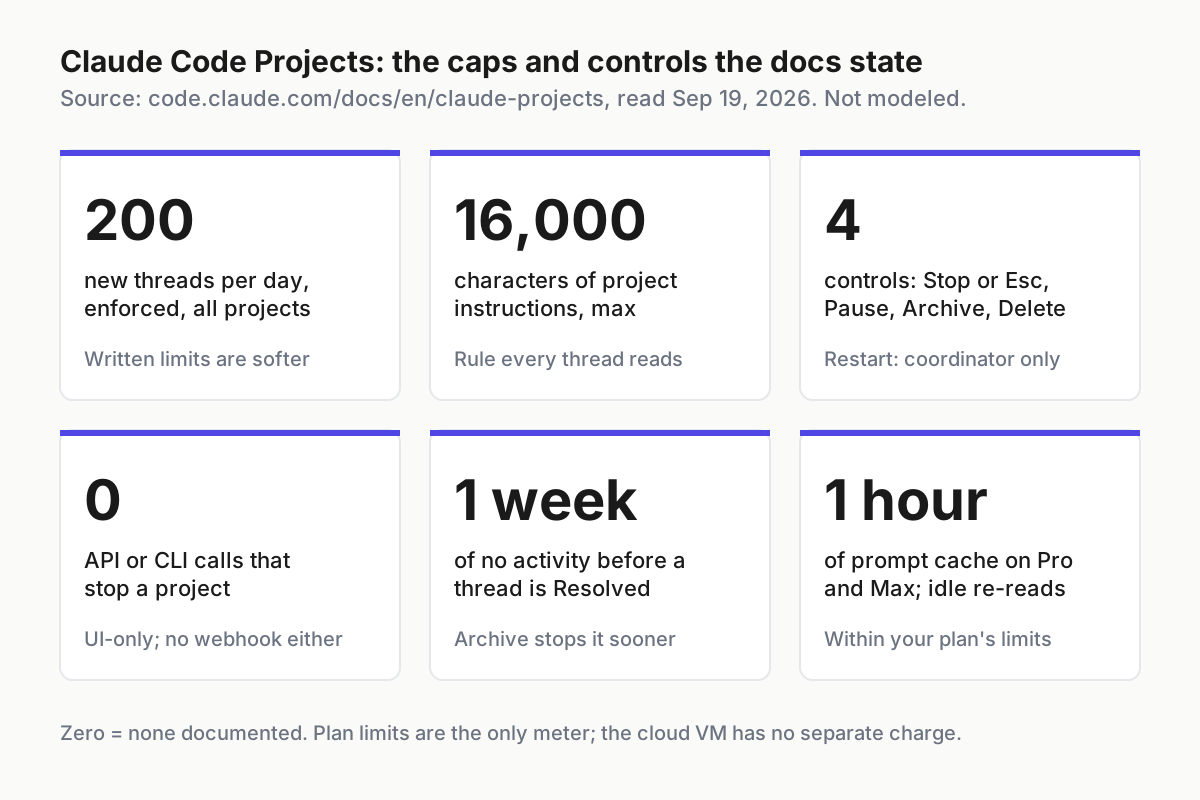 The numbers the docs state, as tiles. None of these is modeled; the source is code.claude.com/docs/en/claude-projects, read Sep 19, 2026.
Step 2: Put your policy in project instructions, and know it is not a cap
Project instructions are the one place a rule you write reaches every thread, and the docs are honest about their strength: “They’re instructions Claude keeps to, not enforced settings, so a thread limit you give this way isn’t a hard cap.” “The enforced limit is 200 new threads per day across your projects.” Permission rules from .claude/settings.json apply only in a project with one repository.
An illustrative instructions block, well under the 16,000-character limit:
Illustrative project instructions: one project, one repo.

## Scope
Only the `payments-service` repository. Do not clone or read anything else.

## Threads
Prefer three concurrent threads or fewer; tell me in the conversation before
starting a fourth. Commit and push work in progress at least once per hour.

## Git
Don't merge, force-push, or change CI configuration without asking me in the thread.
Open a PR only for the task you were given; report side findings, don't fix them.

## Reporting
Every report back names the branch, the PR number if any, and what is unverified.
The merge line is the docs’ own sample sentence and worth keeping verbatim. The three-thread line is a preference the coordinator keeps to, not a limit anything enforces; the enforced number is 200 per day, and the fan-out metering piece is why a preference still matters.
Step 3: Write the matrix across the three runtimes
The point of this article is the middle column beside its neighbours. The IDE column is Cursor’s, from its docs and its Cloud Agents API (Cursor Projects docs; Cloud Agents API; TypeScript SDK). The right column is the tray companion on your own laptop, an operator construct rather than a vendor feature, so its cells are what a desk layer can do with an OS process, not a vendor’s promise.
| Dimension | Anthropic cloud thread | IDE Project (Cursor) | Your local tray |
|---|---|---|---|
| Stop one worker | Stop or Esc, inside the thread | Project UI: the docs do not say; per run, a cancel endpoint (“Cancellation is terminal”) | end the process on this host |
| Stop everything | Pause, or Archive | the docs do not say; one cancel per run | stop every child the tray started |
| API or CLI kill | none; UI-only | Cloud Agents API v1 cancel; SDK run.cancel() on local and cloud runs |
your own script |
| Children stopped with parent | the docs do not say | the docs do not say | yes, if you kill the process group |
| Partial work | the thread’s branch; “uncommitted changes can be lost” if the sandbox cannot resume | pushed branches; partial text on the Run object | local disk, in the worktree |
| Delete vs compute | Delete removes threads, memory, files; branches and PRs stay | archived agent is terminal; workspace state can be deleted | deleting a session file kills nothing; do both |
| Approval mid-run | inside the thread; the coordinator cannot answer it | the docs do not say | your harness’s prompt, on your screen |
| Evidence | transcript in Overview; Usage by thread and model; no share, no export | run stream with a retention header; usage endpoint; Cloud MCP transcripts “up to 50 runs per batch” | session files on disk |
| Meter | plan limits; “There is no separate compute charge for the cloud VM.” | API pricing plus a first-use spend limit | a local token count |
Read the children row twice. Neither vendor documents whether stopping the parent stops the subagents it spawned. Anthropic documents the neighbouring case, that “Background work that was still running when the VM was reclaimed, such as subagents and shell commands, isn’t restored” (cloud sessions doc), which tells you the children are real processes with their own lifetime. Until a doc says otherwise, treat Stop as a request to the parent and Pause as the only control you trust to quiet the whole tree.
The three-coordinator abort bus extends this matrix to OpenAI’s Agents API.
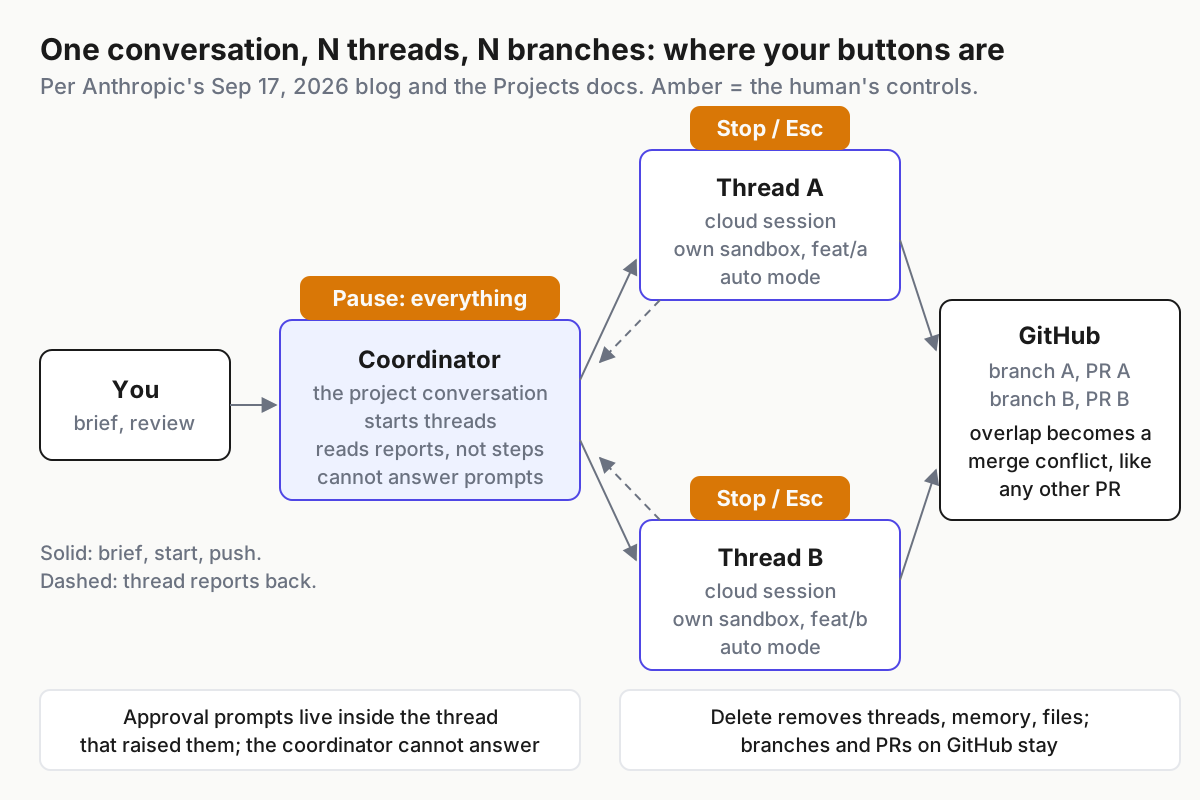 Where the human’s buttons sit. Stop and Esc are per thread; Pause quiets everything; Delete never reaches GitHub.
Step 4: Decide who owns abort when both sides can spawn
Today the Anthropic overlap is zero by construction: “A local session can’t be part of a project.” Even the desktop app’s cross-session view, which can list and message your other Code tab sessions, “doesn’t see cloud sessions, or sessions you started from the terminal CLI or the VS Code extension” (Claude Code desktop docs). The overlap exists on the Cursor side right now, where “When something needs testing on your machine, the coordinator starts a local agent to run it there”, and it is scheduled on the Anthropic side, “coming very soon”. Write the rule while the overlap is still theoretical.
Three rules, in order of precedence:
- Whoever spawned it owns the first kill. A cloud thread is stopped in the thread, a Cursor run is cancelled through Cursor, a process your tray started is killed by your tray. Nobody’s button crosses the boundary, and pretending otherwise is how a process gets orphaned twice.
- The human owns Pause. Pause is project-wide, immediate, and reversible, and it stops the routines too. Practice it on a boring Tuesday so you know how long a working thread takes to go quiet and what the Overview shows afterwards.
- The git host is the last switch. Threads push with the Claude GitHub App’s access; Cursor agents push with theirs. Revoking an installation at GitHub is the one action that outlives Delete, Archive and every vendor’s UI. The docs do not say what a running thread does when it loses push access, so treat that as a last resort, not a routine.
When the local-thread feature ships, add a fourth line: a thread on your machine belongs to the project for its lifecycle and to your host for its kill. The interruptible coordinators piece has the general version of that split.
Step 5: Collect evidence before Delete, because Delete takes the transcript with it
Evidence in a project is generous while the project exists and thin the moment it does not. The Overview pane says of a thread’s transcript, “Read what Claude did, step by step.” The Usage tab shows “token use by thread and by model”.
Then the limits: “A project belongs to one user. You can’t share a project or its threads with another user, and thread transcripts don’t have the share option other cloud sessions have. There are no organization-level controls for projects during the beta.” No export API is documented.
So the evidence drill is manual, and it runs before Delete, not after:
- Push before you stop. The docs’ own advice for long tasks: “On long tasks, ask Claude to commit and push work in progress.” A pushed branch is evidence that survives a reclaimed sandbox and a deleted project.
- Open the PR even for the abandoned thread. The Create PR button turns a pushed branch into a reviewable record on GitHub with a diff, a timestamp and an author. That record is the only artifact the docs say survives Delete.
- Copy the transcript while the thread is Ready for review or Idle. Read it in the Overview and keep your own copy in your archive, tagged with the project name and thread title. There is no share button to do it for you.
- Capture the Usage tab by thread at the end of each window if you need cost attribution later; nothing documented lets you retrieve it after Delete.
- Note the approval prompts you answered inside threads. They are the closest thing to an approval log, and they live in the thread.
The vendor-hosted evidence checklist has the generic version; the project-specific rule is that GitHub is the archive of record, because Anthropic’s Delete never touches it.
Step 6: Budget by usage window, not by thread count
“Projects can run several threads at once, and each one is a full Claude Code session. Because of this, projects can reach usage limits faster.” The docs make the consequence specific: threads count “against the same plan limits as your other Claude Code sessions, and a project can’t spend past those limits on its own”, and “A thread that reaches your plan’s limit waits and continues on its own when the limit resets, so work you left running starts using your next usage window without a message from you.” Extra usage credits are opt-in: “A thread can’t turn them on for you.”
First, set model and effort per project; the default is Opus with high effort for threads and low for the conversation, and both are yours to change. Second, treat the auto-resume as a scheduling decision you made by leaving threads running: a Friday project that hits the weekly limit starts again when the window rolls, in a sandbox that may have been reclaimed and re-cloned. If that is not what you want, Pause on Friday. The overnight merge-gate piece covers what should be allowed to land while you sleep.
Six signals a Claude Code project is running without you
| Failure | The signal | First move |
|---|---|---|
| An approval stuck in a thread you are not watching | Overview shows Waiting on you; in a browser, only the dot on the Overview button | open the thread; the project conversation “doesn’t reach it” |
| Two threads on the same file | Resolve conflicts appears on a thread card; GitHub shows a conflicting PR | click Resolve conflicts; auto-fix cannot see it because “GitHub does not emit a webhook when the base branch advances” |
| Sandbox reclaimed mid-task | the thread continues from a fresh clone; work since the last push is gone | make the hourly push an instruction; check the branch before you trust the report |
| Project deleted, branch still open | a PR from a project that no longer exists | close or merge it deliberately; the branch was never Anthropic’s to remove |
| Threads resumed in the next window unasked | usage climbs on Monday for a project you forgot on Friday | Pause; then decide whether credits should be on at all |
| Auto mode fell back to prompting | a thread that ran alone all morning now waits on every call, after classifier blocks “3 times in a row or 20 times total” | read the blocked actions before you approve; the fallback is a signal (permission modes) |
The operating layer is the part the coordinator does not see
Chatbots suggest; agents act, and a project’s threads act on branches, in sandboxes, with a push credential, while the thing directing them “sees what threads report back”. Every row of the matrix above is an operating-layer function that no vendor’s coordinator performs for the others: an inventory of every process that can spawn on your behalf, one kill switch per runtime with a human who owns Pause, evidence copied out before the vendor’s delete, and a meter joined across plan windows. That is why a fleet command center is a control surface rather than a nicer chat window, and why the local versus cloud hybrid runbook treats a cloud project as one host among several.
Anthropic wrote the most explicit stop semantics of September’s coordinators, and its honest gaps (no API, no export, nothing on children) are the ones to plan around this week rather than wait on.
FAQ: Claude Code Projects controls and limits
Can Claude Code Projects be stopped from the CLI or an API?
No. The docs place Projects in claude.ai/code, the desktop app’s Code tab and the Claude app on iOS and Android, not in the terminal CLI. Stop and Esc act on one thread; Pause, Archive and Delete act on the project. No API, CLI flag or webhook to stop a project is documented.
Does deleting a Claude Code project remove the branches its threads pushed?
No. Delete removes the project, its threads, its memory and its files and turns off routines, and the docs say it cannot be undone. Branches and pull requests the threads pushed to GitHub are not affected, so close or merge them yourself and treat the PRs as your durable evidence.
How many threads can a Claude Code project run at once?
A thread limit you write in project instructions is a preference Claude keeps to, not an enforced cap. The enforced limit is 200 new threads per day across your projects. Each thread is a full Claude Code session against your plan’s limits, so a project can reach usage limits faster than single sessions do.
Sources
- Claude blog: “Projects redesigned: from folder to conversation” (Sep 17, 2026)
- Claude Code docs: “Let Claude coordinate ongoing work with Projects”
- Claude Code docs: “Use Claude Code in the cloud”
- Claude Code docs: Desktop application
- Claude Code docs: permission modes
- The Verge: “Claude Code relaunches Projects to manage multiple AI agents in the cloud” (Sep 17, 2026)
- Cursor docs: Projects
- Cursor docs: Cloud Agents API endpoints
- Cursor docs: TypeScript SDK
- Claude (@claudeai) on X, Sep 17, 2026