Test What Survives a Cross-CLI Session Import
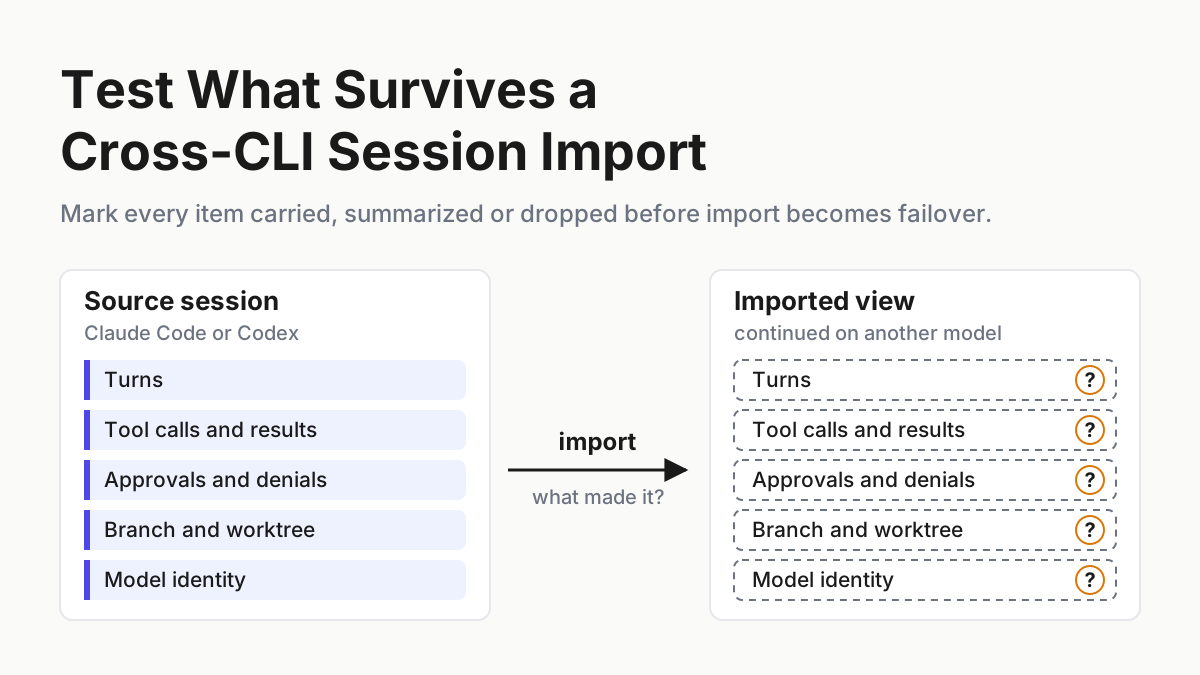
Import Claude Code session history into another tool only after a fidelity test: mark turns, tool calls, approvals, branch and model carried or dropped.

Go deeper. Build your own.
The Claude Code lane stops halfway through a bug with its weekly limit spent, and since Sep 14 there is a button for that moment. Cline Desktop will import a Claude Code session, or a Codex one, and carry it on with whatever provider and model you have configured in Cline. Its pages don’t say which parts of the session make the trip.
This runbook turns that silence into a test you run before import becomes your quota failover. By Tuesday you will have two fixture sessions on a throwaway repo, a scorecard that marks every item carried, summarized or dropped, a secret scan that runs before any transcript moves, one probe question aimed at the biggest gap, and a merge rule that names the model that finished the work.
Sep 14: Cline Desktop imports Claude Code and Codex sessions
Cline launched Cline Desktop on Sep 14, 2026, in a post by Etisha Garg that pitches it as an open-source app for open-weight models. The feature that matters to anyone running a fleet is import: bring in a conversation from Claude Code, Codex or another supported agent, then “review what’s already been discussed, and continue with your next instruction”. The post is candid about the use case: “if you’ve been working through a bug in Claude Code where your subscription quota’s up, you can import that conversation into Cline” and finish the job with a cheaper open-weight model.
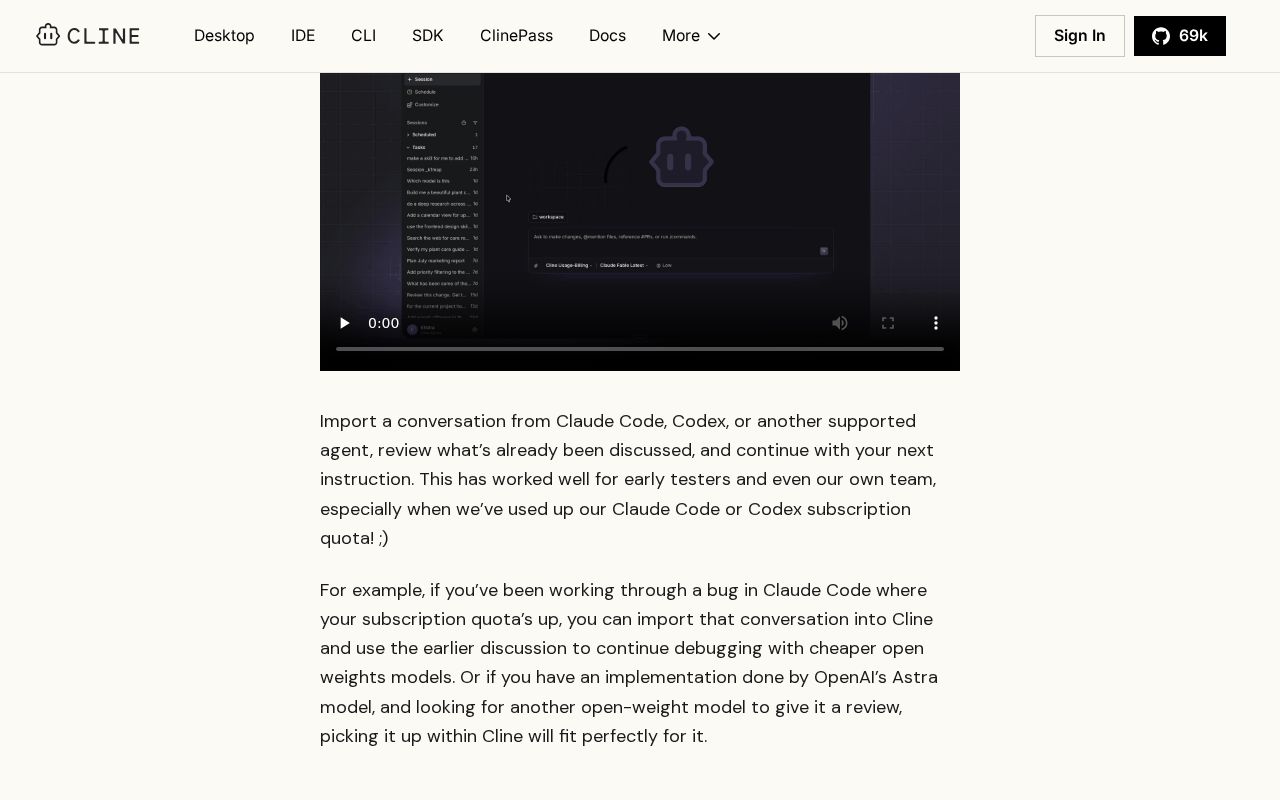 Screenshot: Cline, “Cline Desktop: An open-source app for open-weight models” (Sep 14, 2026), captured Sep 21, 2026.
The Cline Desktop docs give the path: open the Import section in the app’s settings, click Import Sessions, and choose the conversation. One sentence describes the result: “The imported conversation gives Cline the earlier context, while the continued task uses the provider and model you have configured in Cline.” The download page labels the app beta on macOS and Windows.
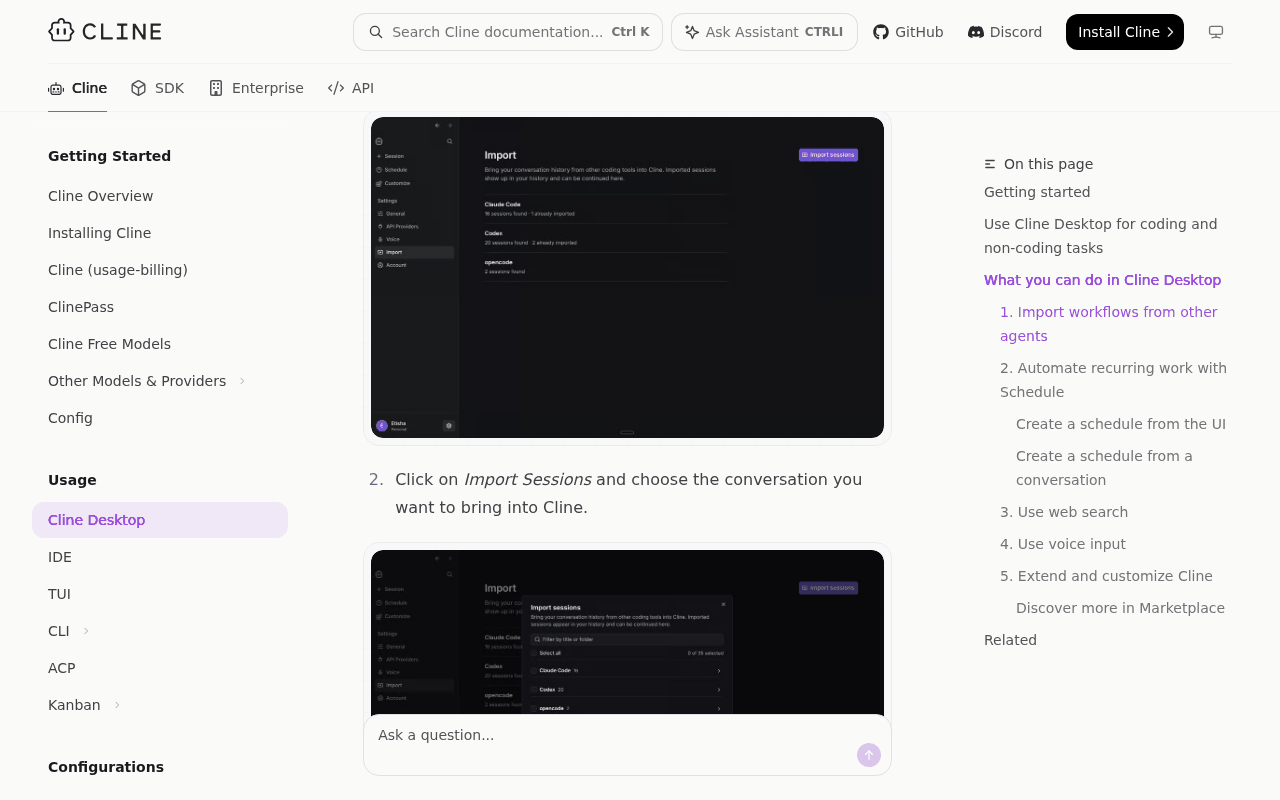 Screenshot: Cline Docs, “Cline Desktop - Cline” (undated), captured Sep 21, 2026.
That sentence is the whole specification. Neither page lists what the import carries or drops: tool calls and their results, images and attachments, compaction summaries, pending or denied approvals, branch and worktree state, the original model’s identity, timestamps, or what happens to a secret sitting in the transcript. None of that is evidence of loss, only a reason to test. The launch also landed in the week Claude Code’s temporary limit boost ended, which Claude Code After September 14 prices as a 17% cut, so the quota-failover pitch has an audience ready.
A coding agent’s session is state, not a conversation
Chatbots suggest; agents act. In a chat tool the conversation is the product, and an import that keeps the words keeps nearly everything. A coding agent’s session is closer to a working directory with a diary attached.
It holds what the agent read and what those files said at the time, the commands it ran and which of them failed, the approvals you granted and the ones you refused, the branch or worktree the edits live on, and which model made which change. Some of that sits in the transcript as structure rather than prose. Some of it, like the checkout, isn’t in the transcript at all.
An importer can render each of those, flatten it into text, summarize it or skip it, and from inside the continued session all four look alike: a conversation that seems complete. The model on the other side acts on what it was handed.
If the refusal didn’t make the trip, it may propose the command you refused. If the branch didn’t, it edits whatever is checked out. Finding out on a fixture costs an hour. Finding out on the real lane costs a revert, usually at the hour the quota ran out.
Step 1: Build two fixture sessions that produce every item class
Never run the first test on a real session. Make a disposable repo with a few files and one failing test, and drive two short sessions against it to completion, one in Claude Code and one in Codex. Each session exists to produce every item class the scorecard asks about, each tagged with a marker string you can search for later. The markers make the comparison mechanical: a search either finds FX-TOOL-3 in the imported view or it doesn’t.
| Item class | How the fixture produces it | Marker |
|---|---|---|
| User and assistant turns | Put FX-TURN-1 in a prompt; ask the agent to answer with FX-TURN-2 | FX-TURN-1, FX-TURN-2 |
| Tool calls and results | The agent reads fixture/notes.txt (its only line is FX-TOOL-3) and runs the failing test |
FX-TOOL-3 |
| Images and attachments | Attach a screenshot whose visible text is FX-IMG-4 | FX-IMG-4 |
| Compaction summary | Claude Code: /compact with an instruction to mention FX-SUM-5. Codex: set model_auto_compact_token_limit low so compaction fires early (the key can only lower the default trigger of 90% of the window) |
FX-SUM-5 |
| Denied approval | Ask for a command that prompts, such as deleting fixture/; deny it, then give your reason in the next message with FX-DENY-6 |
FX-DENY-6 |
| Pending approval (optional third run) | Quit while a permission prompt is still open, with FX-PEND-7 in the request that triggered it | FX-PEND-7 |
| Branch and working tree | Claude Code: claude --worktree fx-a. Codex: --worktree with the experimental worktrees feature on |
Branch name, HEAD SHA |
| Model identity | Note the model and CLI version each session ran | Fixture log |
| Secret | A fake credential in a format your scanner flags, in fixture/.env, read by the agent |
FX-CANARY-8 |
The worktree runs are deliberate. Claude Code’s --worktree flag puts the session in .claude/worktrees/fx-a/ on a branch named worktree-fx-a, and Codex’s experimental worktrees, new in 0.154.0 on Sep 9, check out a detached HEAD bound to the session’s thread. On Claude Code a native resume returns a session to its worktree; whether an import does is exactly what the branch row tests.
Compaction needs one more line. If you run the summary lint from Lint the Compaction Summary Before the Lane Acts on It, Claude Code’s PostCompact hook already saves the source summary, which it receives as compact_summary (hooks reference), so you have its exact text to compare. On Codex with the OpenAI provider the compaction result is an encrypted item, so there is no readable source summary. That row reads against the turns Codex kept.
Keep a fixture log as you go: each marker and the turn it appeared in, what you denied and why, the branch and HEAD at the end, the model and CLI version each session ran. The log is the answer key. Without it, step 4 turns into two people squinting at two screens and agreeing they look similar.
End both sessions finished: last turn answered, no tool call in flight, work committed on the fixture branch. The optional third run, killed at an open permission prompt, tests the case quota failover actually produces, because limits don’t wait for a tidy stopping point.
Step 2: Scan the source transcript for secrets before import
An import is a data transfer. Per Cline’s docs, the continued task runs on the provider and model configured in Cline, so anything the source session read, tool output included, can reach that provider as context. That is a new last hop for data you had scoped to a Claude or Codex lane, the question Your Vendor Lane May Not Be the Last Hop asks of every lane. Scan before the transcript moves.
Find the session’s files on disk. The importer’s docs don’t say which files it reads, so scan everything the source CLI keeps for that session. Use the scanner you already trust on commits, and point it at two places commit scanners rarely look: tool results that echo an environment file or a config dump, and text you pasted into a prompt.
- Prove the scanner on the fixture. It must flag FX-CANARY-8 in the source files. If it misses the canary, it will miss a real key the same way, so fix the scanner before anything else.
- Search the imported view for the canary once step 3 is done. If it made the trip, assume real secrets do too.
- On a real session with a real hit, don’t import. Rotate the credential, since it already sits in a transcript on disk, and hand the continuing tool a written handoff instead.
- Log the result in the fidelity record with the session ID.
# pre-import.sh (illustrative): run before anyone opens the importer.
# secret-scan stands for the scanner you already use on commits.
session_files="$1"      # everything the source CLI keeps for this session
record=".fidelity/$(date -u +%Y%m%dT%H%M%SZ)-scan.json"
if ! secret-scan "$session_files" --report "$record"; then
  echo "secret found: rotate it and hand off with a written note; do not import" >&2
  exit 1
fi
echo "scan clean; record at $record"
On the fixture this script must fail, because the canary is doing its job. On a real session it must pass before anyone clicks Import Sessions.
Be honest about what that gate is. It’s a script you run before you click, and nothing in the importer calls it: a scanner that crashes exits non-zero and blocks, but a script nobody runs blocks nothing. The wall behind it is procedural: the runner, not whoever hit the quota, owns the decision to import, and lanes that read secrets are marked import-never in the lane manifest.
Step 3: Import the Claude Code session and the Codex session, then freeze both views
Import each fixture through Settings, Import, Import Sessions. Before you type a word into either imported session, capture the view exactly as it arrived: screenshots of the full scroll, and an export if the app offers one (the docs don’t mention one). Record the Cline Desktop version and platform, the provider and model configured for the continued task, and the import time in UTC.
Freeze first: your first instruction changes the view, and the probe in step 5 has to reach the session as imported.
Point the continuing tool at a clean clone of the fixture repo on its default branch, not at the source worktree. That’s the realistic failover: the quota ran out, you opened another app, and you’re wherever it put you. Whether the import finds its way back to the fixture branch is one of the rows.
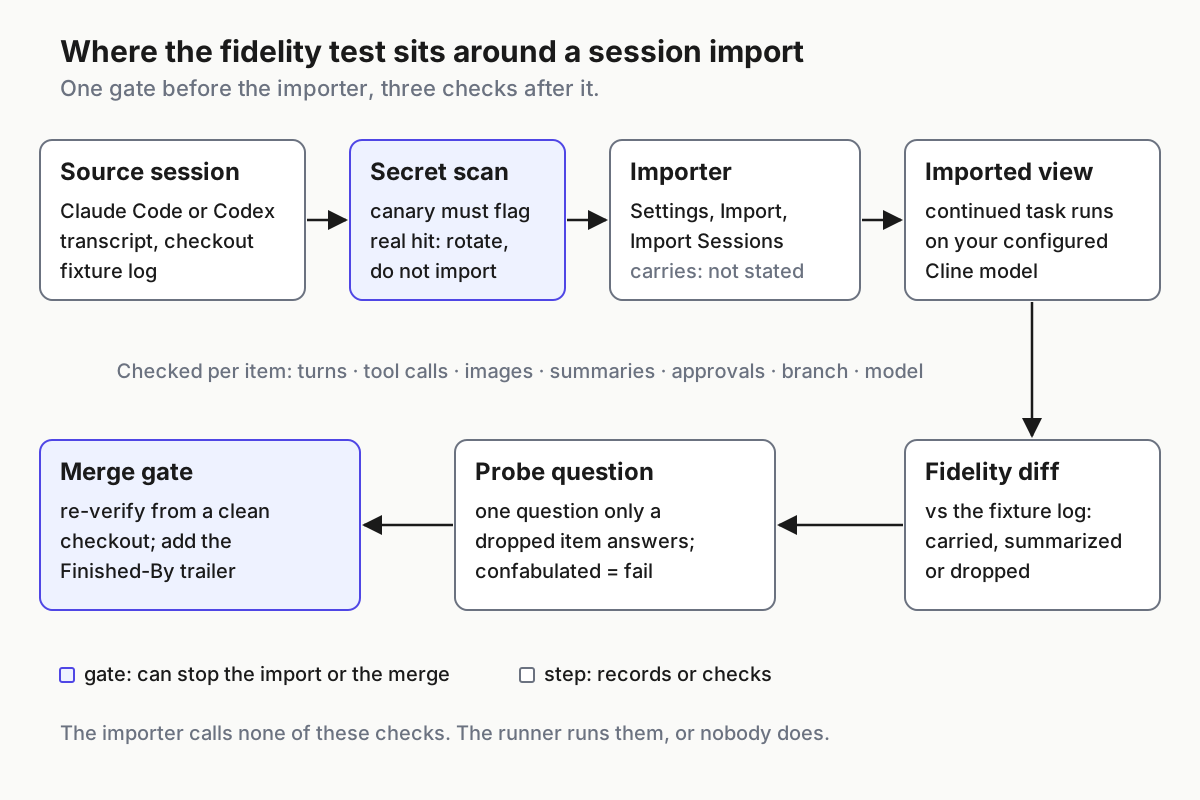 The scan gates what leaves the source. The diff, the probe and the merge gate decide what the imported session may do.
Step 4: Compare source and imported view, item by item
Walk the fixture log row by row and search the imported view for each marker. Define the three marks before you look, so the scoring doesn’t drift to fit what you find:
- Carried: the item is there with its structure. The marker appears verbatim, a tool call shows as a call with its result attached, a denial shows as a denial with its reason.
- Summarized: the gist is there but not the item. The marker is missing or paraphrased, a tool result is described instead of shown, several turns are collapsed into prose.
- Dropped: no trace.
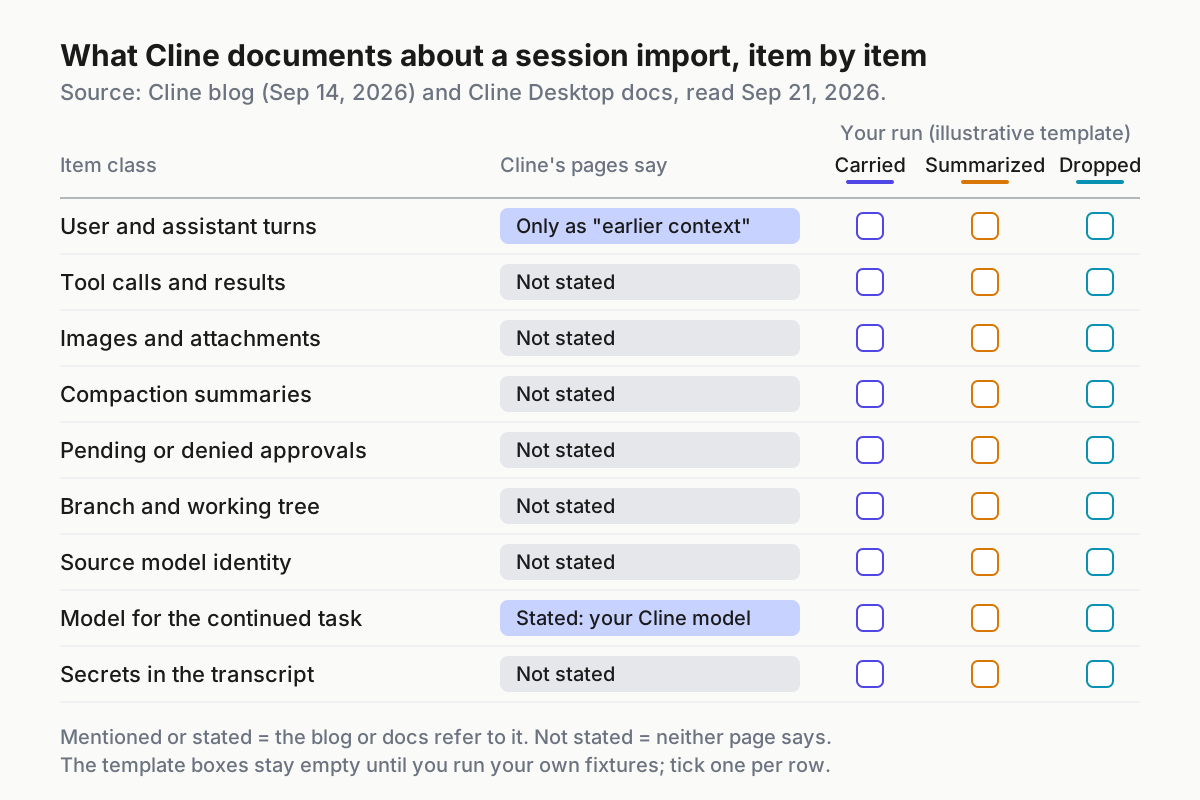 Left column: what Cline’s blog and docs state, read Sep 21, 2026. Right: the illustrative scorecard template, empty until you run your own fixtures.
| Item | Look for in the imported view | If it isn’t carried |
|---|---|---|
| Turns | FX-TURN-1 and FX-TURN-2, in order, with the right speaker | Restate the task and decisions in the first instruction |
| Tool calls and results | The read of notes.txt as a call, with FX-TOOL-3 as its result; the failing test’s output |
The new model re-reads files and re-runs tests before any edit |
| Images and attachments | The screenshot, and whether the new model can read FX-IMG-4 from it | Re-attach it, or describe it in the first instruction |
| Compaction summary | FX-SUM-5, labelled as a summary rather than merged into turns | Lint it as a claim, or rebuild context from the source transcript |
| Denied approval | The refusal and FX-DENY-6 | Re-create the denial as a deny rule in the continuing tool |
| Pending approval | The open call shown as unresolved, not as done | Treat it as denied until a human re-approves |
| Branch and working tree | Same branch or SHA at the first shell command | The runner checks out the source branch first |
| Source model identity | The earlier turns attributed to the model in the log | Record it in the fidelity record and the merge trailer |
| Canary | FX-CANARY-8 present or absent | Present means real secrets travel, so step 2 is mandatory |
Two rows need more than a mark. For compaction, note whether the imported view presents the summary as a summary or blends it into the conversation as though those turns happened. A blended summary is a claim the new model treats as memory, which is the problem the compaction lint exists for.
For branch state, check at the continued session’s first shell command, never in the interface: a label naming the right branch proves nothing about the checkout the agent is standing in. git branch --show-current and git rev-parse HEAD are the whole check.
Write the result into a record you keep beside the lane manifest, one file per run:
# .fidelity/2026-09-22-claude-code.yaml (illustrative shape; field names are ours)
source:
  cli: claude-code
  cli_version: "<from the fixture log>"
  model: "<from the fixture log>"
  session: "<session id>"
  checkout: { branch: worktree-fx-a, head: "<sha>" }
importer:
  app: cline-desktop
  version: "<as shown in the app>"
  platform: windows
continued_with: { provider: "<configured in Cline>", model: "<configured in Cline>" }
secret_scan: { canary_flagged: true, real_hits: 0 }
items:                          # carried | summarized | dropped | n/a
  turns: "<mark>"
  tool_calls_and_results: "<mark>"
  images: "<mark>"
  compaction_summary: "<mark>"
  denied_approval: "<mark>"
  pending_approval: "<mark>"
  branch_state: "<mark>"
  source_model_identity: "<mark>"
  canary: "<mark>"
probe: { row: "<row>", answer: "<verbatim>", result: "<correct | honest_gap | confabulated>" }
allowed_use: "<quota_failover | context_only | start_fresh>"
Step 5: Ask one question only a dropped item could answer
The scorecard says what the view shows. The probe says what the model believes. Take the highest-risk row you marked summarized or dropped and, before any instruction that can write, ask the continued session one question whose answer lives only in that item.
| Row you marked dropped or summarized | Probe (ask exactly one) | Answer key |
|---|---|---|
| Denied approval | Earlier I refused one command. Which one, and why? | The denied command and FX-DENY-6 |
| Tool call result | What exactly did fixture/notes.txt contain? | FX-TOOL-3 |
| Branch state | Which branch are you on, and is it the one the earlier work used? | worktree-fx-a, or the Codex SHA |
| Compaction summary | List what happened before the summary, in order. | The pre-compaction turns in the log |
| Source model | Which model wrote the earlier changes? | The model in the log |
Score the answer three ways:
- Correct. The item reached the model somewhere, perhaps inside a summary. Move the row up one mark and note where the answer came from.
- Honest gap. The model says it doesn’t have that information. The row stays dropped, and at least the session isn’t guessing.
- Confabulated. A confident, specific, wrong answer. This result matters most, because it’s how the continued session will behave on real work: fill the hole and act.
Ask one question, not a quiz. Every extra question leaks part of the answer key into the session and teaches it what you’re looking for. To probe a second row, import again and ask a fresh copy.
Step 6: Decide what import may be used for, lane by lane
Now turn the scorecard into policy. A lane’s allowed use depends on the rows that lane needs, not on an overall grade.
| Allowed use | When | On failover |
|---|---|---|
| Quota failover: continue the task | Turns, both approval rows, branch state and source model carried; tool results carried or covered by a re-read step; probe correct or an honest gap | Scan, import, re-create denials as rules, confirm the checkout, continue; step 7 before merge |
| Context only: review, explain, plan | Turns carried; other rows missing; probe not confabulated | Import for reading; no writes until the new model has re-read the files and re-run the tests |
| Start fresh | Probe confabulated, or the lane touches secrets and the canary travelled | Written handoff from the source transcript into a new session |
Two rules sit on top of the table. First, a refusal carried in the import is still only text the new model has read. Re-create every denied command as a deny rule or a sandbox limit in the continuing tool, because a sentence in the context is advice and a rule is a wall, and even the rule only covers the commands you thought to list.
Second, wherever the answer is start fresh, the failover you want is the one the OpenAI Agents API continuity drill builds: resume from state you keep yourself. Import sits on top of that plan. It doesn’t replace it.
Write the allowed use into each lane’s manifest beside the importer version it was tested on. No record means start fresh.
Step 7: Re-verify before merge and mark which model finished the work
Work that crossed an import has two authors and a seam, and review should treat it that way.
- Diff from the import point. The fixture log has the source’s last commit. Everything after it is the continuing model’s work, reviewed as a whole rather than as a continuation of something already looked at.
- Re-run the tests from a clean checkout of the branch. The continuing model saying the tests pass is a claim.
- Check its tool calls against the source’s refusals. A match with any denied command fails the review, whatever the outcome.
- Confirm the branch. The PR’s head is the branch the source session worked on, or a deliberate new one with a note saying why.
- Name the finishing model in commit trailers and the PR description.
Illustrative trailer names; use whatever your repo already parses:
Session-Source: claude-code <cli version>, <model>, session <id>
Session-Import: cline-desktop <version>, <UTC timestamp>
Finished-By: <provider>/<model configured in Cline>
The trailers answer the question a diff can’t: which model shipped this change. Rehearse the Provider Cutoff covers the handoff state and provenance any failover should carry. The trailer is the import-specific line of it.
Re-run the whole test when either end changes: a Cline Desktop update, a Claude Code or Codex upgrade, a new provider on the continuing side. Codex alone changed worktrees in 0.154.0 and compaction in 0.155.0, which switched to always-streamed remote compaction on Sep 17, and a change to the session files a CLI writes can change what an importer sees. Canary Every CLI Upgrade is the place to hang it: add the import fixtures to the canned sessions it replays.
Keep the source session until the continued work merges, too. If the import proves lossy after the fact, the source is the only complete record, and automatic cleanup can remove it first. Audit those cleanup settings before they fire.
Six ways an imported session goes wrong, and the signal for each
The replayed refusal. The continued session proposes or runs a command you denied in the source. Signal: a tool call that matches a denied call in the fixture log. Response: denials become deny rules in the continuing tool on every failover.
The wrong checkout. The source worked in .claude/worktrees/fx-a/ or a detached Codex checkout, and the continued session edits whatever the new app opened. Signal: HEAD at its first command differs from the log. Response: the runner checks out the source branch before the first instruction. Codex has its own version of this on native resume: with the worktrees feature on, linked worktrees join the resume and fork pickers and --last lookup, so even a resume inside Codex can land in a checkout you didn’t expect.
The summary that became memory. The imported view opens with a compaction summary presented as conversation. Signal: FX-SUM-5 present while the pre-compaction markers are missing. Response: treat the summary as a claim and lint it before the lane acts.
The confident filler. The probe returns a specific, wrong answer. Signal: confabulated in the record. Response: that lane starts fresh, as the step 6 table says, whatever the other rows say.
The travelling canary. FX-CANARY-8 shows up in the imported view. Signal: the canary search from step 2. Response: the pre-import scan becomes mandatory for every lane, and lanes that touch secrets stay import-never.
The anonymous merge. A PR lands with no record that a second model finished it. Signal: commits after an import timestamp with no trailers. Response: the merge check from step 7 blocks until someone adds them.
Import is a failover path, so the runner owns the test
None of this assumes Cline gets anything wrong. A beta that documents its import in one sentence is ordinary. What isn’t ordinary is a fleet that turns it into the quota plan without a scorecard.
The fixtures, the record, the deny rules and the trailers live in the layer that runs the fleet, the same place a multi-agent command center keeps every CLI’s sessions side by side. Cross-CLI Memory That Survives the Session covers moving what should outlive a session on purpose, with review. This test is for the day a vendor offers to move all of it at once.
Import the fixture first. Let the real session cross only once you know what it leaves behind.
FAQ
Does Cline Desktop keep tool calls and approvals when you import a Claude Code session?
Cline’s blog and docs don’t say. They describe the Import Sessions path and one sentence about earlier context, but list nothing about tool calls, approvals, compaction summaries or branch state. Build a fixture session with a marker string for each item, import it, and mark every item carried, summarized or dropped.
Can importing a Codex session leak secrets to another provider?
It can. The continued task runs on the provider and model configured in Cline, so anything the source session read, tool output included, can reach that provider as context. Scan the source transcript before import, and if a real credential turns up, rotate it and hand off with a written note instead of importing.
Sources
- Cline: Cline Desktop: An open-source app for open-weight models — Etisha Garg, Sep 14, 2026; the quota use case
- Cline Docs: Cline Desktop — Import Sessions path; the “earlier context” sentence
- Cline Desktop download page — beta on macOS and Windows
- Claude Code: Run parallel sessions with worktrees —
--worktreepaths, branches and resume - Claude Code: Hooks reference —
PostCompactandcompact_summary - Codex 0.154.0 release notes — Sep 9, 2026; experimental worktree support
- Codex PR #43279 — linked worktrees in resume and fork pickers and
--lastlookup - Codex 0.155.0 release notes — Sep 17, 2026; always-streamed remote compaction