Automatic Agent Session Cleanup: Audit the Settings Before They Fire
VS Code agent session cleanup, Devin archive and Codex delete can remove sessions, PRs and worktrees. Audit each setting, dry-run it and test restore first.

Go deeper. Build your own.
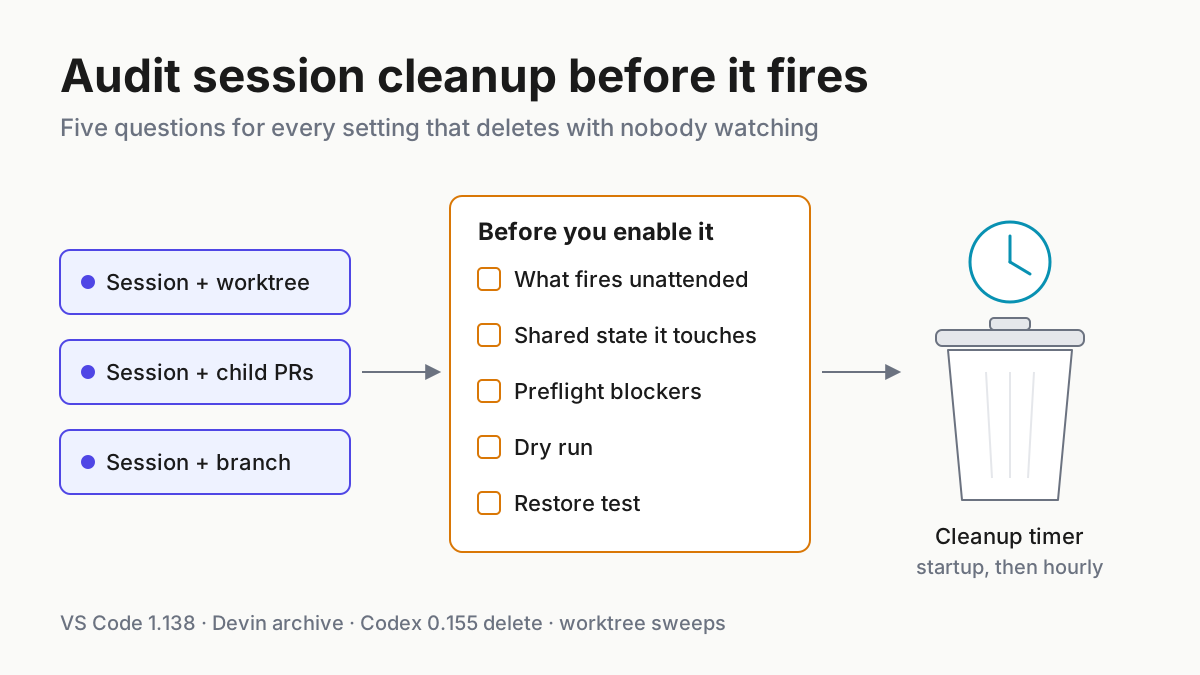
VS Code 1.138 shipped on Sep 16 with two settings that clean up agent sessions on a timer, and both arrive switched off. Nobody has to hunt for them, though: when a merged pull request makes a session eligible, the Mark as Done suggestion carries a button that opens both. VS Code agent session cleanup sits one number away from the default, and so does the question of what it removes at startup, and every hour after, with nobody watching.
In the same nine days, Devin’s archive learned to close child sessions’ pull requests, and Codex 0.155 put delete in its agents overview. Each harness draws its own line around what counts as finished and what leaves with the session: the record, the PRs its children opened, the worktree, and whatever git ignored inside it.
This runbook is the audit you run before typing a number into any of those settings. By Tuesday you will have an inventory of every cleanup trigger in the fleet, a map of what each one touches, a preflight that blocks on unpushed commits, dirty trees, open child PRs and pending approvals, an export of the files git would delete without asking, a dry run, and a restore test you have actually run.
Sep 9–17: VS Code agent session cleanup, Devin’s archive cascade and Codex delete
VS Code 1.138, released Sep 16, 2026, puts session cleanup in preview. Two settings drive it. chat.agentSessions.autoMarkAsDoneMergedSessionsAfterDays marks an inactive session done, and chat.agentSessions.autoDeleteArchivedMergedSessionsAfterDays deletes it after a separate grace period. The release notes are plain about the starting point: “Both automatic-cleanup settings are disabled by default.”
The manage-sessions docs hold the rules. Cleanup covers inactive Agent Host sessions only; “External sessions aren’t eligible.” A session qualifies when “it isn’t in progress, its last-modified time exceeds the configured threshold, it has at least one merged pull request, and none of its related pull requests are open.”
VS Code checks at startup and hourly while either setting is on. The recommended value is 15 days, 0 switches a stage off, and only sessions VS Code marked done itself are deleted automatically. Restoring one clears its deletion eligibility.
That rule is looser than the nudge, which fires when all of a session’s PRs have merged. Read literally, a session with one merged PR and one closed without merging qualifies. The docs don’t show that case, so treat it as an inference and settle it in step 5.
The worktree gets more care. When cleanup marks a session done or deletes it, VS Code removes the worktree “only when the branch tracks an upstream and has no outgoing commits or uncommitted changes”, keeps it when git state is unknown, and adds: “Cleanup never force-removes a worktree.” PR #335851, merged Sep 11 for 1.138, separates the paths: manual archive commits uncommitted changes before removing the worktree, while automatic cleanup removes only clean, synchronized ones.
Manual delete is harsher. For Copilot sessions it removes the associated worktrees, and “Deleting a session is irreversible.”
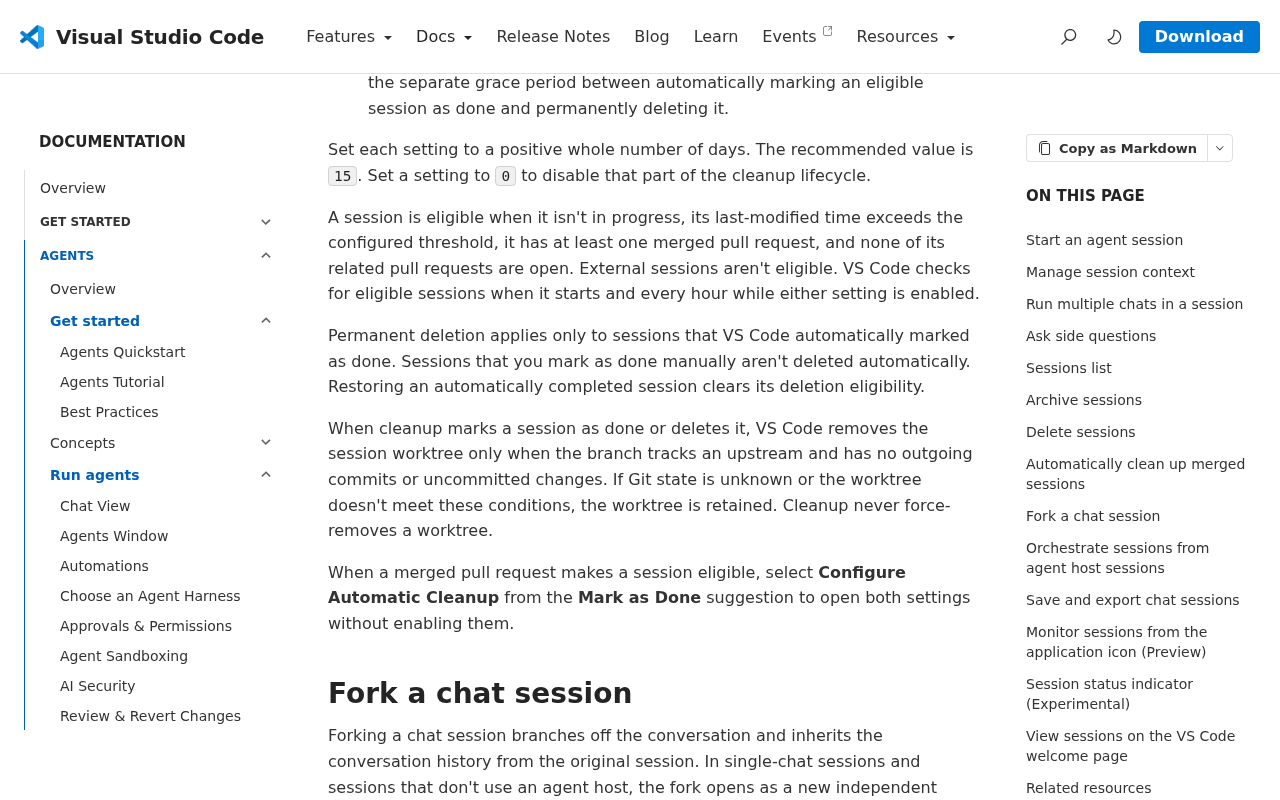 Screenshot: Visual Studio Code, “Manage agent sessions in VS Code” (undated), captured Sep 21, 2026.
Devin’s release notes moved the reach sideways on Sep 9: archiving a session now also closes the open PRs of the child sessions archived with it, listed in the archive prompt so you can choose which to close. A human clicks archive; the cascade reaches PRs a reviewer may still be reading.
Codex 0.155.0, on Sep 17, added task hiding, archiving and deletion to the agents overview, plus “confirmed deletion of clean managed worktrees.” The notes say nothing about recoverability. The Codex app’s worktree docs use a count cap instead of a timer: it keeps your 15 most recent managed worktrees by default, deletes on chat archive or to stay under the cap, and “Before deleting a Codex-managed worktree, Codex saves a snapshot of the work on it.” CLI checkouts share that pool, but PR #42652 leaves automatic cleanup disabled for them.
Part of the pressure is disk, as Niels Rogge of Hugging Face warned a month earlier:
A cleanup setting is an unattended agent with delete rights
Chatbots suggest; agents act, and an agent session leaves behind things a chat log never had: a branch whose last commits may not be pushed, a worktree holding a test log and a .env that git ignores, child sessions with PRs open, an approval still waiting. Clearing a chat history deletes words. Clearing an agent session can close a colleague’s review or remove the only copy of a failing run’s log.
A timer that fires hourly is an actor with delete rights and nobody at the keyboard. Review it like one: what it may touch, what stops it, how you’d know it ran, and how you undo it.
Step 1: Inventory every cleanup trigger and mark what fires unattended
List every setting and action in the fleet that can remove a session, a worktree, a branch or a pull request. Two columns set the priority: what starts it, and whether the docs describe an undo. A timer with no undo goes first.
| Product | Setting or action | Starts it | Touches | Stated guard | Undo, per the docs |
|---|---|---|---|---|---|
| VS Code 1.138 (preview) | chat.agentSessions.autoMarkAsDoneMergedSessionsAfterDays |
Timer: at startup, then hourly | Session state; worktree if clean | Not in progress; past threshold; one or more merged PRs, none open | Restore clears deletion eligibility |
| VS Code 1.138 (preview) | chat.agentSessions.autoDeleteArchivedMergedSessionsAfterDays |
Timer, after a separate grace period | Session; worktree if clean | Only sessions VS Code marked done itself | None; deletion is permanent |
| VS Code | Manual archive | Click | Worktree | Commits uncommitted changes first (PR #335851) | Not stated |
| VS Code | Manual delete | Click | Session and its worktrees (Copilot sessions) | Shared worktree kept until its last linked session goes | None; “irreversible” |
| Devin | Archive (Sep 9) | Click | Session; child sessions’ open PRs | PRs listed in the prompt; you choose | Not documented |
| Codex 0.155 | Delete in agents overview | Click | Task; clean managed worktree | Confirmation; clean worktrees only | Not stated |
| Codex app | Worktree retention | Cap of 15, or archiving the chat | Managed worktree | Skips pinned, in-progress and permanent; CLI allocations exempt | Snapshot, restore from the chat |
| Claude Code | Background retention sweep | Age past cleanupPeriodDays |
Worktrees it made for subagents and background sessions | Keeps changed, untracked or unpushed work; marker check since 2.1.246 | Not stated |
| Cursor 3.5+ | Worktree cleanup | Every 6 h; cap of 25 per machine | Worktrees in its root, including ones it didn’t create | Dirty and locked handling not documented | Not stated |
Add a row for anything your own runner deletes, then mark each row timer or click, and local or vendor-hosted. Timer rows come first, because nothing asks you. Click rows with a cascade come second: the click is real, but it gets less attention than the cascade deserves.
Treat every stated guard as a claim about the vendor’s code, not a fact about your repo. Claude Code’s worktree docs record the precedent: before v2.1.246 on Aug 25, its retention sweep could remove a worktree you had created yourself when an old background-session record pointed at it. Cursor’s worktree docs make foreign worktrees inside its root eligible on purpose, and don’t say whether dirty or locked ones are spared.
Step 2: Map the shared state each trigger touches
A session is the tip of a small graph: the record, the PRs it and its children opened, the worktree, and the branch behind it. Draw each trigger’s arrow into that graph and write its guard on the arrow.
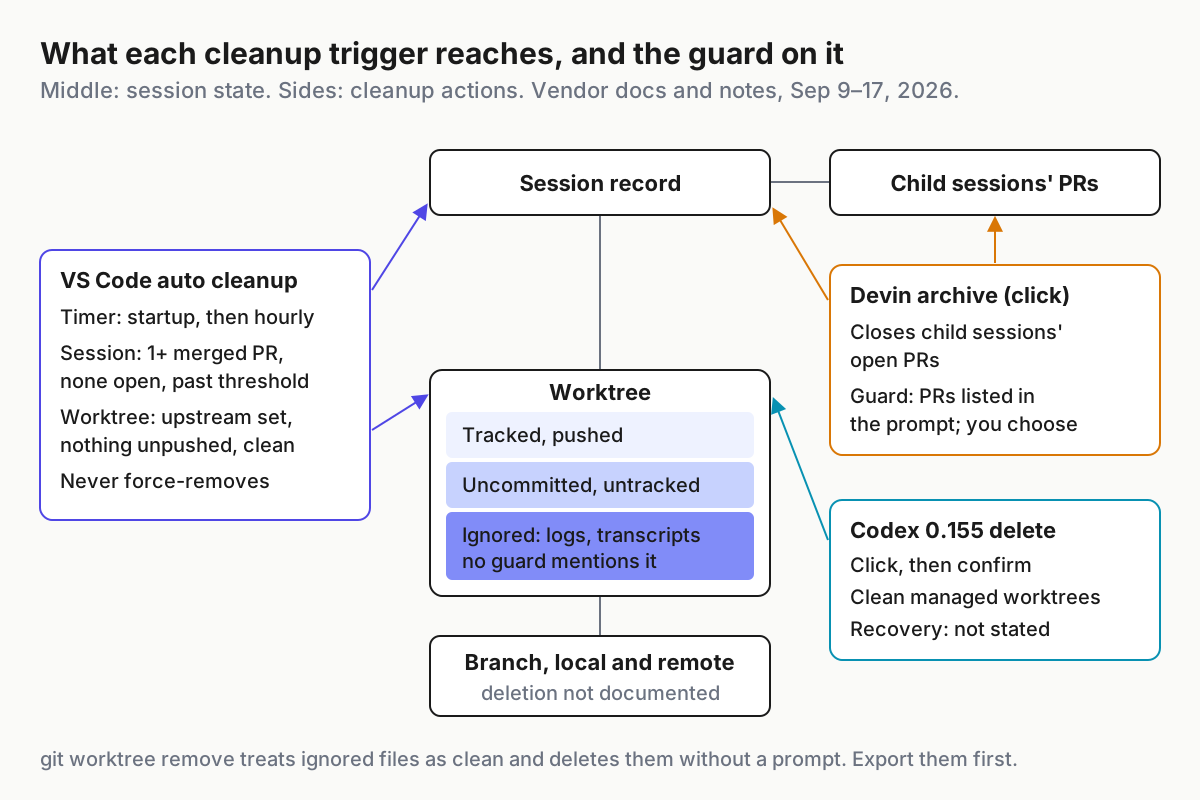 Session state in the middle, cleanup actions at the sides. The ignored-files band is the one no vendor guard mentions.
Three edges deserve a line in your notes.
- Child PRs. Devin’s archive closes whichever child-session PRs stay selected in the prompt. Your runbook’s default is none selected; a PR under someone else’s review closes when that person says so.
- Shared worktrees. VS Code keeps a worktree shared by several sessions until the last linked session is deleted or archived, which hides the dependency: removing that last session takes everyone’s work in the checkout.
- Branches. VS Code’s docs don’t say whether cleanup deletes the session’s branch, and neither do Devin’s or Codex’s notes. Write “not documented” and let the step 6 fixture answer it.
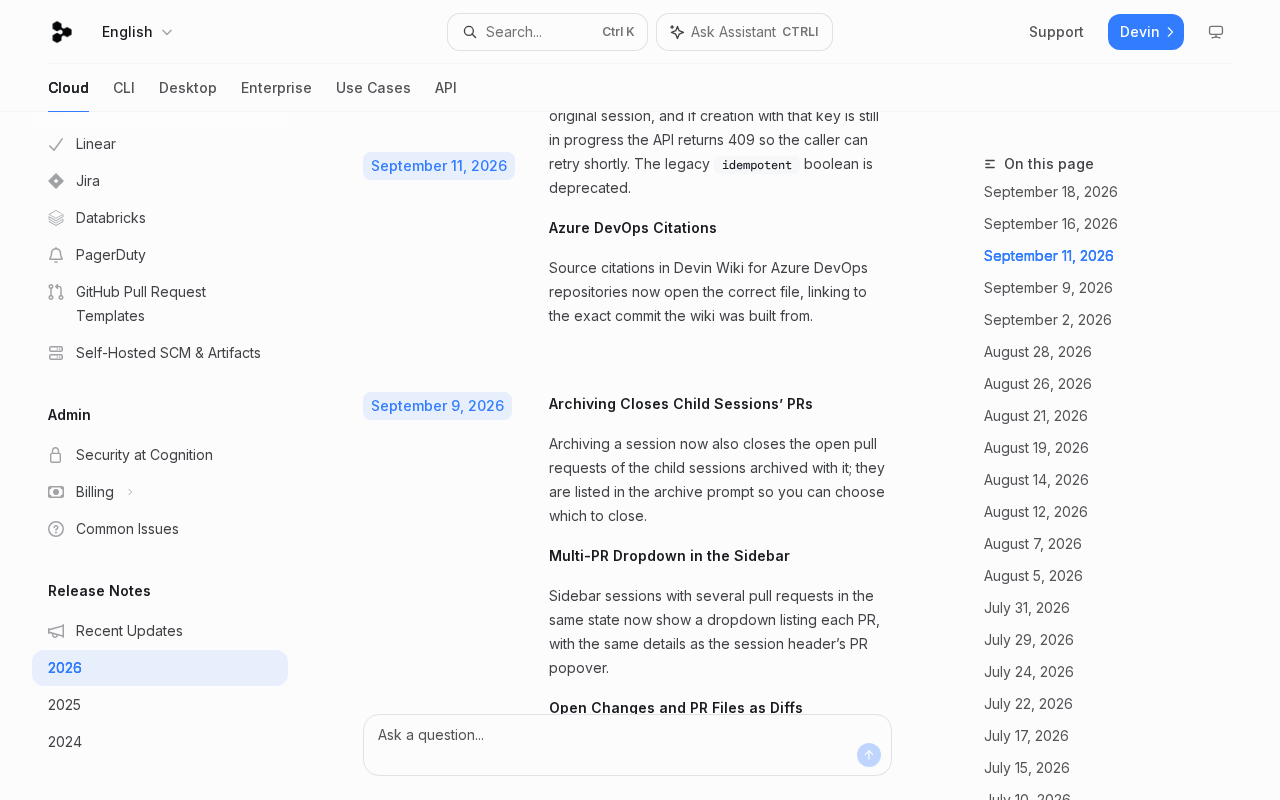 Screenshot: Devin Docs, “2026 - Devin Docs” (Sep 9, 2026 entry), captured Sep 21, 2026.
Step 3: Write the preflight, and make it stricter than any vendor’s rule
The preflight is the list of conditions that block removal, checked by a script you own. It runs before any cleanup you trigger, and on a schedule beside any a vendor triggers, so you learn what the vendor’s rule would have taken. Four blockers:
- Unpushed commits. No upstream, or commits ahead of it, blocks.
- Dirty tree. Uncommitted changes or untracked files block.
- Open child PRs. Any open PR on the session’s branch, or opened by one of its child sessions, blocks.
- Pending approvals. A session waiting on a human decision blocks, even if the harness counts it as idle.
Add a fifth for your own runner: a process still running inside the worktree blocks. A stopped worker is the precondition for everything else.
#!/usr/bin/env bash
# preflight.sh <worktree> (illustrative): prints CLEAR or BLOCK with a reason; exits 1 on BLOCK.
wt="$1"
block() { echo "BLOCK $wt: $1"; exit 1; }
pgrep -f -- "$wt" >/dev/null && block "a process is still running in it"
git -C "$wt" rev-parse --abbrev-ref '@{u}' >/dev/null 2>&1 || block "no upstream, or detached HEAD"
[ -z "$(git -C "$wt" status --porcelain)" ] || block "uncommitted changes or untracked files"
[ "$(git -C "$wt" rev-list --count '@{u}..HEAD')" -eq 0 ] || block "unpushed commits"
branch="$(git -C "$wt" branch --show-current)"
open="$(gh pr list --head "$branch" --state open --json number --jq 'length')"
[ "$open" -eq 0 ] || block "$open open PR(s) on $branch"
grep -qxF "$wt" pending-approvals.txt 2>/dev/null && block "approval pending"
echo "CLEAR $wt"
Codex’s managed worktrees are detached-HEAD checkouts, so the upstream check blocks them by design; leave those to Codex’s confirmed delete and the app’s snapshot. Pending approvals live in the harness, not in git, so pending-approvals.txt stands for whatever list you can pull from each session view. Child sessions’ worktrees go through the same script.
The removal rule on top is deliberately stricter than VS Code’s: remove a worktree only after the worker is stopped, the branch is pushed and the tree is clean, with git-ignored logs and transcripts exported first (step 4). Never git worktree remove --force. A checkout that fails the preflight becomes a question for a person, not a flag to add. Who owns each checkout, and how to lock the ones your runner created, belongs to One Checkout, One Owner.
Be honest about what this gate is. Nothing in VS Code, Devin or Codex calls it; if it crashes or never runs, the vendor’s own guard is all that stands between the timer and the worktree. The wall behind both is the step 4 export, which works whether or not anyone read the preflight’s output.
Step 4: Export what git would delete without asking
Git decides clean by tracked changes and untracked files. Ignored files don’t count, so git worktree remove on a clean worktree deletes them without a prompt. That’s git’s behaviour, not a vendor statement, and VS Code’s docs don’t say what happens to ignored files when it removes a worktree. Ignored is exactly where agent runs put their logs, scratch output and sometimes transcripts.
Before any trigger can fire on a worktree, copy its ignored files out, minus secrets:
#!/usr/bin/env bash
# export-ignored.sh <worktree> <archive-root> (illustrative): copy ignored files out, minus secrets.
wt="$1"; dest="$2/$(basename "$wt")-$(date -u +%Y%m%dT%H%M%SZ)"
mkdir -p "$dest"
git -C "$wt" ls-files --others --ignored --exclude-standard -z \
  | grep -zvE '(^|/)(\.env[^/]*|node_modules/.*|.*\.pem)$' \
  | (cd "$wt" && xargs -0 -r cp --parents -t "$dest")
(cd "$dest" && find . -type f -print0 | xargs -0 -r sha256sum) > "$dest.sha256"
echo "exported $(wc -l < "$dest.sha256") files from $wt"
The exclusions are deliberate: an archive full of credentials is a second incident, so scan what you keep. And mind VS Code’s first stage. Per its docs, worktree removal applies when cleanup marks a session done, not only when it deletes one, so the export runs before you enable mark-as-done.
Session records need the same treatment. Export timing and retention windows for vendor-hosted sessions are covered in Evidence When the Harness Is Vendor-Hosted, and what those records can establish after an incident in You Can’t Replay What You Can’t See.
For sessions whose transcripts live on local disk, a local library is one way to keep a searchable copy. Automater Lite is a free desktop tray companion for Windows, macOS and Linux. Its homepage says it reads “each tool’s own transcript files and folds them into one library on your machine”, and lists 45 session formats. It does not preserve vendor-hosted cloud sessions: a Devin session, or any cloud session that never wrote a local transcript, is not in it.
Whatever keeps your record, prove it in step 6 by deleting a fixture session and searching for its marker.
Step 5: Dry-run VS Code agent session cleanup before you enable it
None of the three products documents a dry run, so build one from the preflight. It changes nothing and writes one dated line per worktree:
#!/usr/bin/env bash
# dry-run.sh (illustrative): what would a cleanup pass remove today? Changes nothing.
git worktree list --porcelain | sed -n 's/^worktree //p' | tail -n +2 | while read -r wt; do
  printf '%s %s\n' "$(date -u +%FT%TZ)" "$(./preflight.sh "$wt")"
done | tee -a cleanup-dry-run.log
Run it daily for a week with nothing enabled. Each BLOCK line names a checkout your rule protects, and why. Read the CLEAR lines harder: each is a checkout a sweep could take today, ignored files included.
For VS Code, add the session side: record each Agent Host session’s PR states and last-modified date, and apply the eligibility rule by hand. Include a fixture with one merged PR and one closed without merging to settle the news-section inference.
When the dry run matches what you expected, stage the real thing on one machine: mark-as-done on, delete at 0. Restoring an automatically completed session clears its deletion eligibility, so stage one is recoverable at the session level. It still removes clean worktrees, which is why step 4 came first.
Step 6: Run the restore test on a fixture, not on the incident
A restore path you haven’t run is a sentence in someone else’s docs. Build a fixture per product: a disposable repo, one session driven to a merged PR, and three markers.
RS-PUSHED is committed and pushed. RS-IGNORED sits in an ignored logs/ directory. RS-TRANSCRIPT is typed into the session itself. Let cleanup take the fixture, then try to get each marker back.
| Trigger | What the docs promise | Test on the fixture | Pass means |
|---|---|---|---|
| VS Code auto mark done | Restore clears deletion eligibility | Let it mark the fixture, restore it, wait past the delete window | Session back, and still there after the grace period |
| VS Code auto delete | Permanent deletion | Let it delete; search for RS-TRANSCRIPT everywhere | Found only in your export or local record |
| VS Code manual delete | Irreversible; worktrees go too | Don’t test an undo; test that step 4 ran first | Export manifest lists RS-IGNORED |
| Codex app retention | Snapshot before delete; restore offered from the chat | Archive the fixture chat, reopen it, restore | RS-PUSHED and RS-IGNORED back, or noted missing |
| Codex 0.155 overview delete | Not stated | Delete the fixture task; look for task and worktree | Exactly what’s gone, written down |
| Devin archive | No restore documented | Archive a parent with one child PR left unselected | The unselected child PR is still open |
| Claude Code sweep | Keeps changed, untracked or unpushed work | Age a clean background-session fixture past cleanupPeriodDays |
RS-IGNORED recoverable from your export |
Record the result per marker. Expect it mixed: the pushed commit survives on the remote, the session may or may not come back, and the ignored log exists only in your step 4 export. Written down, that’s acceptable. Discovered the week an incident needs the log, it isn’t.
Step 7: Pick the numbers, then re-audit on every upgrade
Now enable, with values you chose and wrote down.
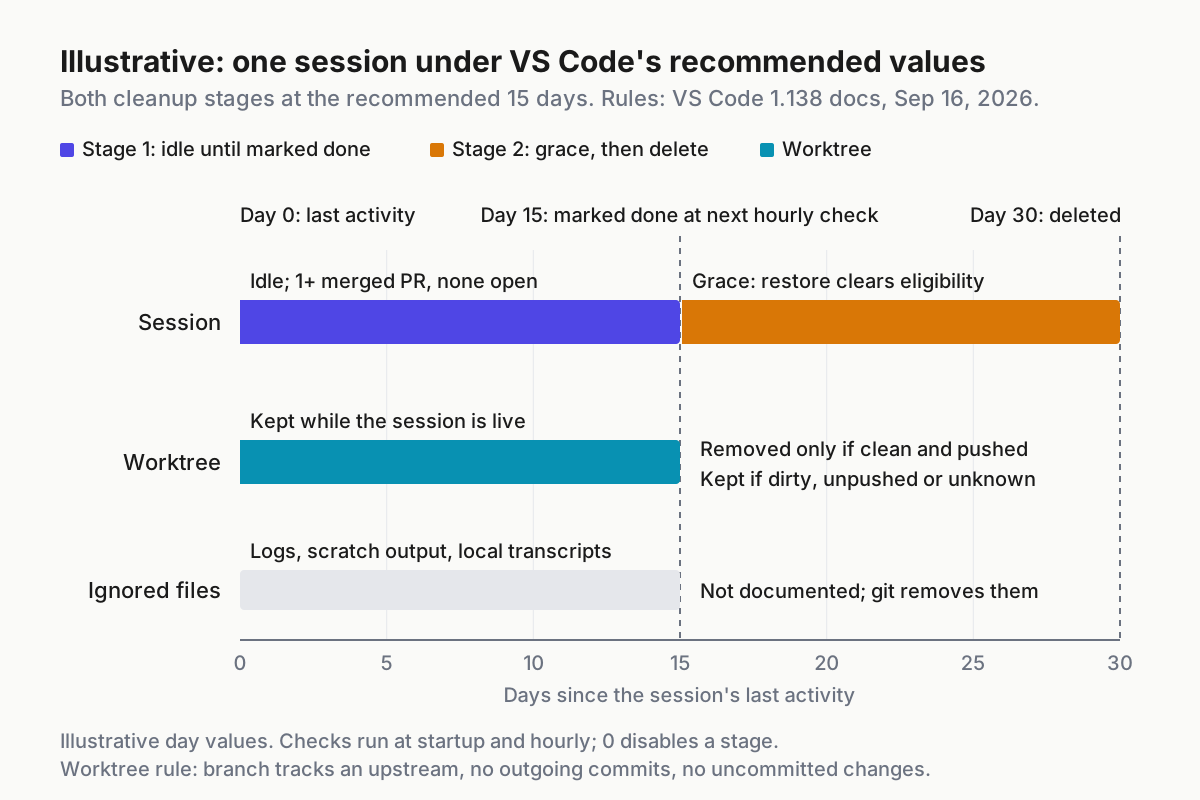 Illustrative. Setting semantics from the VS Code 1.138 docs; the 15-day values are the docs’ recommendation, and the session is modeled.
VS Code recommends 15 days for each setting. With both at 15, a session idle past day 15 with a merged PR and none open is marked done at the next hourly check, its worktree goes if clean, and it’s deleted 15 days later unless someone restores it. That second window is your recovery budget, so size it to how long a missing log takes to be missed. Weekly incident reviews fit inside 15; a lane that runs monthly jobs doesn’t.
Write the values into a retention record beside the lane manifest:
# retention.yaml (illustrative; field names are ours, vendor setting IDs appear under settings)
reviewed: 2026-09-22
settings:
  vscode_1_138:
    chat.agentSessions.autoMarkAsDoneMergedSessionsAfterDays: 15
    chat.agentSessions.autoDeleteArchivedMergedSessionsAfterDays: 0   # stays off until step 6 passes
  cursor:
    cursor.worktreeCleanupIntervalHours: 6    # docs default
    cursor.worktreeMaxCount: 25               # per machine, across all workspaces
  claude_code:
    cleanupPeriodDays: "<your value>"         # age limit for its background worktree sweep
policy:
  devin_archive_child_prs: none-selected-by-default
  codex_overview_delete: human-only-after-preflight
  runner_roots_outside_vendor_roots: true
  preflight: preflight.sh
  export_before_remove: export-ignored.sh
  restore_test_last_passed: 2026-09-22
Then re-audit on change. VS Code’s docs say the feature “is in preview and might change before it becomes generally available”, and Codex reshaped deletion in a routine release. Add the step 6 fixture to the canned sessions in Canary Every CLI Upgrade, and rerun the restore test whenever a harness updates. Keep any session whose work was continued elsewhere until that work merges; Test What Survives a Cross-CLI Session Import relies on the source staying put.
Five ways cleanup takes more than you meant, and the signal for each
The clean worktree with the only log. The tree passed every guard because the log was ignored. Signal: an incident review asks for a run log whose worktree no longer exists. Response: the step 4 export runs on a schedule, before any trigger can fire.
The cascade nobody read. A Devin archive closes a child PR someone was reviewing. Signal: a PR closed within a minute of a parent archive, with no comment from its reviewer. Response: none selected by default, and the person archiving reads the list.
The closed PR that didn’t count. A session with one merged PR and one abandoned one is marked done while the abandoned work still matters. Signal: the step 5 fixture shows up as eligible. Response: close abandoned PRs deliberately, or keep that lane’s threshold at 0.
The machine that was off. VS Code checks at startup, so a laptop back from a week away runs one pass over everything that aged past the threshold meanwhile. That’s an inference from the schedule, not a documented case. Signal: a burst of done-marks at one boot timestamp. Response: read the dry-run log after any long gap.
The foreign checkout in a vendor’s root. Cursor’s sweep treats worktrees in its root as eligible whoever made them. Signal: a runner checkout missing after a sweep. Response: runner roots live outside every vendor root, proved by the ownership piece’s decoy test.
Retention is a fleet policy, not a settings page per app
Each product’s cleanup is sensible inside its own window, but a fleet has several: VS Code’s Agents window, Devin’s sidebar, the Codex overview, Claude Code’s sweep and your runner’s teardown, each with its own clock and idea of finished. The inventory, preflight, export and retention record live above them, in the layer that runs the fleet, where a multi-agent command center keeps every CLI’s sessions side by side.
Automater works at that desk level, and it enforces none of this; your preflight does. Lite keeps the local, searchable record of sessions whose transcripts exist on the machine, and Pro adds managed sessions you can start, steer, interrupt and stop. Automater Lite is free on automater.ai; Pro is $50/year.
Turn cleanup on. Just let it take only what the dry run said it would.
FAQ
Does VS Code delete agent sessions automatically?
Only if you enable it. VS Code 1.138 adds two preview settings: one marks inactive Agent Host sessions done, the other deletes them after a separate grace period. Both ship disabled. Deletion applies only to sessions VS Code marked done itself, so sessions you mark done by hand are never deleted automatically.
Sources
- Visual Studio Code 1.138 release notes — Sep 16, 2026; both cleanup settings off by default
- VS Code: Manage agent sessions — eligibility, recommended 15, worktree conditions
- microsoft/vscode PR #335851 — Sep 11, 2026; manual versus automatic worktree cleanup
- Devin release notes 2026 — Sep 9, 2026; archive closes child PRs
- Codex 0.155.0 release notes — Sep 17, 2026; delete in the agents overview
- ChatGPT Learn: Worktrees — Codex app retention and snapshots
- openai/codex PR #42652 — CLI allocations exempt from auto-cleanup
- Claude Code: Run parallel sessions with worktrees — retention sweep and the 2.1.246 fix
- Cursor: Worktrees — 6-hour cleanup, 25 per machine