Routers You Can’t See Inside: Fugu Max, Copilot Auto, Cursor Auto vs Your Own Cascade
An LLM router that can't name the model behind each change fails change control. Five acceptance tests for Fugu Max, Copilot Auto, Cursor Auto and your cascade.

Go deeper. Build your own.
Three vendors now sell the same thing under different names: a model picker that bills like a model. Sakana prices Fugu Max, an orchestrator, at $2 per million input tokens and $6 per million output. GitHub’s Copilot Auto now takes a cost-or-quality tier and picks a model per prompt. Cursor’s Auto bills each request at the list price of whichever model it chose.
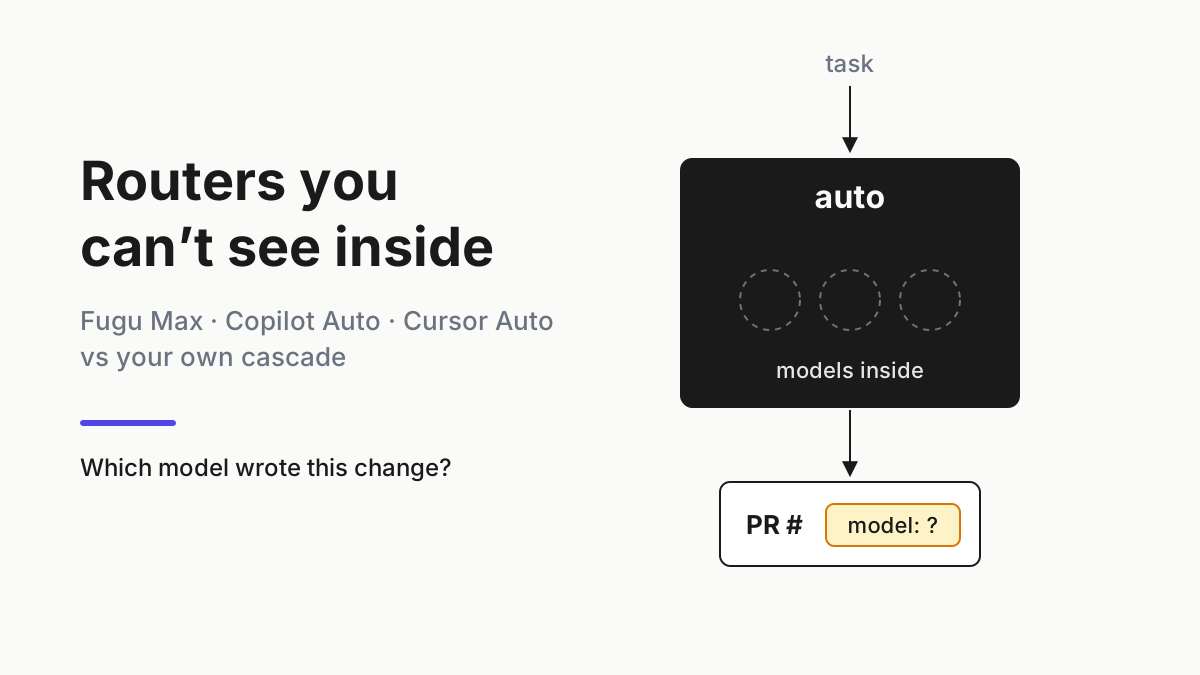
Each is an LLM router you rent instead of build, and each gives a different answer to the question your change control will ask sooner or later: which model wrote this? A chatbot router only has to be right on average. A router in front of agents that edit code, open pull requests and run shell commands has to leave a record a reviewer can read, rerun and roll back against. “Auto” is not a model anyone can roll back to.
This is the buy-side test. You leave with five acceptance criteria to run against any hosted router, a scorecard for the three on offer now, a way to run your own cascade as the control arm, and a rule for the routers that fail: treat each one as a single unpinned vendor model and fence its lane.
What shipped: Fugu Max, Copilot Auto tiers and Cursor’s routed billing
Sakana, Sep 11. Fugu Max and Fugu Ultra v2 are orchestrators sold as models, both reachable through Sakana’s OpenAI-compatible API. The release page says Fugu Max routes each task to the leanest model capable of solving it and prices it at $2/$6 per million tokens. That page prices only Max.
Ultra v2’s $5 input and $30 output come from the Vercel AI Gateway listing, which also shows a $0.50/M cache-read price, a 1M-token context and a second tier from 272,001 tokens at $10 input and $45 output (cached input $1). Sakana does say which models are not in Ultra v2’s pool: Fable 5, Fable 5.1 and GPT-6-Astra. Nothing on the page says which model answered a given call.
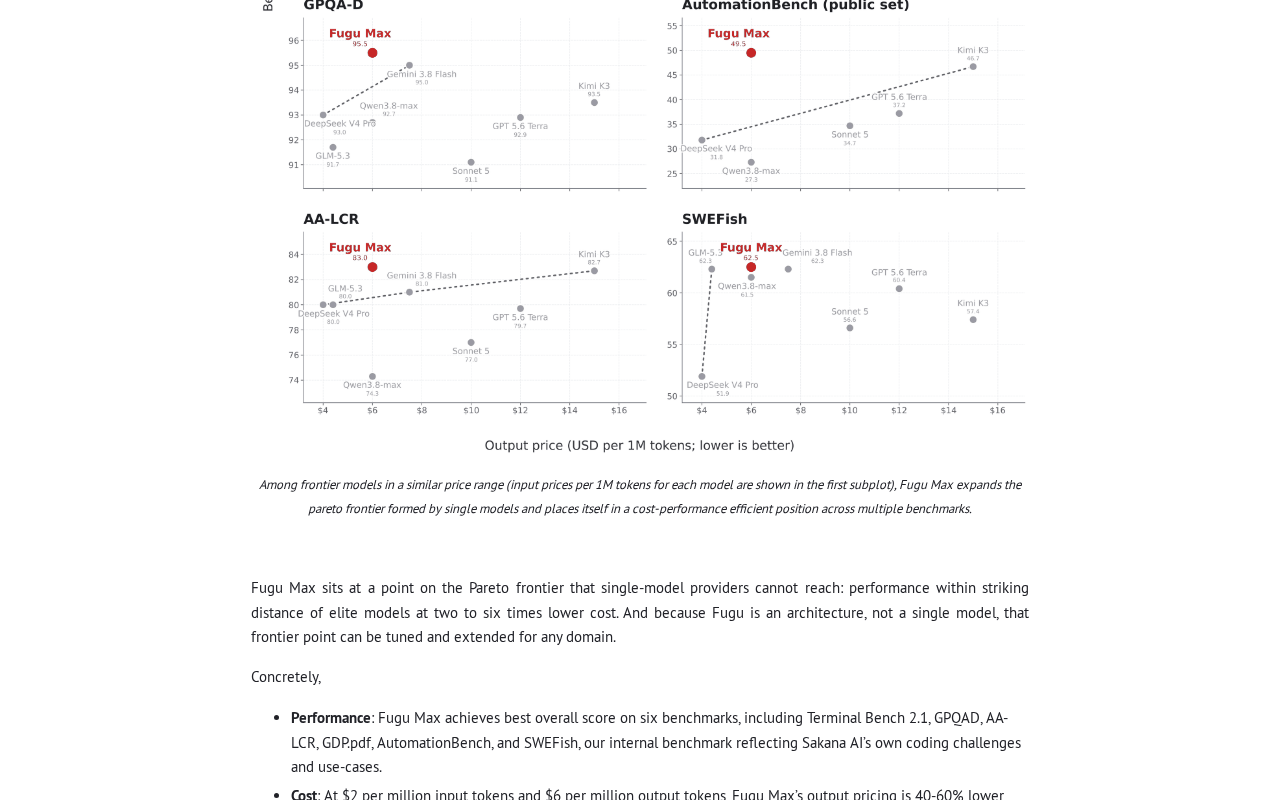 Screenshot: Sakana AI, “Introducing Fugu Max and Fugu Ultra v2: Orchestrating the Pareto Frontier” (Sep 11, 2026), captured Sep 21, 2026.
GitHub, Sep 14. Copilot’s auto model selection gained three tiers, Efficiency, Balance and Intelligence, rolling out in VS Code, Copilot CLI and the GitHub Copilot app. Per the changelog, usage is charged at the rate of the model auto selects whatever the tier, and paid subscribers keep a 10% discount on auto usage. The tier steers the choice; GitHub’s own example is a docstring task that may land on a small model even under Intelligence.
Unlike Fugu, Copilot shows its work per response: the auto model selection docs say you can see which model answered each response (hover in Chat, printed in the CLI, at the end of a cloud agent response, beside Auto in the app). Neither page describes an export or API log of routed models.
Cursor, undated docs. Cursor’s models and pricing page bills every Auto mode at the list price of the model each request routes to. On Teams and Enterprise, third-party model requests add a Cursor Token Rate of $0.25 per million tokens, whether you picked the model or Auto did, and the rate covers BYOK usage too; first-party Cursor models (Grok, Composer) are exempt. Cursor’s changelog carries no pricing notice, so treat any reported cutover date for older flat-rate Auto plans as unconfirmed.
The Cursor Router behind Auto launched Jul 22 for Teams and Enterprise. It runs a classifier on each agent request in Balance and Intelligence, while Cost mode keeps the older routing logic. You can’t hand-pick the model, and the pool changes as new models ship.
The reference orchestrator, Sep 4. GitHub’s Project HydraFusion, experimental in Copilot CLI, picks Single, Cascade or Critique per task. Its best-tuned configuration beat Opus 5 on estimated cost in GitHub’s controlled offline runs, every model at medium reasoning (the build-side playbook in step 4 charts the numbers), and GitHub says the approach works best on first-turn, single-prompt coding tasks. The line that matters to a buyer: the runtime records each leg’s role, cost and outcome internally, and externally the developer gets “one coherent response and one permission-aware change set.”
Why an agent lane needs the model name a chatbot never did
The served model is a change-control input. You need it to reproduce a regression, to find every change a model made after you stop trusting it, to apply per-model data terms, and to answer an auditor who asks what wrote the payment code. When a provider swaps the model under a fixed API ID, that is forced model routing, and you drill for it. A hosted router makes the swap the product, and it can happen on every prompt.
This is not the MCP gateway question either. Buying or building an MCP gateway is about proxies in front of tools; a model router decides what does the thinking. Chatbots suggest; agents act, and the router decides which model does the acting.
Step 1: Turn LLM router buying questions into five pass/fail tests
Write the criteria down before any vendor demo, and phrase each as a test with a number in it. A question like “does it support visibility?” gets a yes from every sales deck.
| # | Criterion | Passes when | Test you run |
|---|---|---|---|
| 1 | Per-call routed-model visibility | Every call or response yields a model ID your runner stores without a human reading a screen | 20 fixed tasks; 20 of 20 records carry a served model, or fail |
| 2 | Spend by routed model | Usage can be split by the model that served it | Split one week of spend by served model; totals match the invoice |
| 3 | Pin and override | A lane can force a named model and exclude others, and the served model matches | Pin, run five tasks, compare served model to pin |
| 4 | Eval on a fixed task set | The same tasks run through the router and your alternatives, scored the same way | Cost per merged PR on a frozen set, every attempt counted |
| 5 | Evidence export | A per-call record (request reference, served model, cost, outcome) leaves the vendor before its retention does | Export last week; join every row to a PR |
Grade criterion 1 on three levels, because vendors blur them. Exported means a machine-readable model ID per call, from the vendor or from a log you control. Displayed means a person can see it on a screen. Not exposed means nobody can. A displayed model counts as exported only when your runner captures it reliably, and that capture is a test you rerun after every CLI upgrade.
Criterion 5 is where hosted routers quietly fail even when criterion 1 passes. A model name on a hover card is evidence for the person hovering and nobody else. Vendor-hosted agent evidence covers export timing and retention windows; the router adds one field that has to survive the export.
Step 2: Score Fugu, Copilot Auto and Cursor Auto against the five
Fill the scorecard from the vendor’s own pages, and write “the docs do not say” where they don’t. Anything a salesperson tells you goes in a separate column until it shows up in documentation.
| Fugu Max / Ultra v2 | Copilot Auto | Cursor Auto (Router) | Your own cascade | |
|---|---|---|---|---|
| Which model answered | Not exposed; Sakana lists three models absent from Ultra v2’s pool | Displayed per response in Chat, CLI, cloud agent and app | Admin “Underlying model” toggle, hidden by default; Balance and Intelligence only | Exported: whatever you log |
| How it bills | As one model: Max $2/$6; Ultra v2 $5/$30 per Vercel’s listing, $10/$45 from 272,001 tokens | Routed model’s rate, 10% off auto usage for paid subscribers | Routed model’s list price, plus $0.25/M on third-party models (Teams, Enterprise, incl. BYOK) | Each tier at its own rate |
| Spend by routed model | Not possible: one price line | Docs do not describe a by-model export | Docs do not describe a per-request export | Yes, from your log |
| Pin and override | Choose Max or Ultra v2; Sakana does not describe pinning a sub-model | Admin model policies exclude models from Auto; the only pin is leaving Auto | No hand-pick inside Auto; admins can disable up to two modes; Impose Auto (Hard) locks the picker | Yes: the route table |
| Pool changes | Ultra v2 training cutoff 2026-08-28; no change policy stated | May serve evaluation models to individual plans (opt-out exists) | Pool changes as new models ship; router needs Grok 4.6 enabled | Only when you change it |
| Fixed-task eval | Whole system only | Whole system, model visible per response | Whole system, model visible only with the toggle | Per arm and per tier |
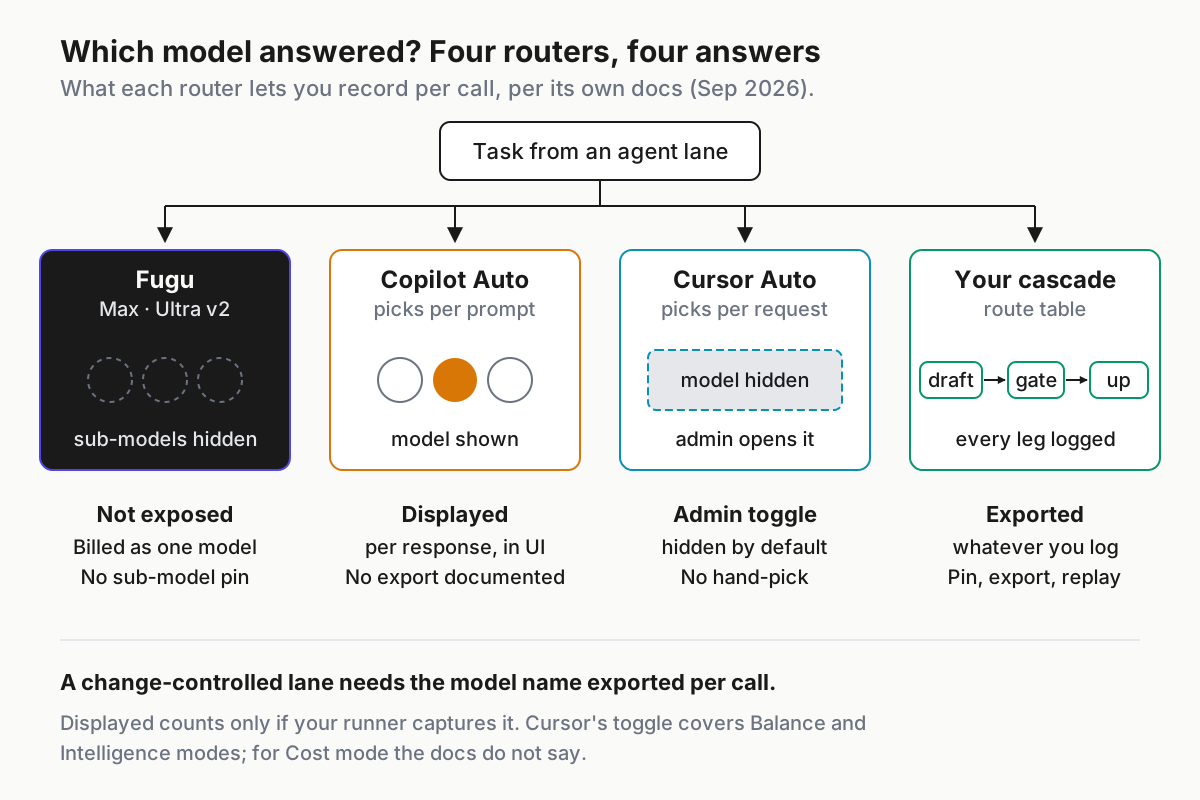 Four routers, one question. Only the last column is evidence you control.
What the scorecard says, router by router:
- Fugu fails criteria 1 to 3 by design. It is the purest case of an orchestrator sold as a model: one price line, one answer, no sub-model name. That’s a coherent product, and it means you evaluate Fugu as a model on your task set and fence it like one (step 5).
- Copilot Auto passes criterion 1 at the displayed grade. In Copilot CLI the model prints with each response, so a runner that keeps the terminal transcript can build its own per-response record. The docs do not document an export, so the capture is yours to build and test. Note that GitHub says auto evaluates each prompt individually: one pull request built over a dozen prompts can carry several served models.
- Cursor Auto passes criterion 1 only if an admin flips the setting. Cursor’s docs call hidden “the default and recommended” so answers are judged on merit, a fine rule for chat and the wrong one for a lane under change control. The toggle covers Balance and Intelligence; for Cost mode the docs do not say, so score it not exposed. On Enterprise the router itself is off until someone enables it.
- HydraFusion is the yardstick, not a product. It is experimental, and GitHub’s post doesn’t say users can see the per-leg records its runtime keeps.
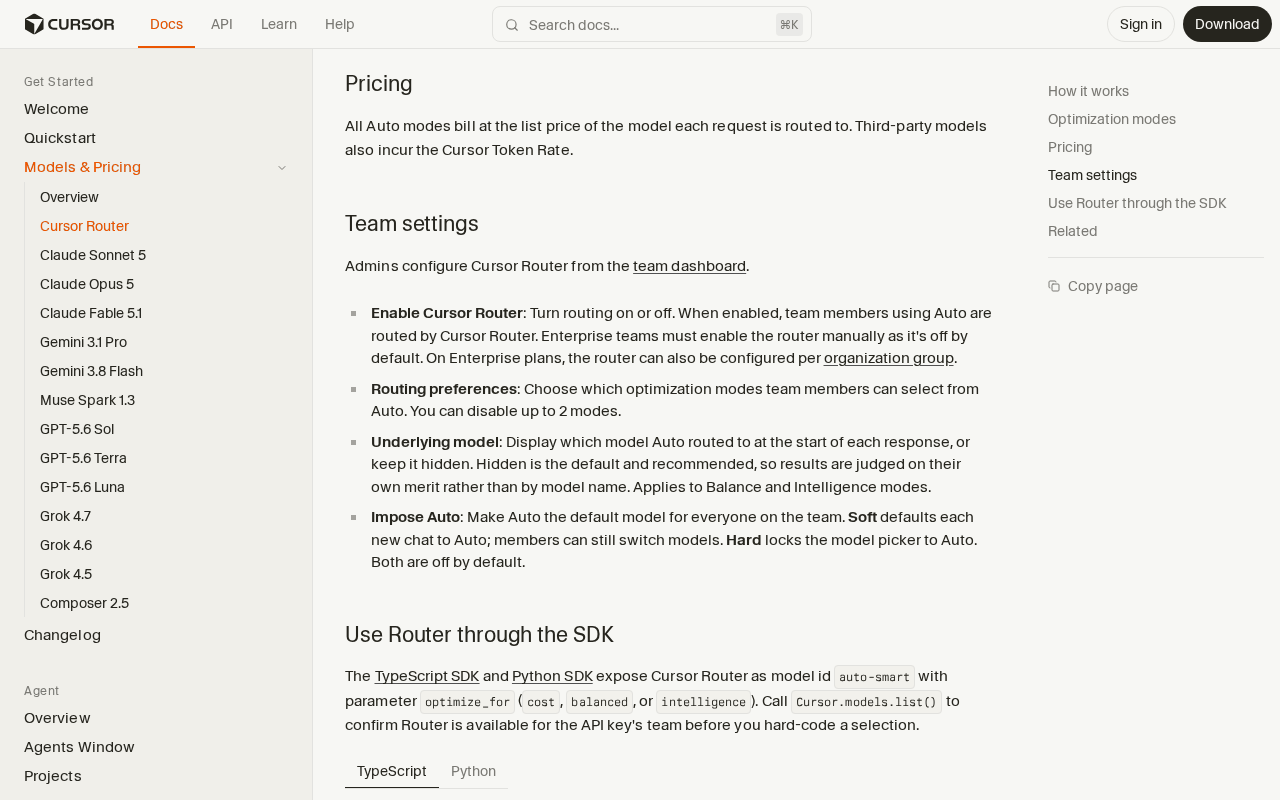 Screenshot: Cursor Docs, “Cursor Router” (undated), captured Sep 21, 2026.
Step 3: Price the router before you price the tokens
Hosted routers split into two pricing shapes, and each hides something different. Fugu gives you a known rate for an unknown model. Copilot and Cursor give you a known model per request, when it is visible, and an unknown rate until the month closes, because the router’s choice sets the price.
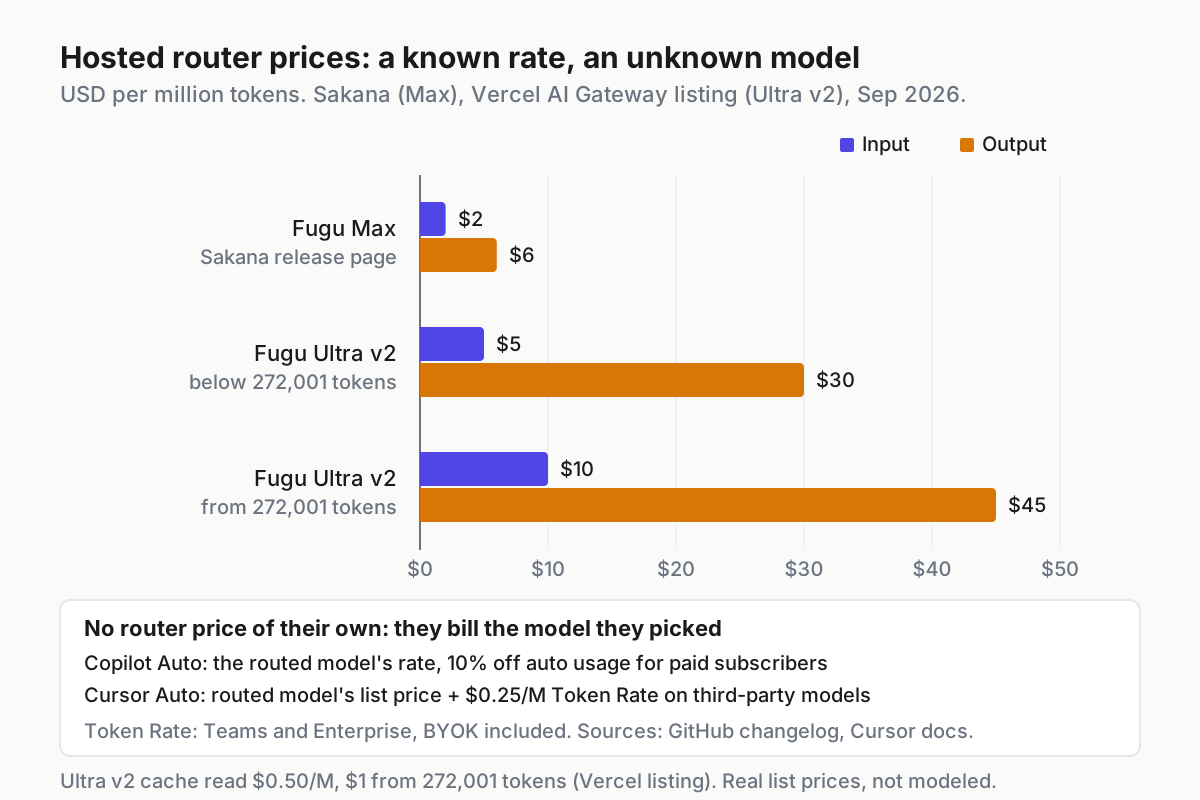 Fugu prices the orchestrator. Copilot and Cursor price whatever it picked. Sources: Sakana release page, Vercel AI Gateway listing, GitHub changelog, Cursor docs.
Put real rates against one illustrative month so the shapes are concrete. The volumes are illustrative: 20M input and 4M output tokens for one lane.
| Router | Rate basis | Illustrative month, 20M in / 4M out |
|---|---|---|
| Fugu Max | $2 in / $6 out | $40 + $24 = $64 |
| Fugu Ultra v2, requests below 272,001 tokens | $5 / $30 (Vercel listing) | $100 + $120 = $220 |
| Fugu Ultra v2, from 272,001 tokens | $10 / $45 (Vercel listing) | $200 + $180 = $380 |
| Copilot Auto | Routed model’s rate, less 10% for paid subscribers | Unknown until you see the model mix |
| Cursor Auto, third-party routes | Routed list price + $0.25/M | Model mix + $6.00 Token Rate on 24M tokens |
Three pricing checks follow from that table:
- Log input size per request on any Ultra v2 lane. Long agent contexts drift past 272,000 tokens without anyone deciding to, and Vercel’s listing charges more from there.
- Don’t read a Copilot tier as a budget. The tier steers selection; the bill follows the model. Spend caps belong in your budget layer, not in a tier dropdown.
- Track first-party versus third-party routes on Cursor. The Token Rate applies when Auto routes to a third-party model, BYOK included, so the router’s choice moves the bill even when list prices don’t.
Spend by routed model then goes into the monthly close. The chargeback reconciliation piece builds the three-column worksheet (client estimate, gateway meter, provider invoice); a router lane adds a served-model column to it, and a router that can’t fill that column reconciles only as a single line item.
Step 4: Run your own cascade as the control arm
Your build side already exists as a design. The Jev routing playbook covers the route table, the confidence floor, the never-route list and cost per merged PR on a fixed task set, and the DeepSeek agent-economics piece works the cascade-with-escalation arithmetic. Don’t rebuild either here. Wire them into one comparison with every hosted router you are considering.
# router-eval.yaml (illustrative shape; your eval runner reads it, no vendor does)
task_set: frozen-40-v3            # repo snapshots + acceptance tests, never edited mid-run
arms:
  - own-cascade                   # route table from the build-side playbook
  - fugu-max
  - copilot-auto:balance          # served model captured from CLI output
  - cursor-auto:balance           # Underlying model setting turned on
record_per_attempt: [arm, task_id, attempt, served_model, tokens_in, tokens_out,
                     cost_usd, escalated, tests_passed, merged]
served_model_if_hidden: not_exposed   # never blank, never guessed
score: cost_per_merged_pr             # every attempt, retry and escalation counted
rerun_on: [new_served_model_seen, cli_upgrade, monthly]
Run rules that keep the comparison honest:
- Same snapshot, same rubric, same reviewer. A router judged on a newer repo state than your cascade is judged on a different test.
- Count everything. Retries, escalations, abandoned attempts and reverted merges go in the spend. Only merges go in the denominator.
- A served model you haven’t seen before is a pool change. It triggers a rerun. For a router that exposes nothing, the monthly rerun is the only trigger you have.
- Upgrades are pool changes too. A CLI bump can change which models Auto picks; the CLI upgrade canary logs the model served per prompt before and after.
- Read HydraFusion as a ceiling on expectations. GitHub says the approach works best on first-turn, single-prompt tasks. If a vendor quotes those gains against your multi-turn agent work, ask for your task set’s number.
The decision rule is short. A hosted router that beats your cascade on cost per merged PR and passes criteria 1, 3 and 5 is worth buying, and you can retire the build. One that beats it and fails any of those three goes to step 5, where it can still earn a lane.
Step 5: Fence the router that can’t name its model
If a hosted router can’t tell you which model shipped the change, treat it as one unpinned vendor model. Two consequences follow, and both belong in the lane manifest your runner enforces, not in a wiki.
Log its output apart from other lanes. Separate lane ID, separate log stream, and the served model recorded as not_exposed rather than left blank. A blank looks like a logging bug; not_exposed is a fact you can count.
Keep it out of any lane whose audit or change-control policy requires naming the model behind each change. Payment code, infrastructure, security fixes, anything a regulator or customer contract asks you to attribute. The fence is enforced at lane launch and again at merge.
# lanes.yaml (illustrative shape; the runner refuses a launch that violates it)
lanes:
  docs-drafts:
    router: fugu-max
    model_identity: not_exposed        # exported | displayed | not_exposed
    treated_as: unpinned_vendor_model
    log_stream: routers/fugu-max       # never merged into other lanes' logs
    change_control: human-review
  payments-service:
    change_control: named-model-required
    routers_allowed: [own-cascade]
    model_identity_required: exported  # displayed passes only with a tested capture
Then check at merge time, so a lane that drifts out of policy can’t ship quietly:
# Illustrative pre-merge check: every routed response on a named-model lane has a model
jq -e --arg pr "$PR" '
  [ .[] | select(.pr == $pr and .lane_policy == "named-model-required") ]
  | length > 0 and all(.served_model != null and .served_model != "not_exposed")
' routed-calls.json || { echo "PR $PR: routed response without a named model"; exit 1; }
The check fails closed: a missing or unreadable log exits non-zero and blocks the merge, which is what you want. It is still only a guardrail. Make it a required status on the protected branch, so a skipped run blocks instead of passing, and keep human review on named-model lanes as the wall behind it.
Record the router in the change itself, too. A commit trailer such as Routed-By: copilot-auto/balance with a Served-Models: list, or Served-Models: not-exposed, costs nothing and answers the auditor’s first question without a log search. The list form matters for per-prompt routers, since one change can have several authors.
A router whose pool you can’t see is also a data question: your prompt goes somewhere you can’t name. Put it through the last-hop register and cap the lane’s data class at what you can verify about where the request ends up.
Where a hosted LLM router leaks out of change control, and the signal for each
One PR, several models. Copilot evaluates each prompt and Cursor’s router classifies each agent request, so a change built over many turns has more than one author. Signal: the per-response log shows two or more served models for one PR while the PR record lists one. Fix: attribution is a list, in the record and the trailer.
Displayed, never captured. The model name scrolled past in the CLI and nothing stored it. Signal: rows with a null served model on a Copilot lane. Fix: a capture step with a fixture test, rerun after every CLI upgrade; a failed capture downgrades that response to not_exposed and the fence applies.
The toggle nobody turned on. Cursor ships with the routed model hidden. Signal: Balance or Intelligence responses without the model line at the top. Fix: an admin turns on Underlying model for change-controlled teams, and Cost-mode lanes are scored not exposed until the docs say otherwise.
The tier treated as a budget. Signal: spend per task rises on a lane whose tier never changed. Fix: caps in your budget layer and a by-model split in the monthly close.
Pool drift under a stable name. Signal: cost per merged PR or pass rate on the frozen set moves with no config change, or a new model name appears. Fix: rerun the eval and re-approve the lane before it takes new work.
A benchmark budgeted as savings. Signal: your task set shows a fraction of the published gain. Fix: budget from your own control arm; published results are a ceiling, not a forecast.
The model name is fleet evidence, not a vendor setting
Routers will keep getting better at picking models, and some of them will keep hiding the pick because hiding it makes the product simpler to sell. That is the vendor’s call. Whether a hidden pick may touch your payment service is yours, and it gets made in the layer that launches lanes, records what ran and refuses what policy forbids.
That layer is what a multi-agent command center is once you strip the dashboard off it: one place where every lane, whichever CLI or router it runs through, writes the same record, including the field most vendors leave empty. Buy the router that fills it. Fence the one that doesn’t.
FAQ
Does Copilot Auto show which model answered?
Yes, per response. GitHub’s docs say the model appears on hover in Copilot Chat, prints in the terminal in Copilot CLI, shows at the end of a cloud agent response and sits beside Auto in the Copilot app. The docs do not describe an export or API log of routed models, so capture it yourself.
Can you pin a model inside Cursor Auto?
No. Cursor’s router docs say you can’t hand-pick the model that handles a request, and the pool changes as new models ship. Admins can show the routed model through the Underlying model setting. To control the model, select one directly instead of Auto, unless an admin has imposed Auto in Hard mode.
Sources
- Sakana AI: Introducing Fugu Max and Fugu Ultra v2 — Sep 11, 2026; Fugu Max at $2/$6 per million tokens; models absent from Ultra v2’s pool
- Vercel AI Gateway: Fugu Ultra v2 listing — $5/$30, cache read $0.50/M, second tier from 272,001 tokens
- GitHub Changelog: Configure cost and quality in Copilot auto model selection — Sep 14, 2026; tiers, billing at the selected model, 10% discount
- GitHub Docs: Auto model selection — per-response model visibility by surface; evaluation models; admin exclusions
- Cursor Docs: Models and pricing — Auto bills the routed model’s list price; $0.25/M Cursor Token Rate incl. BYOK
- Cursor Docs: Cursor Router — classifier per request, no hand-pick, Underlying model setting hidden by default
- GitHub Blog: Project HydraFusion — Sep 4, 2026; Single, Cascade, Critique; offline results; internal per-leg records