GitLab MCP 19.4: Always-Ask Writes as the Default Dialect
GitLab MCP 19.4 turns fixed tool rules into settings: reads allow, writes ask, deletes deniable. Copy that dialect into every agent on your repos, then audit.

Go deeper. Build your own.
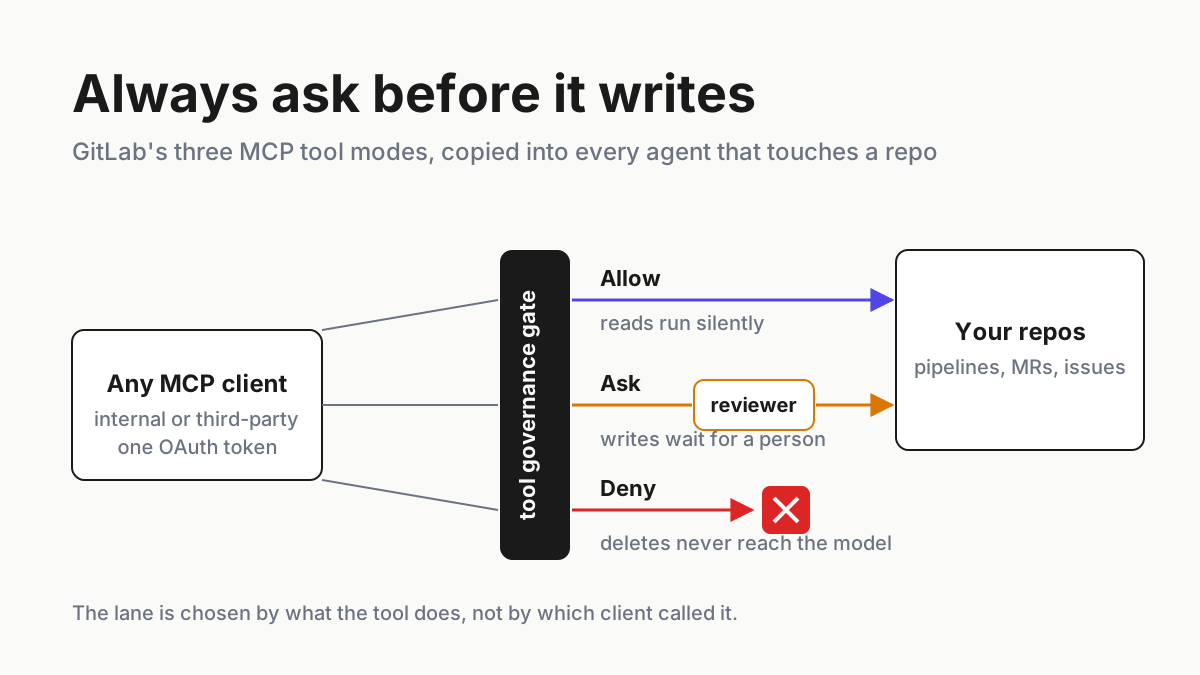
A read runs, a write waits, a delete never reaches the model. Three clauses, and they are the entire tool policy most platform teams have spent a year trying to write in a wiki nobody opens. Since September 17 GitLab can express all three: the GitLab MCP server’s tools sit in the same Tool management tab as GitLab’s own agent tools, with a default mode per tool class that a group Owner can change. Reads ship as Allow and writes and deletes as Ask, so the third clause is the new Always Deny, set on purpose.
The move this piece teaches is not flipping that setting. It is taking the three defaults as a dialect and speaking it everywhere else: in the settings file on a developer’s laptop, in a Codex profile, in the policy of whatever gateway sits between your agents and your repos. GitLab’s rules stop at GitLab’s edge. Your agents do not.
By the end you will have a classification rule that puts every tool in one of three lanes by its effect rather than its name, illustrative config shapes that express the same lanes in clients GitLab cannot see, a named human on the three actions that matter most (run a pipeline, open a merge request, ship), and a Tuesday audit that proves the defaults are set rather than assumed.
What GitLab MCP governance changed on September 17, and what it left alone
GitLab 19.4 shipped on September 17, 2026 (GitLab 19.4 release notes). The same day, Rebecca Carter’s post on the GitLab blog, “New MCP tools help platform teams scale automation safely,” covered the two halves: new tool families for the GitLab MCP server (CI/CD, merge requests, repository, project and user, work items, vulnerabilities) and governance for those tools (GitLab blog). The post’s own summary of the defaults: “Read-only tools default to Always allow, so routine lookups run without interrupting the team.” And: “Write and delete tools default to Always ask, giving a reviewer a checkpoint before an agent changes anything.”
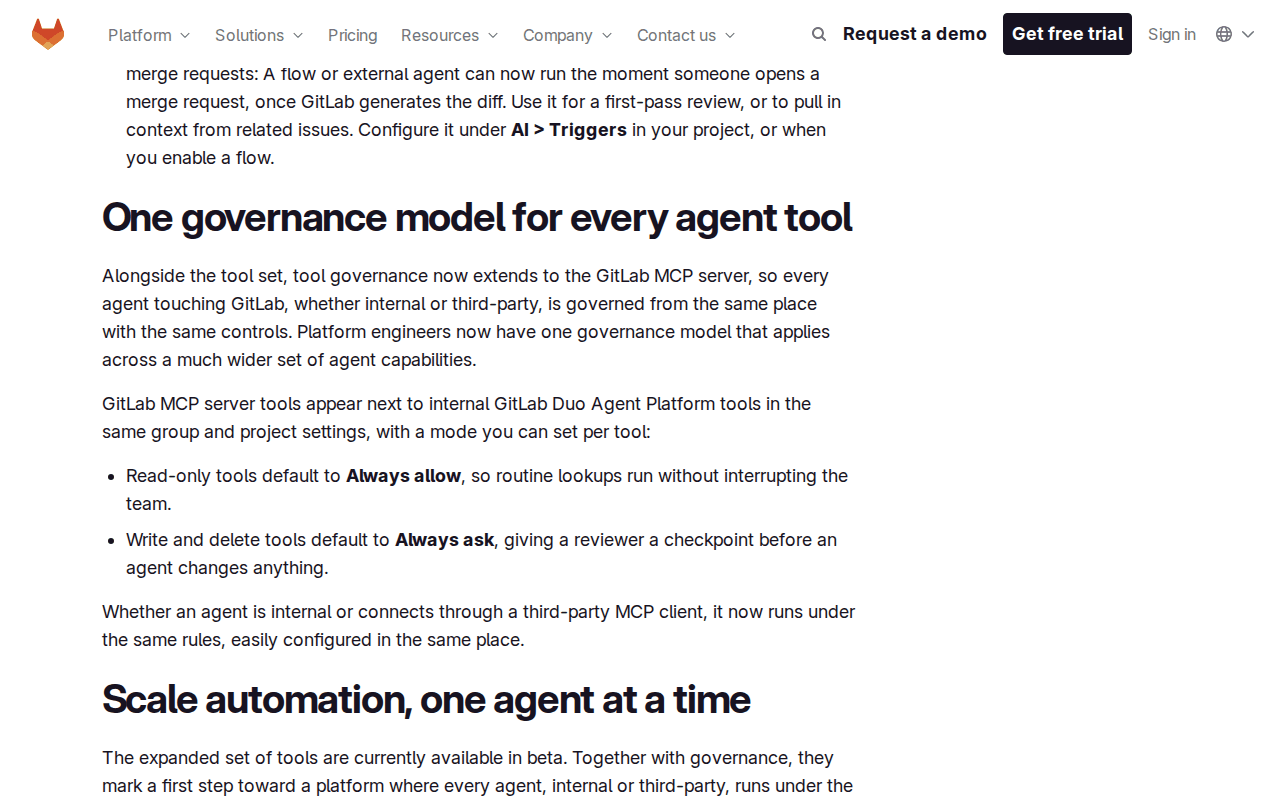 Screenshot: GitLab blog, “New MCP tools help platform teams scale automation safely” (Sep 17, 2026), captured Sep 19, 2026.
The part launch coverage skipped is what was already true the day before. The tool governance docs put it plainly: “If you don’t set a mode, behavior is unchanged. Read-only MCP tools remain pre-approved. Write and delete MCP tools still prompt for approval.” The release notes say the same from the other side: tools reachable through the MCP server “followed fixed rules that could not be changed.”
So 19.4 did not invent the write prompt. It turned a fixed rule into a configurable default, added a third mode, Always Deny, under which “The tool is blocked entirely and is invisible to the agent,” and put MCP server tools on the Tool management tab with a source of mcp, next to the Duo Agent Platform tools (Agent tool governance docs).
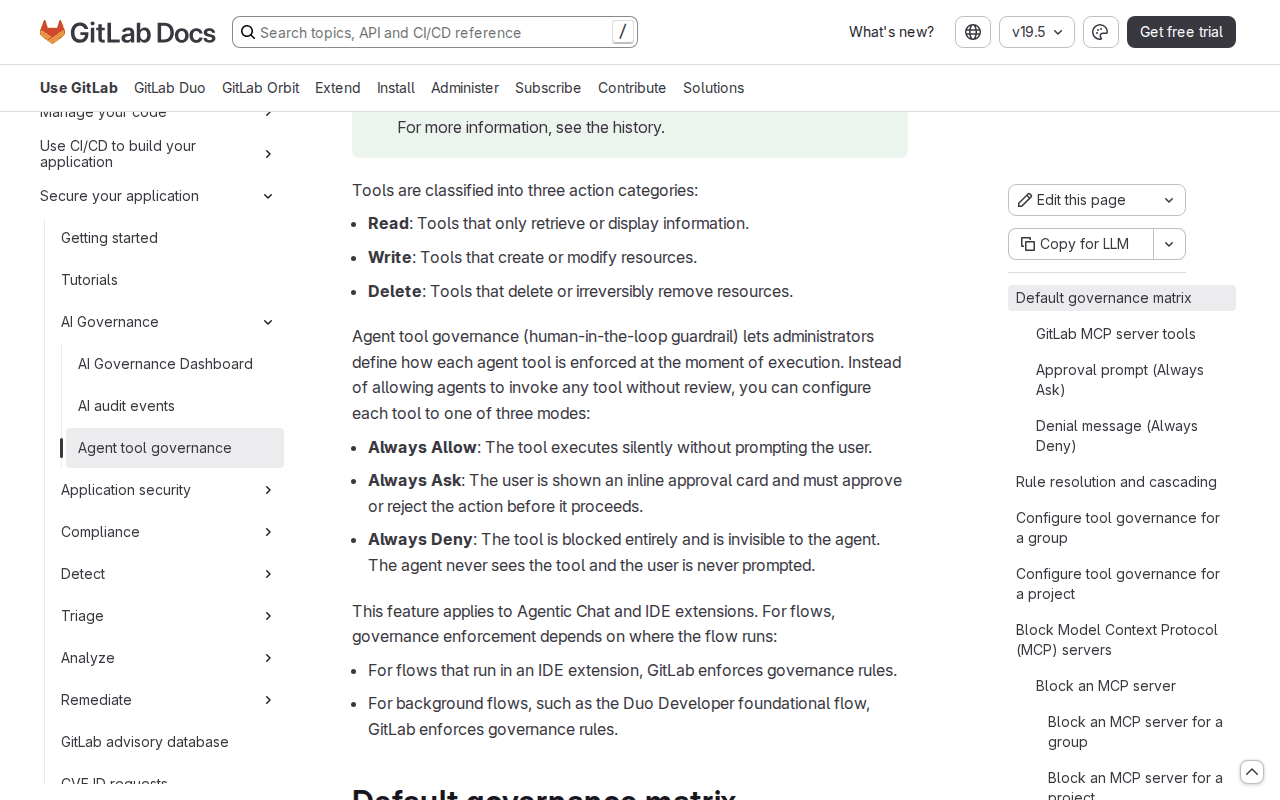 Screenshot: GitLab Docs, “Agent tool governance” (version history through 19.4), captured Sep 19, 2026.
Three more facts frame the runbook.
The classification is mechanical: an MCP tool with readOnlyHint: true is Read, readOnlyHint: false is Write, destructiveHint: true is Delete, and a tool with neither annotation is treated as Delete. The scope is one place: “Whether an agent is internal or connects through a third-party MCP client, it now runs under the same rules, easily configured in the same place.”
And the tier is untidy. The blog and the release notes say the tools and governance are in beta on Free, Premium and Ultimate; the governance docs page header says Premium and Ultimate; vulnerability tools are Ultimate only. Check your own instance before you plan around any of it. The news stops here.
The gate is one place because the caller is anyone with a token
The GitLab MCP server lives at /api/v4/mcp on your instance and authenticates clients with OAuth 2.0 Dynamic Client Registration: the client registers itself, asks a person to authorize it, and receives a token (GitLab MCP server docs). The agent then acts as that person. The docs list ten clients that already do this, from Claude Code and Cursor to OpenAI Codex, Gemini CLI, Kiro and Zed. The same page carries a line worth pinning above the desk: “You’re responsible for guarding against prompt injection when you use these tools. Exercise extreme caution or use MCP tools only on GitLab objects you trust.”
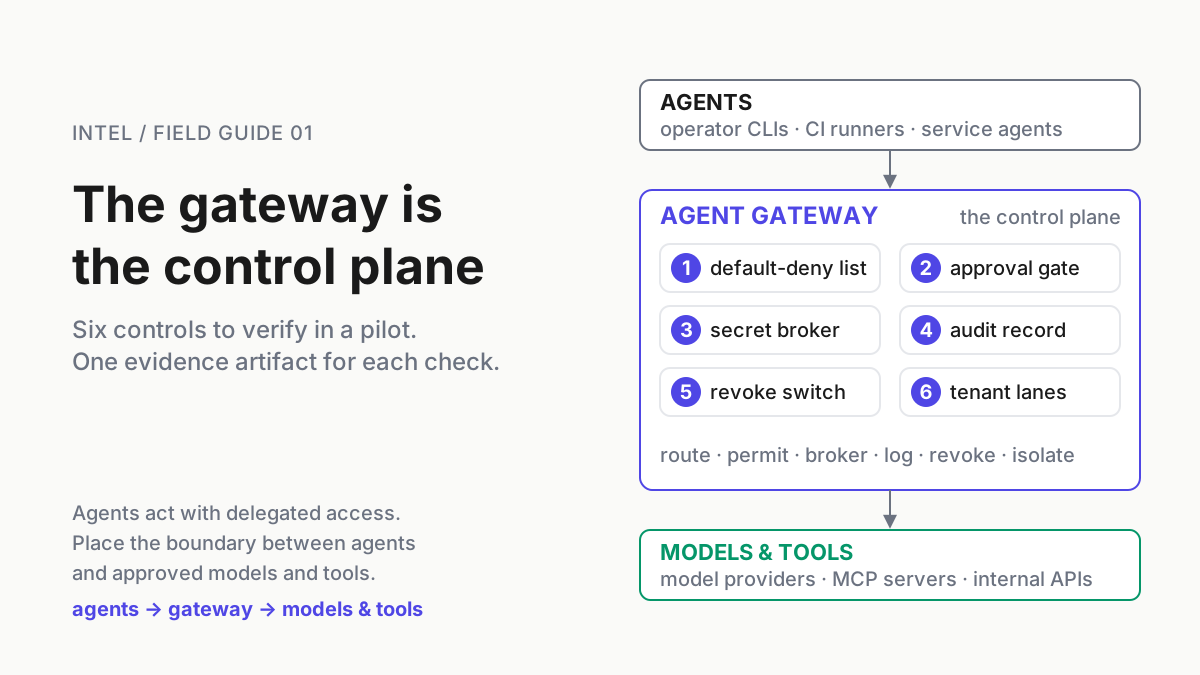
That is the case for one gate in one sentence. Ten clients, each with its own permission model, each holding a token that looks like a developer, each reading merge request descriptions and issue comments that anyone in the project can write.
A policy expressed per client is ten policies, and the eleventh client arrives next quarter. A policy expressed at the resource, by tool effect, is one. GitLab wrote that one for its own server. The rest of this piece copies it outward.
The runbook: one GitLab MCP dialect, three lanes, every client
Step 1: classify every tool by its effect, and fail closed on silence
Write the rule down before you touch a setting, because the rule is what you will carry to the other clients:
readOnlyHint: true→ Read → Allow.readOnlyHint: false→ Write → Ask.destructiveHint: true→ Delete → Deny (GitLab’s default here is Ask; our dialect tightens it, and 19.4 makes that possible).- No annotations at all → Delete. Silence is the most dangerous class, so it goes in the strictest lane.
The annotations are the tool hints defined in the Model Context Protocol spec, whose tools page also says clients “MUST consider tool annotations to be untrusted unless they come from trusted servers” (MCP specification, Tools). GitLab trusts them for its own server because GitLab wrote them. For any server you did not write, the annotations are a claim, and a keyless public server’s self-declared readOnlyHint is exactly the kind of claim a lower trust tier should not get to make on its own behalf. Classify third-party tools by hand once, then let the annotation confirm your call, not replace it.
Against GitLab’s own tool list, the write-capable tools sort into the three human-visible actions like this (GitLab MCP server tools):
| Human-visible action | GitLab MCP tools that perform it | Lane |
|---|---|---|
| Run, retry or cancel a pipeline | save_pipeline (“Runs, retries, cancels, or renames CI/CD pipeline”) |
Ask, named approver |
| Change or delete pipeline records | manage_pipeline (updates metadata or deletes a pipeline) |
Deny for agents |
| Open or edit a merge request | save_merge_request, add_branch, add_commit, fork_repository |
Ask |
| Merge | accept_merge_request |
Deny for agents; a person merges |
| Comment or review | save_note, save_merge_request_review |
Ask, batched |
| Touch work items | save_work_item, link_work_items |
Ask, batched |
| Change a vulnerability’s state | save_vulnerability (dismiss, confirm, revert, change severity, create issue) |
Ask, security approver |
| Start or steer a Duo session | start_duo_session, send_duo_session_input |
Ask |
Two rows are stricter than GitLab’s default, and both are deliberate. Merging and deleting are the two actions no fleet of agents has yet convinced me it should own. A tool that bundles reads and writes under one name belongs in the write lane by construction; splitting fat diagnostic tools is the sibling problem.
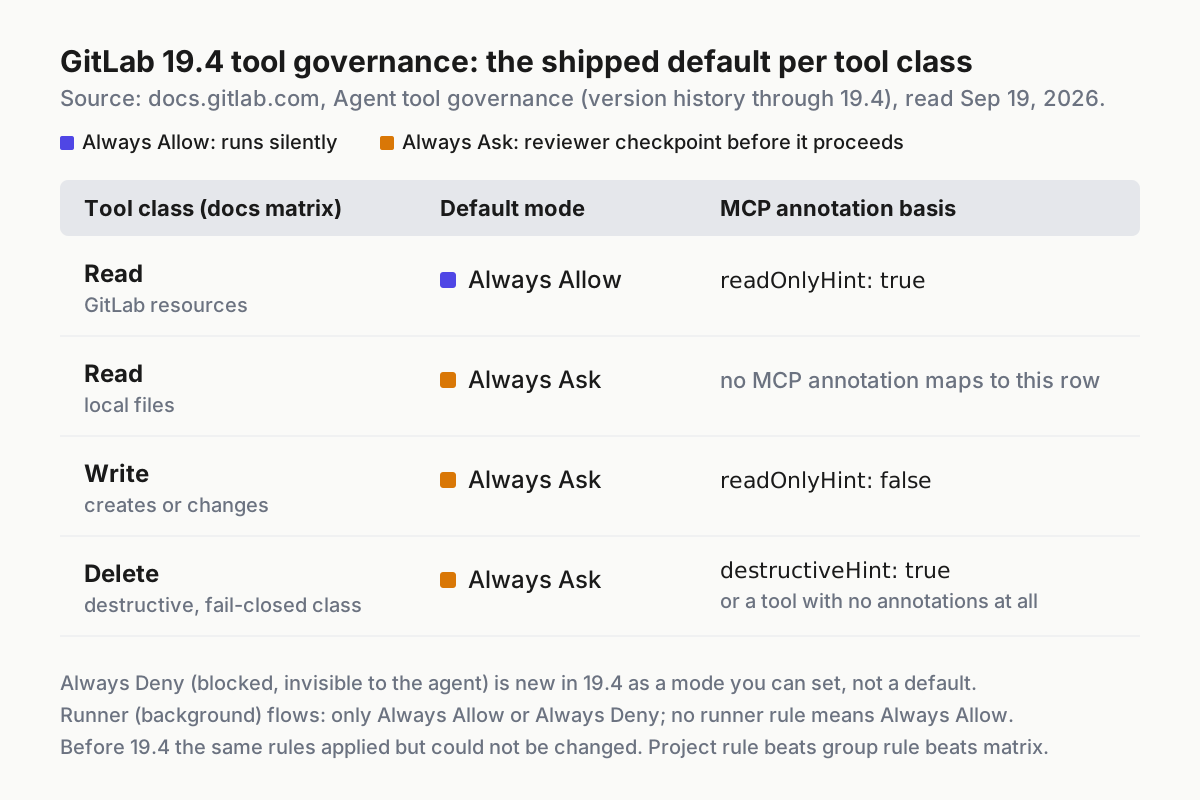 GitLab’s shipped defaults, from the tool governance docs. Note the last column: in background flows Ask does not exist, and an unconfigured tool defaults to Allow.
Step 2: set GitLab’s three defaults on purpose, including the one it does not set for you
Group-level rules need the Owner role on the top-level group; project-level rules need Maintainer or Owner on the project. Resolution is project rule first, then group rule, then the default matrix (Agent tool governance docs). That order means a project Maintainer can loosen a group Owner’s rule, so the audit in Step 5 lists project overrides by name.
The checklist for a top-level group:
- Every tool with source
mcpappears on the Tool management tab; count them against the tools doc. - Reads stay Always Allow. Fighting this is how you end up with a queue nobody reads.
- Writes stay Always Ask. Decide who answers before you decide what asks; queue hygiene is the discipline that keeps Ask from decaying into Allow.
-
manage_pipeline,accept_merge_requestand anything classified Delete move to Always Deny. Invisible to the agent is better than declined by the agent, because a tool the model cannot see is a tool it cannot argue for. - Runner rules are set explicitly for every write and delete tool. The docs are blunt: “Runner access supports only Always Allow and Always Deny. Always Ask does not apply, because no user is present to respond to an approval prompt in a background flow,” and “A tool with no configured runner rule defaults to Always Allow.” That last sentence is the one to read twice. In the lane with no human, the unconfigured default is the permissive one. Then confirm the rules are enforced: the page puts background-flow enforcement behind the
duo_workflow_background_tool_governancefeature flag, disabled by default when it arrived in 19.3. - Project overrides are zero, or each one has an owner and a reason in the project’s README.
The docs describe Always Ask as an inline approval card and do not say where that card appears, or whether the call is simply refused, when the caller is a third-party client. Treat it as a reviewer checkpoint and test it from each client you allow, on a throwaway project, before you rely on it.
Step 3: say the same three things in the clients GitLab cannot see
The governance docs are careful about their own reach. Of IDE and CLI clients they say the servers are configured “through local configuration files, which this setting does not control.” That sentence is about GitLab agents consuming external servers, but the boundary it draws runs both ways: a laptop’s settings file decides what a client will attempt before GitLab ever gets to decide what it will allow. The defense in depth is to express the same three lanes in that file, so a client never attempts what GitLab would deny, and a misconfigured GitLab rule has a second wall behind it.
The shapes below are illustrative. Key names and wildcard syntax vary by client and version, so check them against the client’s own docs (Claude Code permissions; Codex MCP configuration) before you ship them. The point is the structure, not the spelling.
// ~/.claude/settings.json — illustrative; rule syntax per Claude Code's permissions docs
{
  "permissions": {
    "allow": ["mcp__gitlab__get_*", "mcp__gitlab__list_*", "mcp__gitlab__semantic_search"],
    "ask":   ["mcp__gitlab__save_pipeline", "mcp__gitlab__save_merge_request",
              "mcp__gitlab__add_commit", "mcp__gitlab__save_note"],
    "deny":  ["mcp__gitlab__manage_pipeline", "mcp__gitlab__accept_merge_request",
              "mcp__gitlab__save_vulnerability"]
  }
}
# ~/.codex/config.toml — illustrative; keys per the Codex MCP docs
[mcp_servers.gitlab]
url = "https://mcp-gateway.example.internal/gitlab" # never the instance directly
enabled_tools = ["get_merge_request", "list_merge_requests", "get_job", "save_merge_request"]
disabled_tools = ["manage_pipeline", "accept_merge_request"] # the Deny lane
default_tools_approval_mode = "writes" # the Ask laneCodex already speaks the dialect: its docs say “The writes mode prompts for tools that aren’t marked read-only,” which is GitLab’s write lane keyed on the same annotation, with the same trust question for servers you did not write.
# gateway policy — illustrative shape for any MCP gateway
servers:
  gitlab:
    upstream: https://gitlab.example.com/api/v4/mcp
    classify:
      by_annotation: true          # readOnlyHint / destructiveHint, per Step 1
      missing_annotation: delete   # fail closed
    lanes:
      read:   { mode: allow, log: call }
      write:  { mode: ask, approver: "@platform-oncall", expires: 15m, log: call+diff }
      delete: { mode: deny }
    overrides:
      accept_merge_request: { mode: deny }
      save_pipeline:        { mode: ask, approver: "@release-owner" }
The gateway shape is the one that scales, because it classifies by annotation at call time for every client at once instead of trusting each laptop’s hand-typed tool list. The client shapes still matter: the laptop is where permission modes drift first, and where a developer with a command entry never crosses the gateway at all. Whether you buy the proxy or build it is its own decision; the lanes are the same either way.
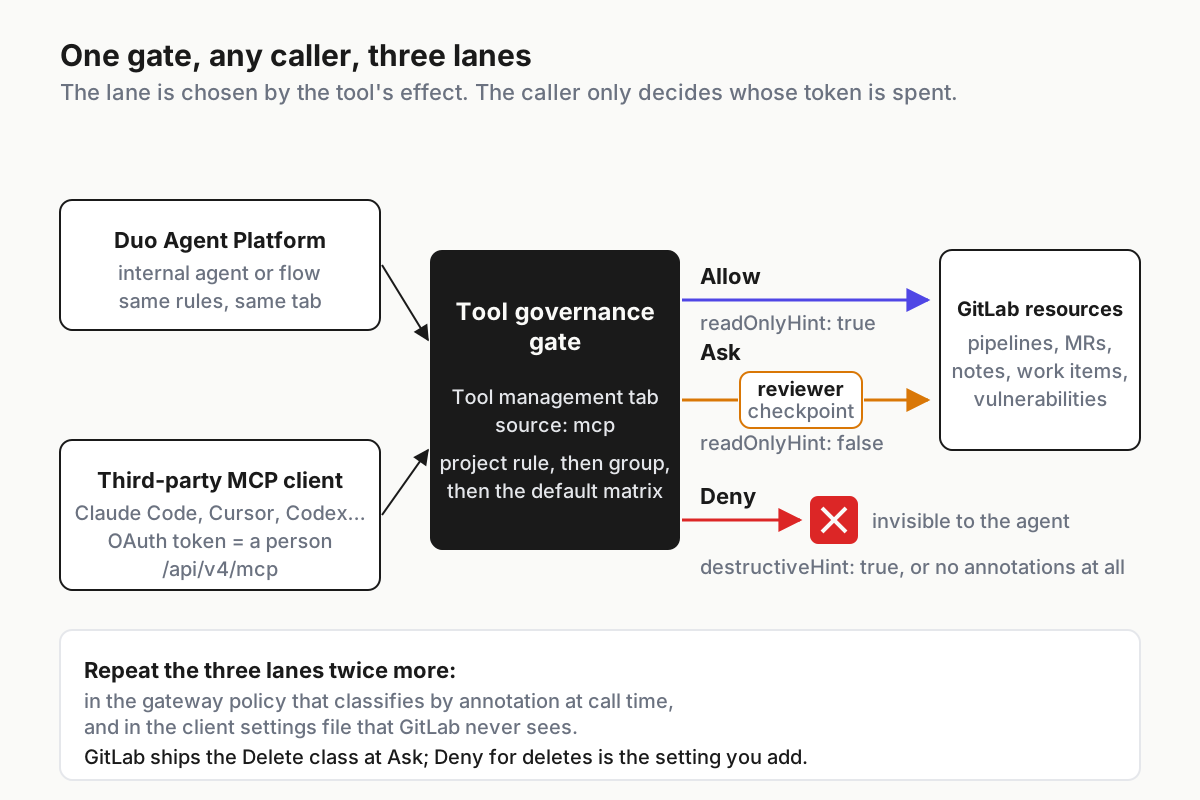 The gate does not care who is calling; the tool’s effect picks the lane. GitLab ships deletes at Ask, so the Deny lane is the setting you add.
Step 4: a named human on pipeline run, merge request open, and deploy
Ask is only a control if someone specific answers. The blog puts the principle in one line, that “a human should decide which actions an agent can take on its own and which need a reviewer,” and then leaves the who to you. Fill it in per action, not per tool:
| Action | GitLab tool | 19.4 default | Our dialect | Who answers | Approval expires |
|---|---|---|---|---|---|
| Run or retry a pipeline | save_pipeline |
Ask | Ask | Pipeline owner for that project | 15 minutes |
| Cancel a pipeline | save_pipeline |
Ask | Ask | Anyone on the on-call rotation | 15 minutes |
| Open a merge request | save_merge_request |
Ask | Ask | The developer whose token the agent holds | 1 hour |
| Push a commit to a branch | add_commit |
Ask | Ask, batched per branch | Same developer | 1 hour |
| Deploy | a pipeline job | Ask (via save_pipeline) |
Ask, plus the environment’s own protection | Release owner | Per run |
| Merge | accept_merge_request |
Ask | Deny | A person, in the UI | n/a |
Deploy is a row without its own tool because in GitLab a deploy is a pipeline, so the pipeline gate is the deploy gate. Do not let that be the only gate; protected environments and approval rules exist outside MCP and should stay in force whatever an agent asks. The approval expiry column is not decoration. An approval granted at 9:00 for a pipeline the agent finally runs at 14:00 approved a different world; approve-once died for the same reason at the server level.
Step 5: audit that the defaults are set, not assumed
This is the Tuesday step, and it has three layers because the policy has three homes.
GitLab. The docs describe no API or CLI for governance rules and make no statement about an audit log of approvals, so the audit is a person and a screenshot until that changes. Once a month, for each top-level group: open the Tool management tab, filter to source mcp, and record the mode of every tool.
Any Write or Delete tool in Always Allow is a finding. Any project-level override is a finding unless it has a named owner. Any runner rule left unconfigured on a write tool is a finding, per the Always Allow default above. Keep the screenshots in the same place as the rest of your fleet evidence, with the date in the filename.
Gateway. Here the audit can be a script, because the gateway already speaks MCP. The shape:
# illustrative: list every tool the gateway exposes, classify by annotation, diff against policy
for s in $(gw servers --json | jq -r '.[].name'); do
  gw tools/list "$s" --json \
  | jq -r '.tools[] | [.name,
        (if .annotations.destructiveHint==true then "delete"
         elif .annotations.readOnlyHint==true then "read"
         elif .annotations.readOnlyHint==false then "write"
         else "delete" end)] | @tsv' \
  | sort > "audit/$s.observed.tsv"
  diff -u "policy/$s.expected.tsv" "audit/$s.observed.tsv" || echo "DRIFT: $s"
done
Drift comes in two flavors and both matter: a tool whose annotation changed since you classified it, and a new tool with no annotation that your policy has never seen. The second is the one that lands in the Delete lane automatically, which is the point of failing closed.
Laptops. The gateway cannot see a settings file that names the instance directly. Sweep for url entries that contain /api/v4/mcp and do not point at the gateway host, and for any command entry that launches a GitLab-shaped server locally. The sweep is the shadow MCP ritual with a narrower grep; run it weekly from the endpoint tool you already have.
One upcoming item to track: the MCP server docs mention toolset selection arriving in 19.5 behind a feature flag named mcp_toolsets, disabled by default. Toolsets narrow what a client can see; they do not replace the lane a tool lands in once seen.
Where Always Ask quietly becomes Always Allow
| Failure mode | The signal | First response |
|---|---|---|
| Ask decays into Allow | Approval latency under five seconds, approval rate near 100% for a week | Batch the low-risk writes; rotate the approver; see the queue hygiene piece |
| Runner lane left at default | A write tool ran in a background flow with no approval in the record | Set explicit Deny for every write tool in runner scope; confirm background-flow enforcement is on; re-run the Step 5 audit |
| Project override loosens the group rule | Audit finds a project with save_pipeline at Always Allow |
Revert; require an owner and a reason in the project README for any override |
| Annotation drift on a third-party server | Gateway audit prints DRIFT for a tool that moved from read to write |
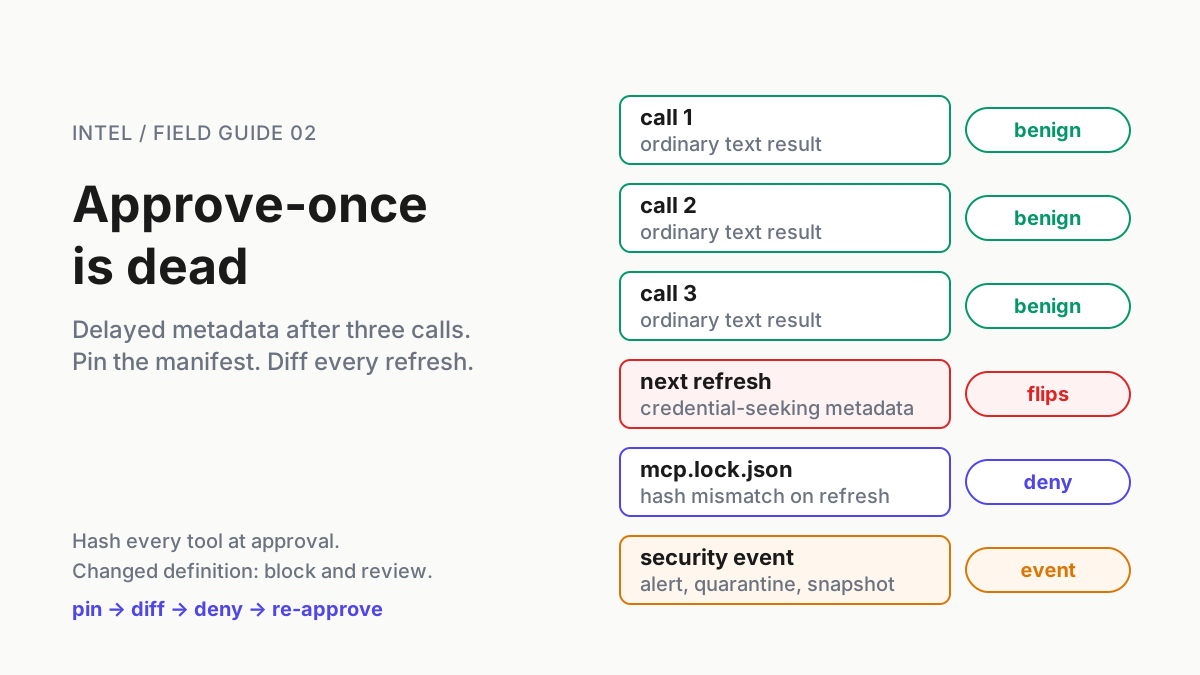
Freeze the server until a person re-classifies; treat as a security event |
| Client bypasses the gateway | Laptop sweep finds /api/v4/mcp with the instance host |
Rewrite to the gateway host; ask why; check the token’s scope |
| Approval outlives its context | Approved at 9:00, executed at 14:00 | Expiry per Step 4; the approval names a diff hash, not a tool |
The first row arrives in week two, when the novelty of the card wears off. The second row is the quiet one, because nothing prompts and nothing complains; only the audit finds it.
One gate, many callers
GitLab did something worth copying beyond the setting: it moved the policy from the caller to the resource. Every client that arrives with a token gets the same three lanes, and the platform engineers, in the blog’s phrase, “configure guardrails once rather than for every new client.” That is the shape the operating layer keeps arriving at from the other direction. The fleet is many agents, many CLIs, many tokens that all look like people; the control that survives that is the one attached to what is being touched, not to who is touching it.
Where GitLab’s gate ends, the gateway and the laptop file carry the same dialect, and the audit proves the three copies agree.
Triggers are the other half of this release, and they open a different question: what runs when a merge request appears, and what stops it from running again. That is the sibling piece.
FAQ: GitLab MCP tool governance
What are the default modes for GitLab MCP server tools in 19.4?
Per GitLab’s tool governance docs, reads of GitLab resources default to Always Allow, while writes and deletes default to Always Ask; 19.4 adds Always Deny, which hides a tool from the agent entirely. The defaults are set per tool at group or project level, and a project rule overrides a group rule.
Does GitLab tool governance apply to Claude Code, Cursor and Codex?
Yes for any client that connects through the GitLab MCP server with an OAuth token; GitLab’s blog says an internal agent and a third-party MCP client now run under the same rules. It does not reach the client’s own local configuration, so express the same lanes in the client’s settings and at your gateway.
How does GitLab decide whether an MCP tool is read, write or delete?
By the tool’s annotations: readOnlyHint: true is Read, readOnlyHint: false is Write, destructiveHint: true is Delete, and a tool with neither annotation is treated as Delete. Copy that fail-closed rule into your gateway, and classify third-party tools by hand before trusting their self-declared hints.
Sources
- GitLab, “New MCP tools help platform teams scale automation safely” (Sep 17, 2026)
- GitLab 19.4 release notes (Sep 17, 2026)
- GitLab Docs, Agent tool governance
- GitLab Docs, GitLab MCP server
- GitLab Docs, GitLab MCP server tools
- Model Context Protocol specification, Tools (tool annotations)
- Claude Code docs, permissions
- OpenAI Codex docs, MCP configuration